Many khaad and pesticide dealers also supply smaller shops in the villages around them, at a trade rate below the counter price. AgroPOS keeps this business apart from the farmers' counter: shops have their own bills, their own trade rate on each product and their own Shop Khata, while the stock is the same. This guide covers switching wholesale on, adding a shop, making a wholesale bill, and receiving and paying money on a shop's khata.

Swipe to see the whole screen · tap to close
How to switch wholesale on
- As the Admin, open Settings → Modules.
- Under Selling Modules, switch on I also sell to other shops (wholesale).
- Click Save Settings.
The menu now shows WHOLESALE with Wholesale Billing, Wholesale Bills and Shop Khata, for the Store Manager and the Admin ("Make a wholesale bill"). If you switch it off later, the three screens disappear, but every wholesale bill, khata and payment stays as it is. With shops on your books, AgroPOS asks Turn wholesale off? first.
How to set the trade rate on a product
Open Products, click the pencil on a product, and fill in Wholesale Price ("Charged to shop customers, cash or udhaar"). The field shows only while wholesale is on. A wholesale bill uses this rate whether the shop pays cash or takes udhaar. A product with no wholesale price falls back to its Sale Price on a cash bill, and to its Credit Price (or sale price) on a credit or partial bill.
How to add a shop
Shops are added from the wholesale till:
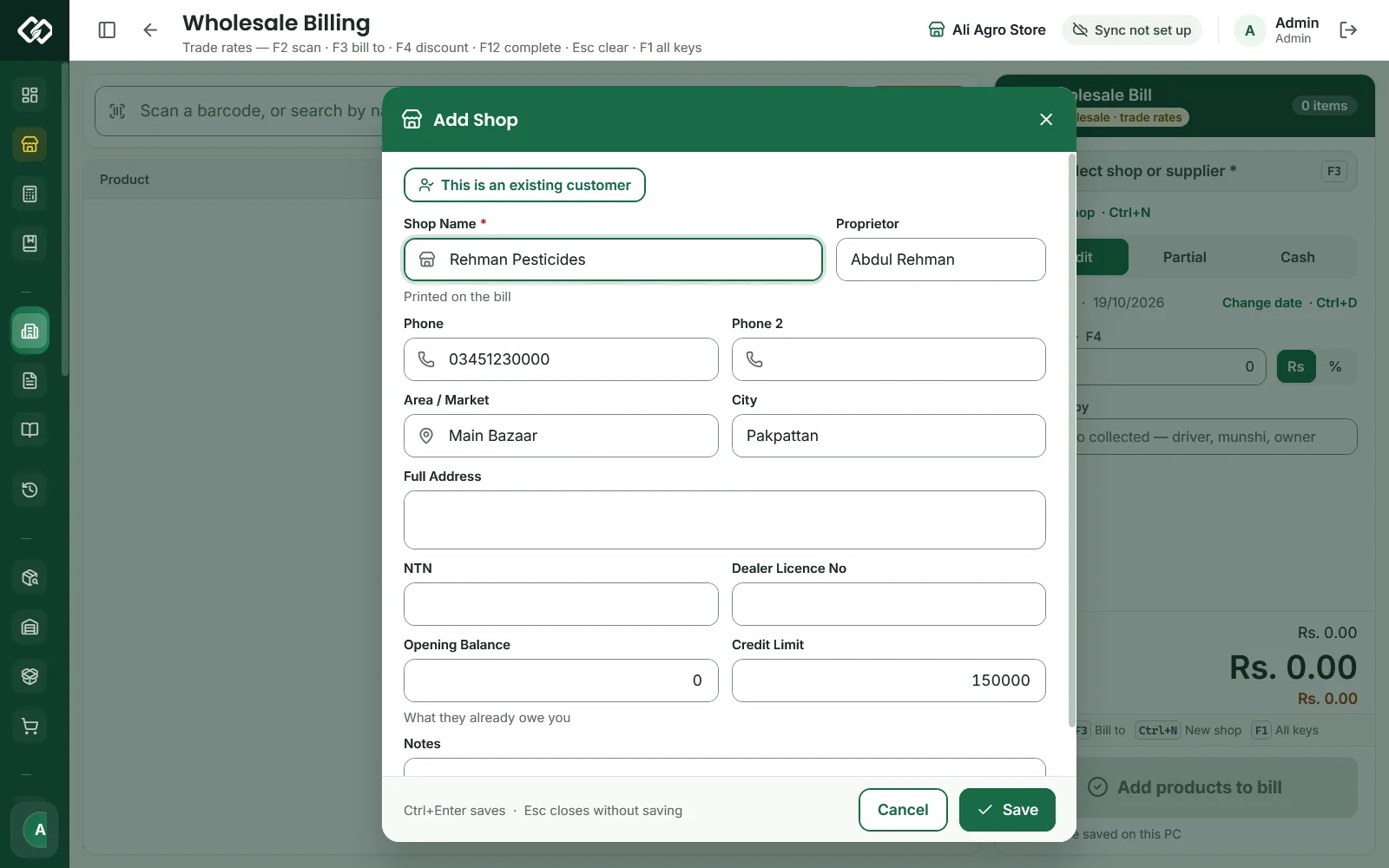
- Open Wholesale Billing and click New shop (Ctrl+N).
- In Add Shop, type the Shop Name (printed on the bill) and, as you like, the Proprietor, Phone, Phone 2, Area / Market, City, Full Address, NTN and Dealer Licence No.
- Type what the shop already owes you in Opening Balance, and a Credit Limit if you want one (0 means no limit).
- Click Save (Ctrl+Enter). The new shop is chosen for the bill.
Swipe to see the whole screen · tap to close
If the shop was until now a customer at your counter, click This is an existing customer in Add Shop and choose the customer. The form fills in with the customer's name, phones, address, village, city and credit limit; correct anything you need and click Convert. The shop is saved as the form shows. Their khata moves across to the shop and the customer is closed; their earlier bills stay on the customer record.
How to make a wholesale bill
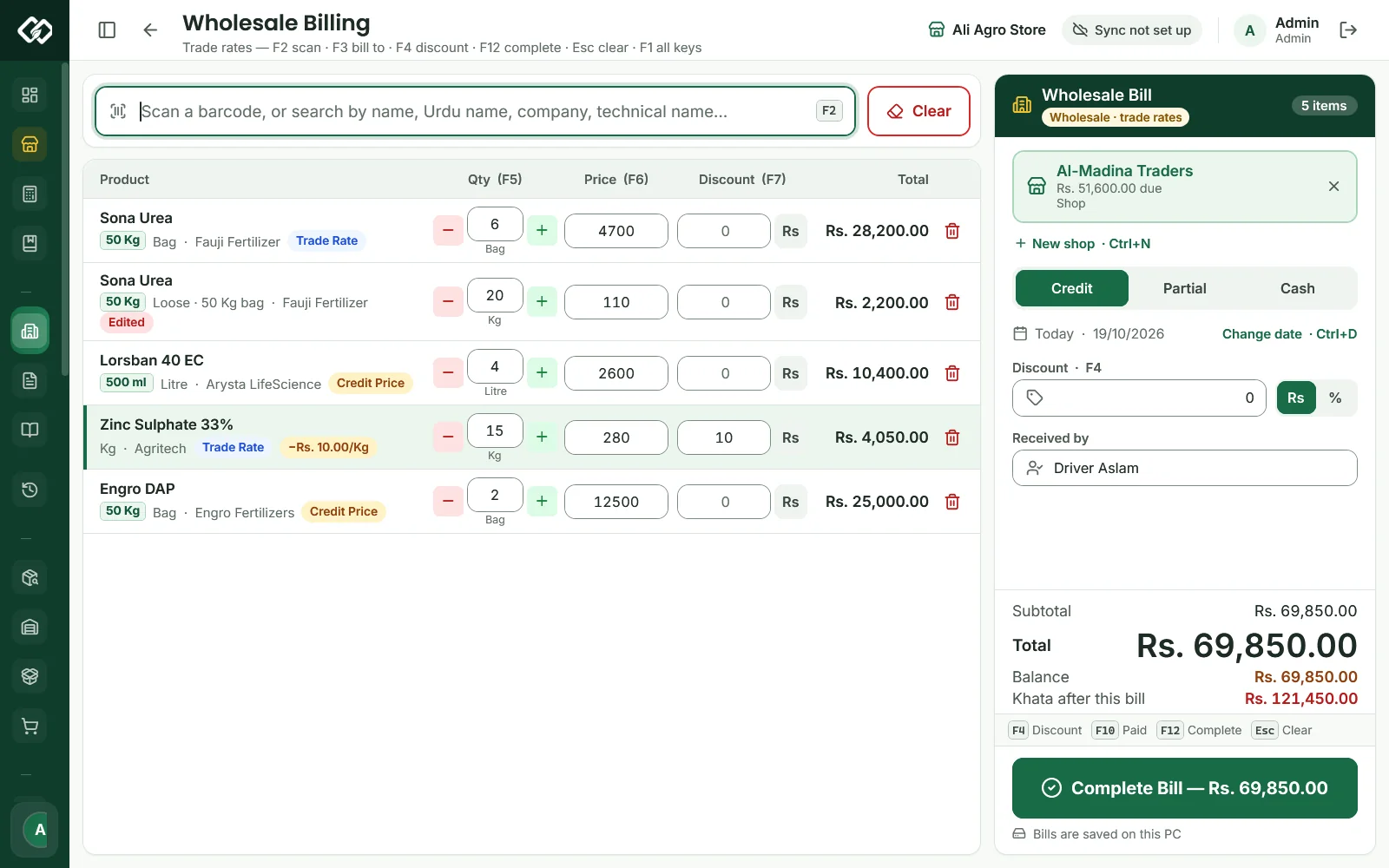
- Open Wholesale Billing. Scan or search products (F2) as at the counter. The batch with the earliest expiry is offered first, and loose khaad by the kg works as at the till.
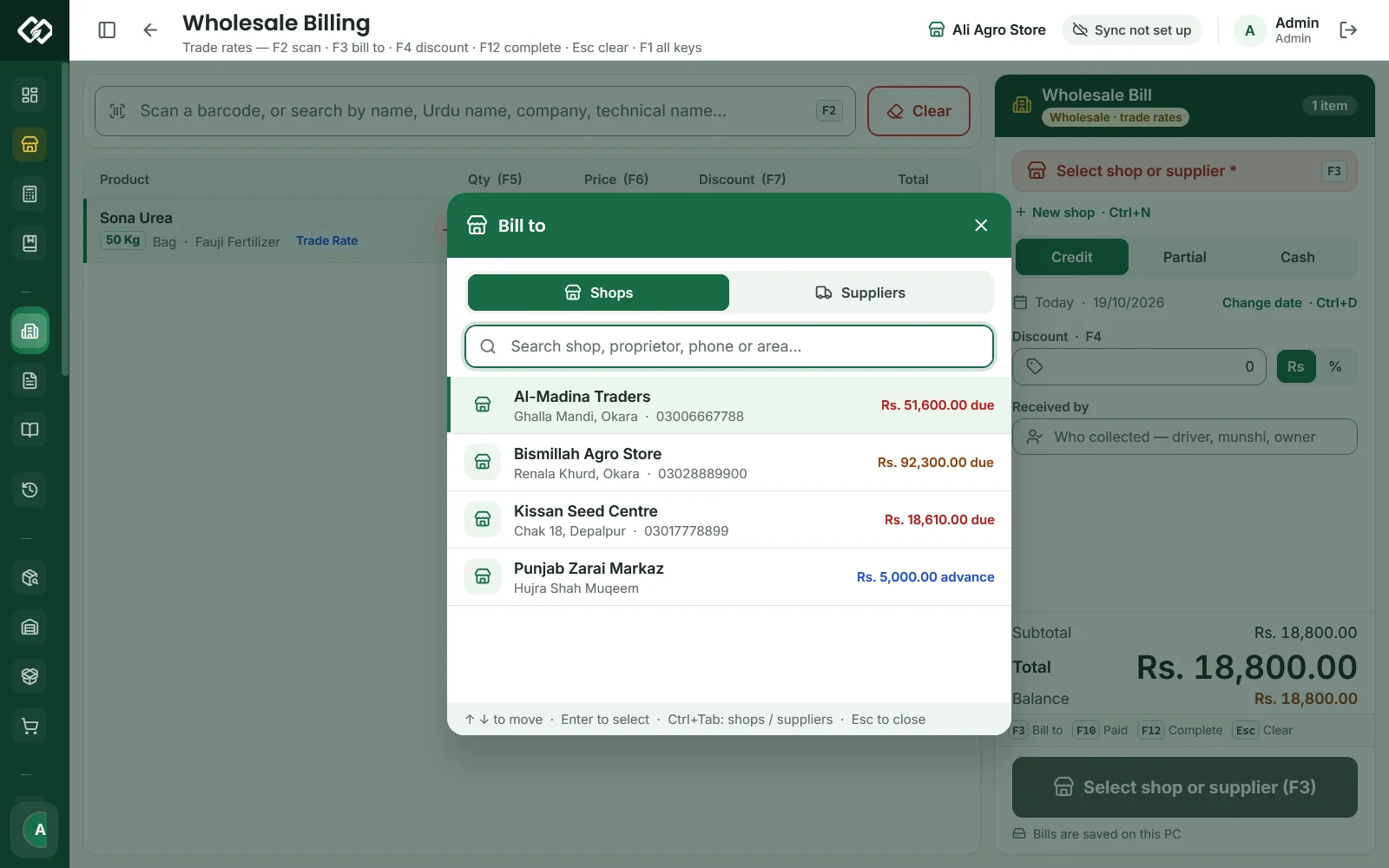
- Press F3 for Bill to and pick the shop on the Shops tab. Every wholesale bill needs a party, even a cash bill. The card shows the shop's khata: clear, due or advance.
- Choose Credit, Partial or Cash (Ctrl+1 / 2 / 3). A new bill starts on Credit, and changing the type prices the lines again.
- On Partial or Cash, type what was paid in Paid (F10) and pick the Payment Method (Ctrl+P). On credit and partial bills, fill Received by (Ctrl+R), such as the driver or the munshi.
- Check the Total, the Balance and Khata after this bill.
- Press F12 (Complete Bill — Rs. …). Sale Completed! shows the slip, which prints like a counter bill.
Swipe to see the whole screen · tap to close
Change date (Ctrl+D) records an old bill, up to five years back. F1 lists every key of the wholesale till. The bill stays on the wholesale till while you look at other screens, so there are no held bills here.
Checks at Complete Bill
- Credit limit. A bill that takes a shop past its limit is refused with the limit and the amount over it. Near the limit (90%), the shop's card turns amber with "This shop is near or over its credit limit."
- Discounts. The Discount box (F4) and price changes (F6) are only for roles that may give discounts (Store Manager and Admin as standard). A changed rate from anyone else is refused: "Rates were changed. Only a Store Manager or Admin can give a discount." A loose (by the kg) line at its own per-kg rate is not a changed rate.
- Paying more than the bill asks More than the bill: Keep as advance puts the extra on the shop's khata, to come off its next bill.
- Cash bill: the paid amount cannot be less than the total. Partial: AgroPOS asks how much was received.
Selling to a supplier, and shops that are also suppliers
The Suppliers tab of Bill to sells to a company or distributor you buy from. The card then reads "Supplier · selling back to the company", and the bill reduces what you owe that supplier.
A shop you also buy from can be linked to a supplier: in Purchases, Buying from a shop? picks the shop and creates its supplier the first time. From then on, buying from it and selling to it move one khata, shown in Shop Khata as "Also a supplier — one khata, netted both ways".
Wholesale Bills
Wholesale Bills lists the latest 100 bills to shops, newest first, with search by invoice number or shop. For older bills, pick the dates in Bill date from and to: every bill of those days is listed, and the search looks in them. Clear dates goes back to the latest 100. Each row has:
- Reprint, or Enter: the Reprint Invoice window, with 80 mm, A4 and Share Invoice PDF;
- Shop return / refund: a return on that bill (see Sale returns);
- View / cancel returns and Cancel bill (Store Manager and Admin). Cancel bill shows only while Allow deleting a sale is on under Settings → Modules. Cancelling puts the stock back into its batches, reverses what the shop still owed on the bill, and removes the bill's wallet or bank entry.
Bills to shops also appear in Sale History with a SHOP badge. Wholesale bills use the same invoice series as counter bills, such as INV-00042, and on a till they stay on the shop's main series.
How to receive and pay money on Shop Khata
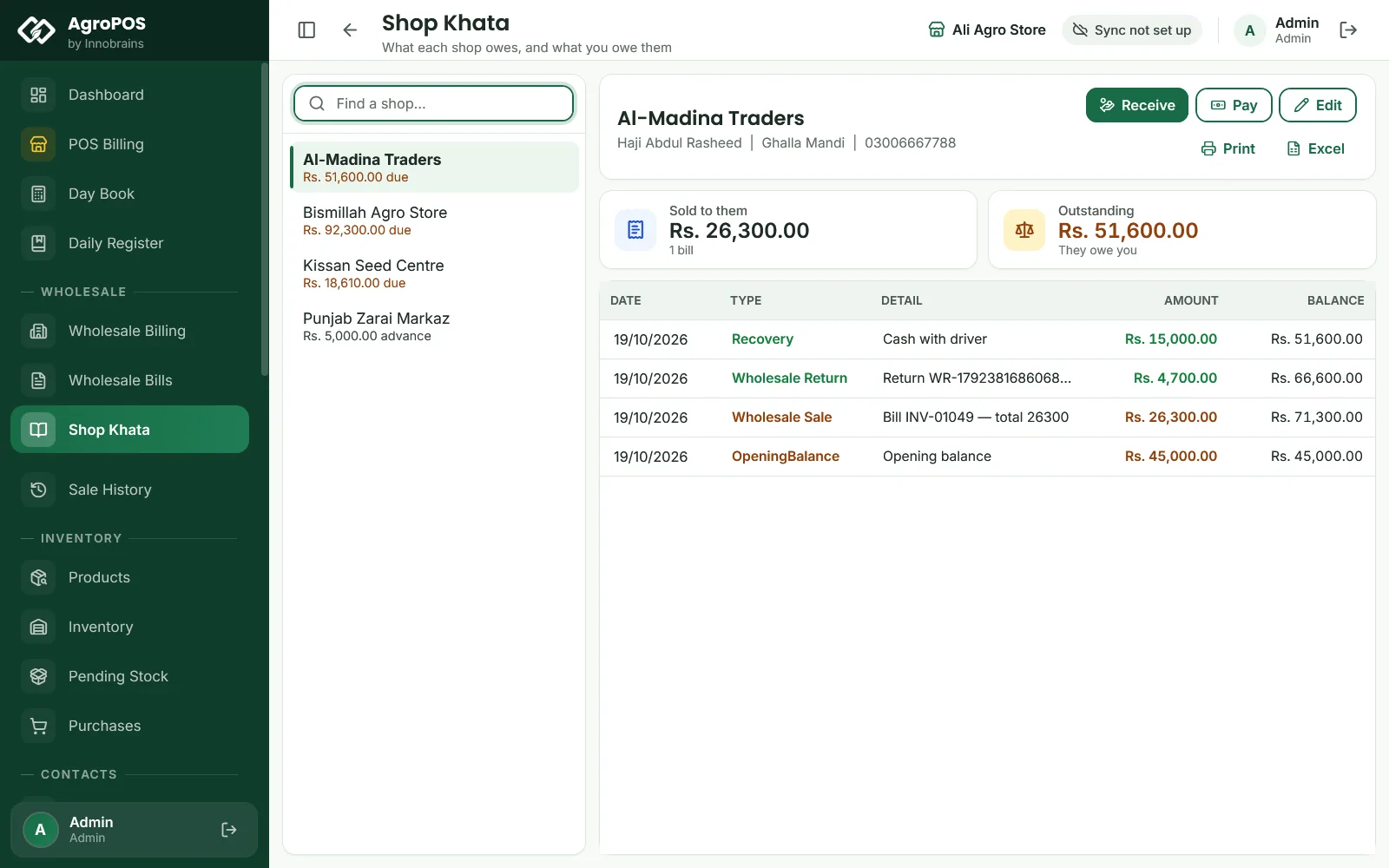
Shop Khata lists every shop with Clear, due or advance. Pick one to see Sold to them, Outstanding (or Net balance for a shop that is also a supplier), and every bill, payment and return with the balance after it.
- Receive: type the Amount received, Received by and a Note, choose the Payment Method and the Date, then Record. The payment settles the shop's oldest open bills first; more than they owe stays as advance. AgroPOS says "Received Rs. … from …", and a PAYMENT RECEIPT slip prints with the previous due, the amount paid and what is left.
- Pay: money you pay a shop, for example back from an advance. Type the Amount paid, choose the Payment Method and the Date, and click Save.
- Edit opens the shop's details. Print prints the khata as an A4 statement and Excel saves it (Store Manager and Admin).
Swipe to see the whole screen · tap to close
With posting to accounts on, wallet and bank money shows the method's account, with Change to pick another, and is posted to it. In the Day Book, cash received counts under Recovery in cash and cash paid to a shop under Paid to shops in cash; wallet and bank money is listed apart. A cheque received, with the Cheque Module on, asks for its number, bank and date and goes into the Cheque Register: the khata moves when it clears.
Rules and tips
- Set a wholesale price on every product you sell to shops, so nobody has to remember the trade rate.
- Give each shop a credit limit. The check uses the shop's balance at the moment of the bill.
- With the Cheque Module on, a bill paid by Cheque asks for the cheque's details and files it in the Cheque Register. The bill is saved unpaid, and the shop's khata moves when the cheque clears. A cheque from a supplier on the Suppliers tab is refused.
- Today's Sales on the dashboard counts counter bills only. Wholesale bills are in Reports → Profit & Loss and in Sale History under Shops.
- On AgroPOS Cloud, the web panel shows Wholesale Bills and Shop Khata, read-only.
Common questions
How is a shop different from a customer?
A shop is billed on Wholesale Billing at the trade rate and has its own Shop Khata. A customer is a farmer or walk-in at POS Billing at the counter price. Both use the same stock.
Can a cashier make wholesale bills?
Not with the standard Cashier role. Wholesale needs Make a wholesale bill, which the Store Manager and the Admin have. The owner can give it to another role under Roles & Permissions.
Can I turn an existing customer into a shop?
Yes. In Add Shop, click This is an existing customer and choose them. The form fills in with their details: correct them before you click Convert. Their khata moves to the shop and the customer record is closed.
Where do I see what all the shops owe?
Shop Khata lists every shop with its balance. The dashboard's Pending Recovery includes what shops owe, and Reports, Recovery shows Owed by Shops.
Why can I not put a bill on hold in Wholesale Billing?
The wholesale till keeps its bill while you look at other screens, so holding is not needed. Held bills are a POS Billing feature.
Related guides
Last updated 21 October 2026. Still stuck? Contact us or message us on WhatsApp.