The Day Book is where the owner or the store manager closes the day. AgroPOS works out from every bill, recovery, expense and payment how much cash should be in the drawer, you count the notes, and it tells you whether the drawer is right, short or over. This guide covers the opening cash, how the expected figure is reached, cash taken to the bank, counting and closing, reopening a day, and the drawers of a Multi-Counter shop.

Swipe to see the whole screen · tap to close
Who can use the Day Book
Day Book is in the menu for the Store Manager and the Admin. A Cashier does not see it: closing the day needs the "close day" permission, which the owner can give to another role under Roles & Permissions. There is nothing to switch on first.
How the opening cash works
You do not have to type the opening cash every morning. A new day opens with the cash that was counted at the last close. If yesterday's drawer was counted at Rs 19,500, today opens with Rs 19,500 by itself. A shop that has never closed a day starts at Rs 0.
To correct it, for example when the owner took Rs 5,000 home overnight:
- Open Day Book. It opens on today.
- Click Set Opening Cash.
- In Opening Cash, type the notes that were in the drawer when the shop opened in Amount (Rs.), such as
14500, and click Save.
Type figures only. "15 hazar" is refused with "Enter the amount in figures, e.g. 5000."
What the drawer should hold
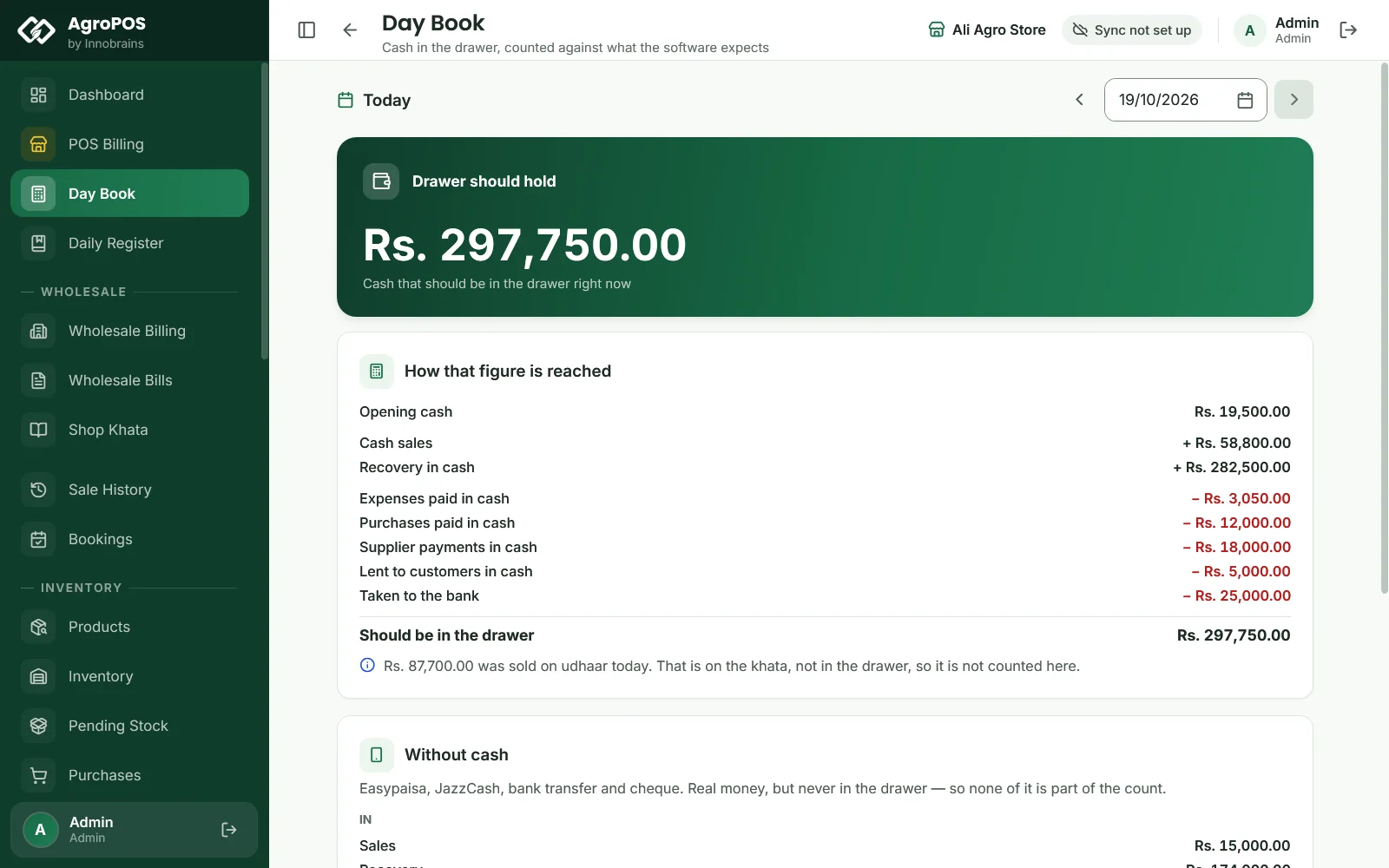
The green card at the top shows Drawer should hold, the cash that should be in the drawer right now. Under it, How that figure is reached lists every part:
| Line | What it is |
|---|---|
| Opening cash | The float the day started with |
| Cash sales (+) | The cash paid on today's bills, retail and wholesale |
| Recovery in cash (+) | Udhaar collected in cash, including cash booking advances |
| Expenses paid in cash (−) | Cash expenses, including cash refunds on sale returns |
| Purchases paid in cash (−) | Cash paid on purchase invoices |
| Supplier payments in cash (−) | Cash paid to suppliers against their khata |
| Lent to customers in cash (−) | Cash given to customers as a loan, shown only when there is some |
| Paid to shops in cash (−) | Cash paid to a shop from its khata, shown only when there is some |
| Taken to the bank (−) | The cash you sent to the bank today |
| Should be in the drawer | The total |
Only money that really passes through the drawer counts. A credit sale is on the khata, not in the drawer, so a note under the list says how much was sold on udhaar today. On a partial bill only the part paid in cash counts. On a day with booking liftings paid from an advance, a note says how much of the day's sales was lifted against advances paid earlier: that money was counted on the day it was paid.
Easypaisa, JazzCash, bank transfer and cheque money is real money, but never in the drawer. When some came in, the Without cash card lists it apart: Sales, Recovery, the payments that went out the same way, and the Net into accounts. None of it is part of the count. A cheque counts only once it is cleared in the Cheque Register.
How to record cash taken to the bank
When the owner or the munshi takes cash from the drawer to the bank:
- In the Day Book, click Cash to Bank.
- In Cash Taken to the Bank, type the amount in Amount (Rs.) and click Save.
The amount is the day's total taken to the bank, and it replaces what was there before. If Rs 25,000 went in the morning and Rs 15,000 in the evening, type 40000 the second time, not 15000.
If Post payments to wallets and accounts is on under Settings → Modules, the dialog also asks which account the money went into ("Bank Transfer — which account?"), and the amount is added to that account under Wallets & Banks. A corrected figure replaces the day's earlier entry in the account, and opening that entry in Wallets & Banks offers Open this day, which brings you back to this Day Book. See Wallets and bank accounts.
How to count and close the day
At closing time, after the last bill:
- Count the notes and coins in the drawer.
- In the Day Book, click Count and Close Day.
- In Count the Drawer, type the total in Counted Cash (Rs.), for example
41250. Type it without commas. - Optional: click Show what the software expects to see the expected figure and whether you are short or over. The figure stays hidden until you have typed your count, so the count is honest.
- Optional: add a Note, such as "Rs 500 taken by Bashir for diesel".
- Click Close Day. AgroPOS says the date "is closed".
Swipe to see the whole screen · tap to close
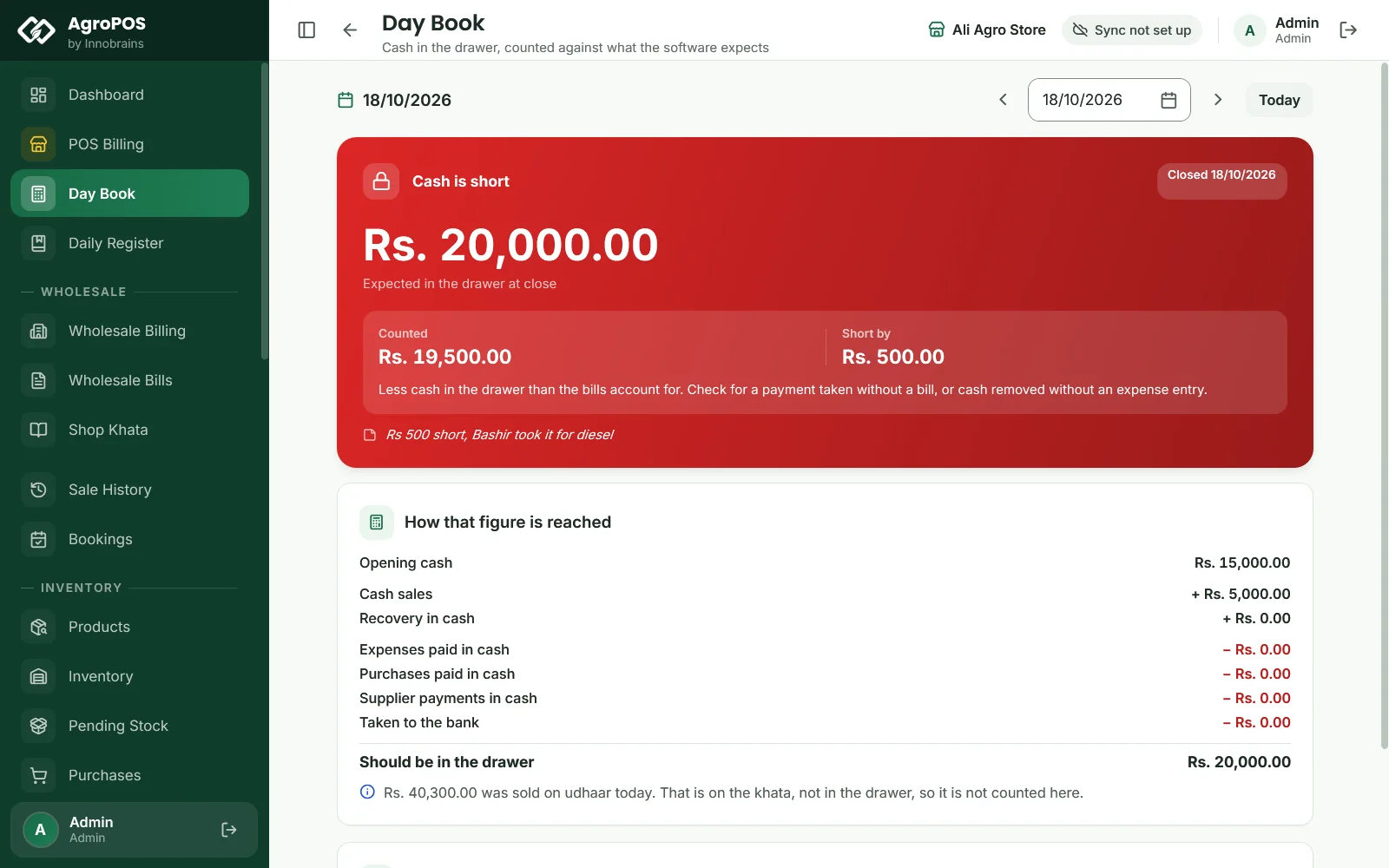
The card at the top now shows the result:
- Counted and matched (green): the count is within Rs 1 of the expected figure.
- Cash is short (red), with Short by and the amount. AgroPOS suggests checking for a payment taken without a bill, or cash taken out without an expense entry.
- Cash is over (amber), with Over by. Usually a bill entered as udhaar that was actually paid, or an expense entered twice.
The difference is not stored as a fixed number: AgroPOS works it out again each time you open the day, from the bills and payments of that date.
How to look at another day or reopen it
Use ‹ and › beside the date, or pick a date in the calendar. The ← and → keys move a day at a time, and Today brings you back. Every past day can be opened, counted and closed in the same way.
To recount a closed day, open it and click Reopen Day, then Reopen. The counted figure is cleared and the day can be counted and closed again. The closing note stays until you close again with a new one. The reopen is recorded in Change History, with the count it cleared and who reopened the day.
Closing a day does not stop billing. A bill made after closing, or an old bill entered later with Change date, still counts on its own day, so that day's expected cash changes. If that happens after you closed, reopen the day and count again.
AgroPOS does not close a day by itself and does not warn you about a day left open. If you forgot to close yesterday, go back with ‹ and close it. Today's opening comes from the last day that was counted.
Cash drawers in a Multi-Counter shop
In a shop with tills, the owner chooses under Settings → Counters → Cash drawers and sign-in on the main counter:
- One drawer for the shop: every counter takes and pays cash from one drawer, counted and closed once for the whole shop. This is how a new Multi-Counter shop starts.
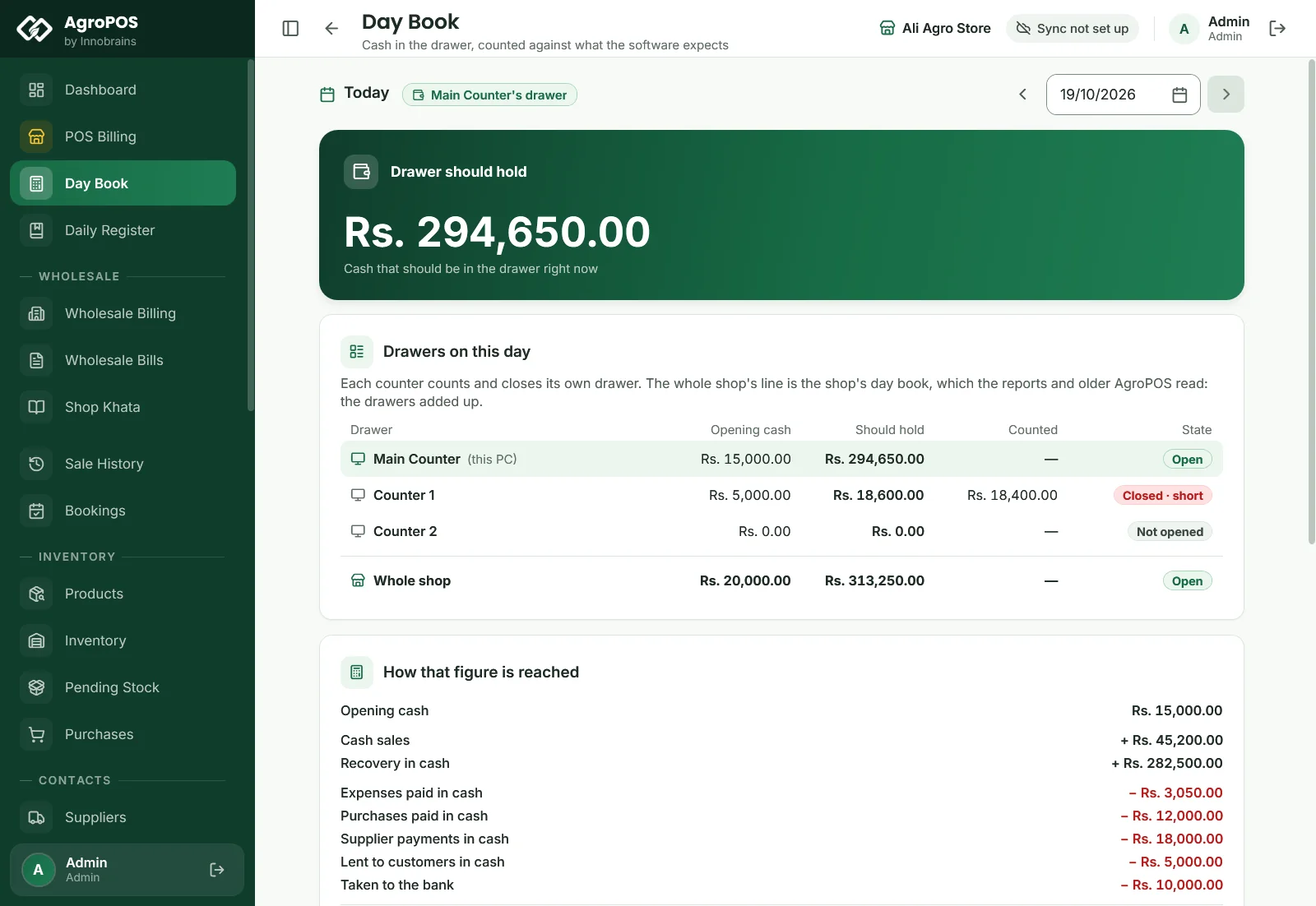
- A separate drawer for each counter: each counter opens, counts and closes its own cash, and its Day Book counts only the money that counter took in or paid out.
With separate drawers, a chip beside the date names the drawer, such as Counter 1's drawer or Main Counter's drawer, and each counter has its own opening cash and its own Cash to Bank. On the main counter of a shop set up as Multi-Counter in V2, Drawers on this day lists each drawer with its Opening cash, what it Should hold, what was Counted and its State (Not opened, Open, Closed · matched, Closed · short or Closed · over), then the Whole shop line. The main counter cannot count or close a till's drawer: that is done on the till.
Swipe to see the whole screen · tap to close
The choice can change only while no day is open, and applies from the next day each counter opens. A day that has started is kept the way it started. Shops moved from the older AgroPOS Multi-Counter keep the setting they had. See Multi-Counter setup.
Rules and tips
- Count and close every evening, even when you are sure the drawer is right. A short drawer found the same day is easy to explain; one found after a week is not.
- Put every cash payment through AgroPOS: an expense as an Expense, a payment to the distributor as a supplier payment. Cash taken out without an entry shows up as short.
- A till staffed only by a Cashier cannot close its own drawer, because the Cashier role has no Day Book. A Store Manager, or the owner with Admin can sign in on every counter on, closes it.
- The Day Book has no printout of its own. On AgroPOS Cloud, the web panel's Day Book shows the same figures for the whole shop.
Common questions
Do I need to enter the opening cash every morning?
No. Each day opens with the cash counted at the last close. Use Set Opening Cash only when the float changed overnight, for example when cash was taken home.
Why is the Day Book not in my cashier's menu?
Closing the day needs the close day permission, which the Store Manager and the Admin have as standard. The owner can give it to another role under Roles & Permissions.
Why did yesterday's closed day change?
Its figures are worked out from the bills and payments of that date each time you open it. A bill or payment entered later with yesterday's date changes them. Reopen the day and count again if you need a fresh close.
Is Easypaisa or bank money counted in the drawer?
No. Easypaisa, JazzCash, bank transfers and cheques are listed under Without cash and are never part of the count. A cheque counts only once it is cleared.
I took cash to the bank twice today. What do I type?
The total for the day. Cash to Bank replaces the figure each time, so type both amounts added together.
Related guides
Last updated 21 October 2026. Still stuck? Contact us or message us on WhatsApp.