A backup on a USB drive is only as recent as the last time someone copied it. Cloud backup uploads a backup of the shop to Innobrains' server by itself while the PC is online, so a recent copy is safe even if the shop PC is stolen or its disk dies. This guide covers who has cloud backup, when it uploads, restoring a cloud backup, and how it differs from AgroPOS Cloud's full restore.

Swipe to see the whole screen · tap to close
Who has cloud backup
| Edition | Cloud backup |
|---|---|
| Cloud (monthly or yearly) | Included |
| Offline (lifetime) | An optional yearly add-on |
| Free trial | Included during the trial |
Prices are on the pricing page. If an Offline shop's yearly cloud backup is not renewed, new uploads stop with "The yearly cloud backup subscription has expired. Your licence is lifetime and the software keeps working — only online backup has stopped." Backups already uploaded can still be listed and downloaded.
The Cloud Backup tab is on Backup & Restore for the Store Manager and the Admin; restoring needs the Admin. In a Multi-Counter shop it runs on the main counter.
How the automatic backup works
- AgroPOS checks every 10 minutes while it is open, starting half a minute after it opens.
- It uploads only when the PC is activated, the shop's data has changed, and at least an hour has passed since its last upload.
- When you close AgroPOS, it tries one last upload, waiting at most 10 seconds.
- Each upload also keeps a copy in
Documents\AgriPOS_Backupson the PC, and then only the five newest backups are kept in that folder.
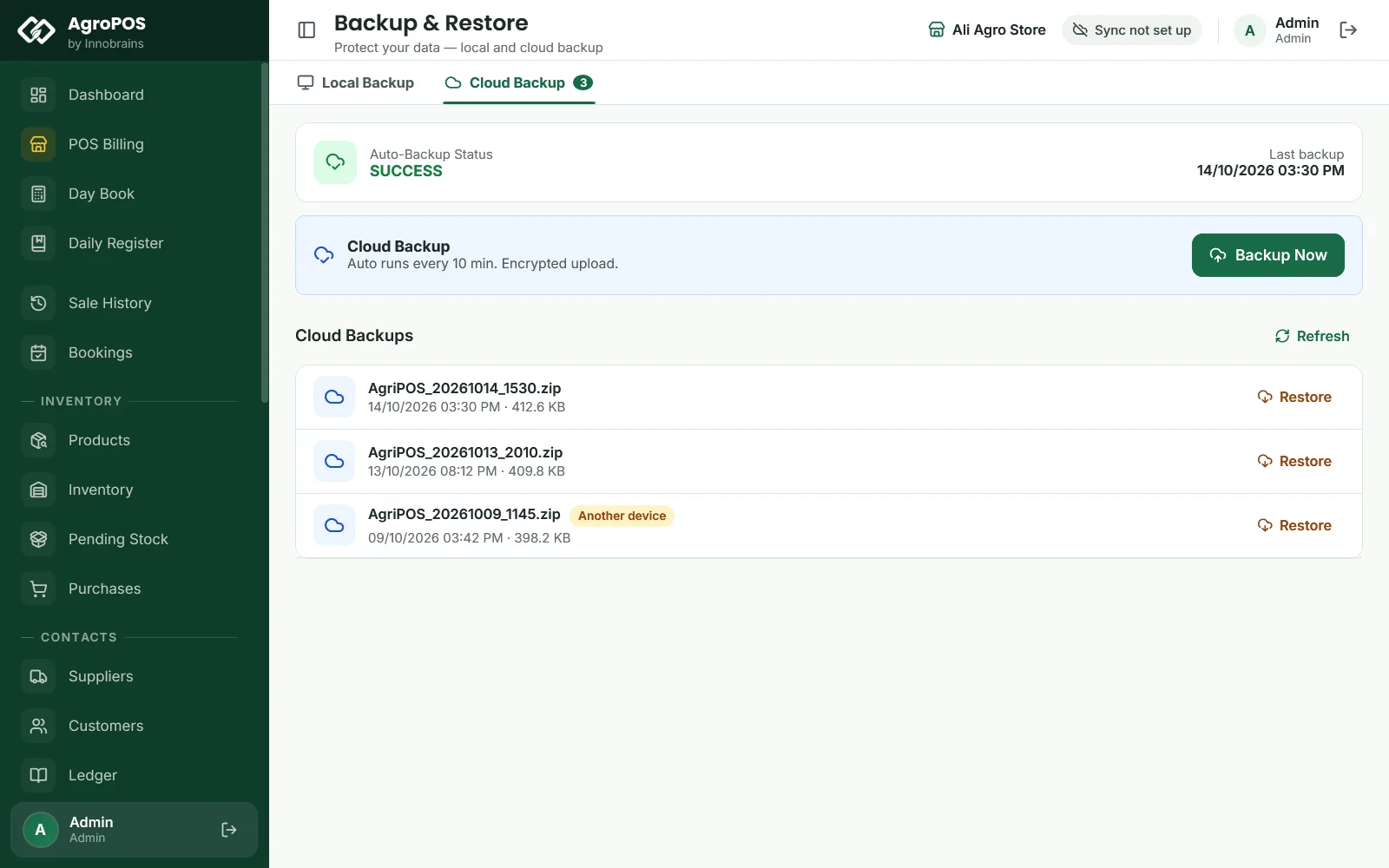
The Auto-Backup Status card shows SUCCESS, a FAIL message such as "App not activated", or Never, with the time of the Last backup. A failed upload is tried again once the data changes.
How to back up now
Click Backup Now under Cloud Backup. AgroPOS uploads at once and says "Backup uploaded to server successfully!". Do this before a big change, such as moving to a new PC, when the automatic backup has not run for a while.
Which backups are kept online
Cloud Backups lists the backups on the server, newest first, with their date and size. A backup uploaded from another PC of your licence, such as the old shop PC, is marked Another device. On the server, every backup of the last 48 hours is kept, and after that the newest backup of each day, for at least 30 days. Backups cannot be deleted from the app.
How to restore a cloud backup
- Open Backup & Restore → Cloud Backup as the Admin.
- Click Restore on the backup you want, usually the newest.
- Confirm Restore from Cloud: all current data on this PC will be replaced. For a backup from Another device, AgroPOS warns that this PC's data will be replaced by that device's.
- AgroPOS downloads the backup, checks it, keeps a safety copy of this PC's data, and says "Cloud restore complete!".
The restore works exactly like a local restore: everyone then signs in with the users and passwords that were in the backup. If the download fails, check the internet; if the licence cannot be verified, check it under Settings → About → Licence.
Cloud backup or AgroPOS Cloud restore?
| Cloud backup | AgroPOS Cloud (Cloud Sync) | |
|---|---|---|
| What goes up | A backup file now and then | Every change, as it happens |
| How recent | Up to an hour or more old | Up to the last change sent |
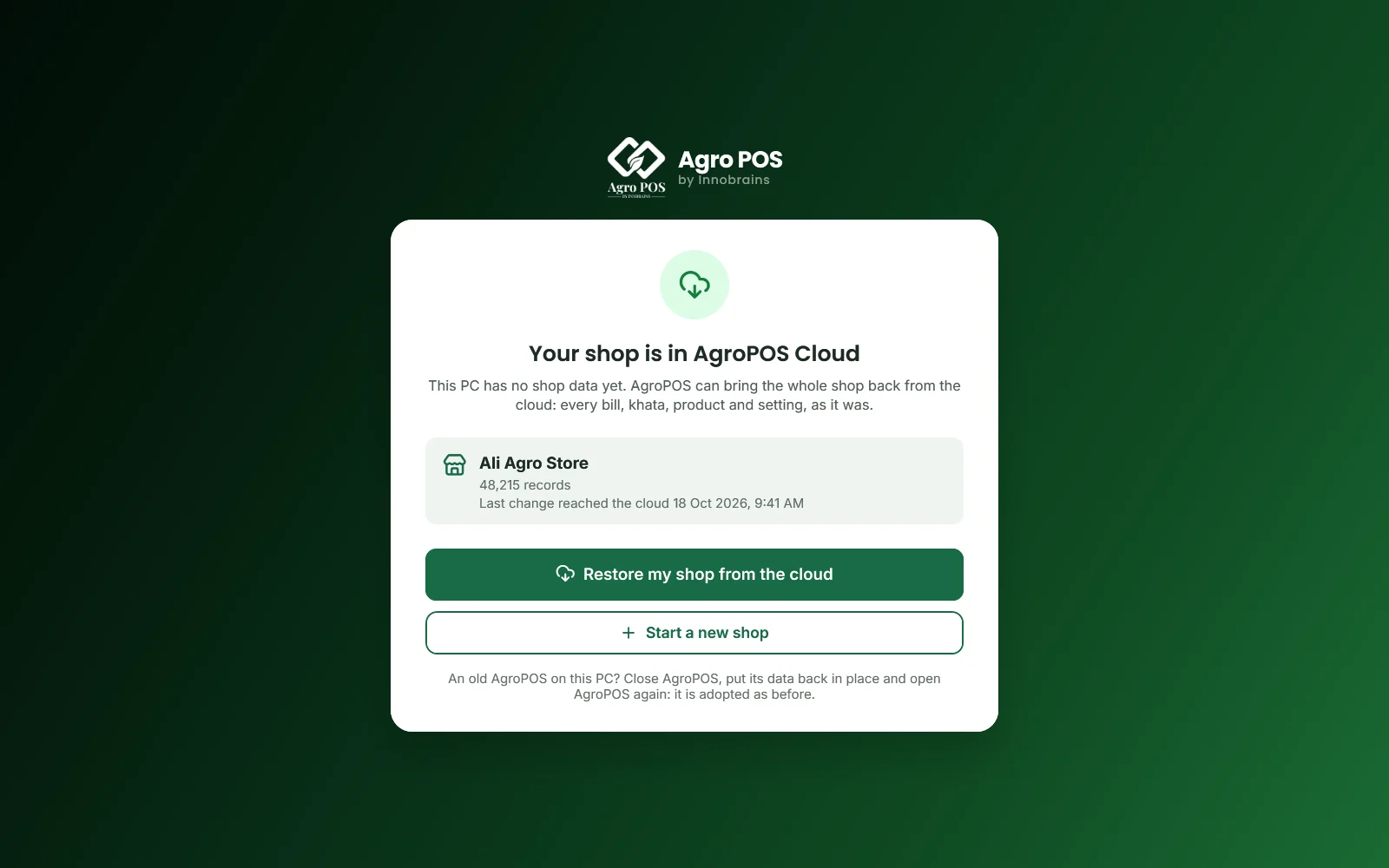
| On a new PC | Restore the backup from Cloud Backup | Restore my shop from the cloud, checked record by record |
| Web panel | No | Yes |
On a Cloud plan you have both. When moving to a new PC, prefer the full restore from AgroPOS Cloud. See Restoring your shop or moving to a new PC.
Swipe to see the whole screen · tap to close
Rules and tips
- Keep the shop PC online for part of each day, so the backups go up.
- Check the Auto-Backup Status once a week: SUCCESS with a recent time is what you want.
- Cloud backup does not replace a USB copy for an Offline shop without the add-on: make local backups too.
- Restoring needs the Admin, because it replaces all the data on the PC.
Common questions
Does cloud backup work without internet?
Uploads need the internet. While the PC is offline, nothing is uploaded; the next upload happens when it is back online and the data has changed.
How often does AgroPOS upload a backup?
It checks every 10 minutes and uploads when the data has changed and at least an hour has passed since the last upload, plus once when you close AgroPOS. Backup Now uploads at once.
Can I get a backup from my old PC on a new one?
Yes. Activate the new PC with your licence, open Backup & Restore, Cloud Backup, and restore the newest backup marked Another device.
What happens to my backups if I stop paying for cloud backup?
New uploads stop. The backups already on the server can still be listed and restored.
Related guides
Last updated 19 October 2026. Still stuck? Contact us or message us on WhatsApp.