A khaad or pesticide dealer usually runs a khata with each company or distributor: purchases on credit, payments by bank or cheque, advances before the season, and credit notes for incentives and rate differences. AgroPOS keeps this supplier khata from your purchases and payments. This guide covers paying a supplier, advances, money a supplier gives back, debit and credit notes, and the Supplier Ledger.

Swipe to see the whole screen · tap to close
Who can do what
Suppliers is under CONTACTS for the Store Manager and the Admin ("Add and edit suppliers"). Supplier Ledger, which only reads, is open to every standard role, Cashier included ("View the ledger"); its Print and Excel need "Export or print data". Deleting a supplier for good is for the Admin only.
Reading the suppliers list
Suppliers lists each company with its contact, phone, city and Balance: red when you owe them, blue with "advance with them" when they hold your advance, green when clear. Search by company, contact or phone. The icons on each row are Edit, Ledger, Add payment, Debit / Credit note, Receive money from this supplier, Deactivate and, when allowed, Delete permanently.
How to pay a supplier
- Open Suppliers and click Add payment on the supplier's row (Pay / add advance when they already hold an advance).
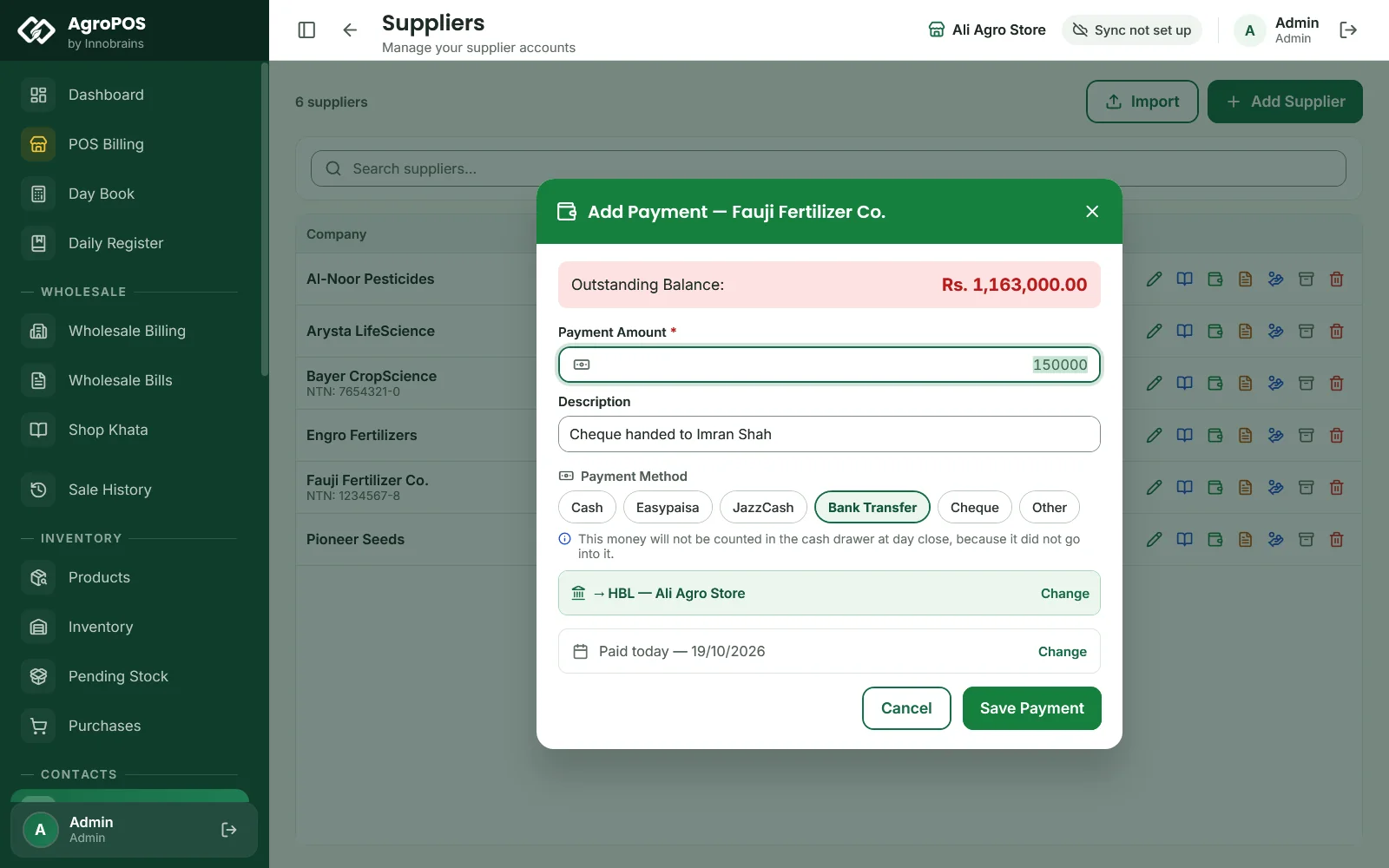
- The dialog shows the Outstanding Balance. Type the Payment Amount and a Description, such as "Cheque handed to Imran Shah".
- Choose the Payment Method: Cash, Easypaisa, JazzCash, Bank Transfer or Other (and Cheque with the Cheque Module on). With posting to accounts on, the method's account is shown; Change picks another.
- The payment is dated today; click Change beside "Paid today" for an earlier date.
- Click Save Payment. AgroPOS says how much was paid to whom.
Swipe to see the whole screen · tap to close
The payment comes off the supplier's khata on its date and settles their open purchases, oldest first. A cash payment counts in that day's Day Book as supplier payments in cash. A payment by cheque is recorded as paid at once; the shop's own cheques are not kept in the Cheque Register.
Advances with a supplier
To book stock with a company before the season, pay more than you owe, or pay when nothing is outstanding. AgroPOS asks first: Advance payment ("the whole amount will be held as an advance with them") or More than is outstanding (the bill is cleared and the extra held). Click Pay advance or Pay.
The advance shows in blue on the supplier's row. When you next enter a purchase from them, the INVOICE SUMMARY shows how much of the advance the bill uses and what is left with them.
Money a supplier gives back
When a company refunds money, for example after a return of expired stock:
- Click Receive money from this supplier on their row.
- Type the Amount, the Date and a Note, choose how it came, and click Save Receipt.
Their balance goes up again: an advance with them shrinks, or they now owe you. With posting to accounts on, money that came by wallet or bank is added to the account shown, under Wallets & Banks. A cheque from a supplier cannot be taken here while the Cheque Module is on: record it as a bank transfer once it has cleared.
Credit notes and debit notes
Companies adjust accounts on paper all the time: an incentive on a big deposit, a rate difference, transport charged back.
- Click Debit / Credit note on the supplier's row.
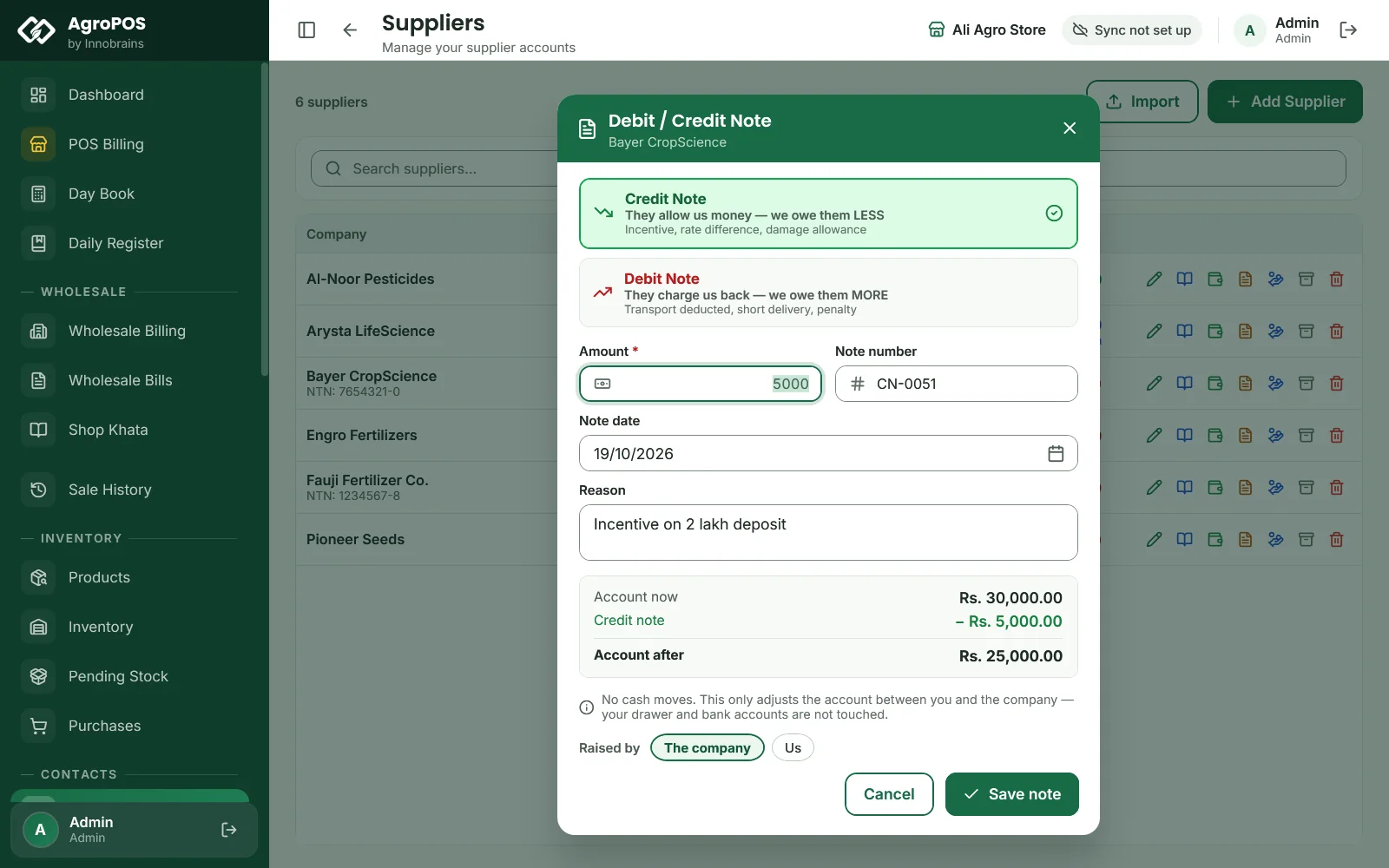
- Choose Credit Note ("They allow us money — we owe them LESS") or Debit Note ("They charge us back — we owe them MORE").
- Type the Amount, the Note number from their paper, the Note date and a Reason, such as "Incentive on 2 lakh deposit".
- Choose who raised it, The company or Us, check Account now and Account after, and click Save note.
Swipe to see the whole screen · tap to close
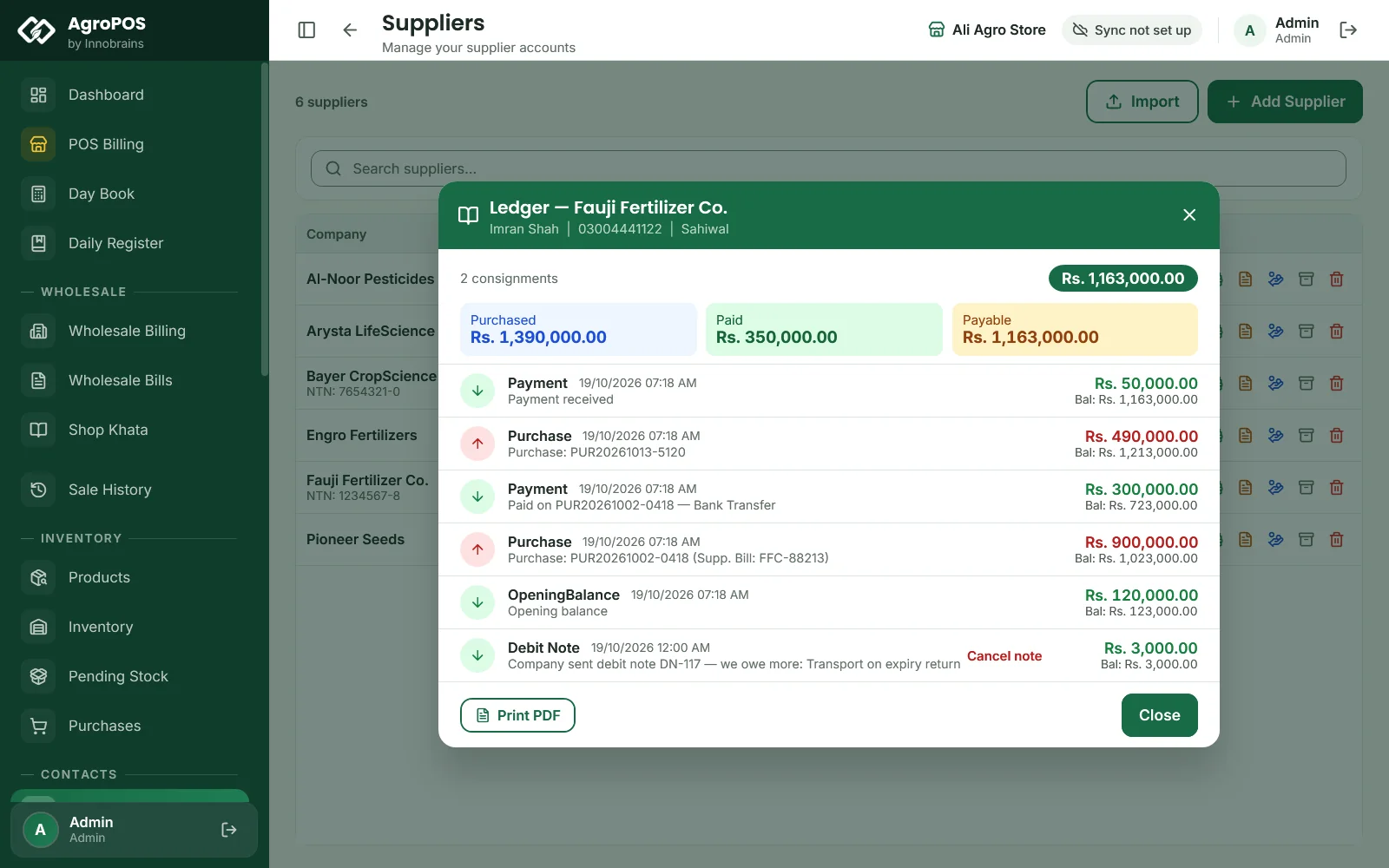
No cash moves: only the khata between you and the company changes. A note entered by mistake can be cancelled from the supplier's Ledger with Cancel note.
The Supplier Ledger
Open Supplier Ledger and pick a supplier, or click Ledger on their row in Suppliers for a quick view. The statement shows Purchased, Paid and Payable (or They Owe You when you hold an advance with them), then every purchase, payment, return and note with the Balance after it, newest first.
- Pick From and To to show some dates only; All dates shows everything. The balance is always the whole khata's.
- Print prints the statement on A4 and Excel saves it, always for every date.
- Esc goes back to the list.
Deactivating or deleting a supplier
- Deactivate hides a company you no longer buy from; its purchases and khata are kept. AgroPOS refuses while anything is owed either way. A deactivated supplier cannot be shown again from the list, so deactivate only those you are done with.
- Delete permanently removes the supplier with every purchase and khata entry, and any wholesale bills made out to them, after you type the name to confirm. Stock from those purchases comes off the shelf, less what was already returned, and stock from those bills goes back on; bank entries and expenses stay as they are. A supplier linked to a customer or a shop shares one khata with them, so it cannot be deleted permanently. It is off as standard: the Admin allows it under Settings → Modules → Parties — Deletion Rules. It cannot be undone, so take a backup first.
Rules and tips
- Enter the opening balance with each company when you add it: I owe them or Paid in advance.
- Match the supplier ledger with the company's statement every month, and enter their credit notes as soon as they arrive.
- A supplier payment entered here, or under Payments, shows in the Daily Register under Paid Out.
- Write the cheque or TID number in the description, so the ledger shows how each payment went.
Common questions
How do I record an advance I paid the company for the season?
Click Add payment on the supplier and type the amount. AgroPOS asks whether to hold it as an advance with them; choose Pay advance. It comes off their next purchases.
Where do I enter a company's incentive or rate difference?
As a Credit Note, under Debit / Credit note on the supplier's row. It reduces what you owe them without any cash moving.
Can my cashier see what we owe the companies?
Yes, under Supplier Ledger, which is open to the Cashier role as standard. Paying a supplier from Suppliers is for the Store Manager and the Admin.
Why is the supplier's balance blue?
Blue means they hold an advance from you: you have paid them more than they have supplied. It is used up by your next purchases from them.
Related guides
Last updated 21 October 2026. Still stuck? Contact us or message us on WhatsApp.