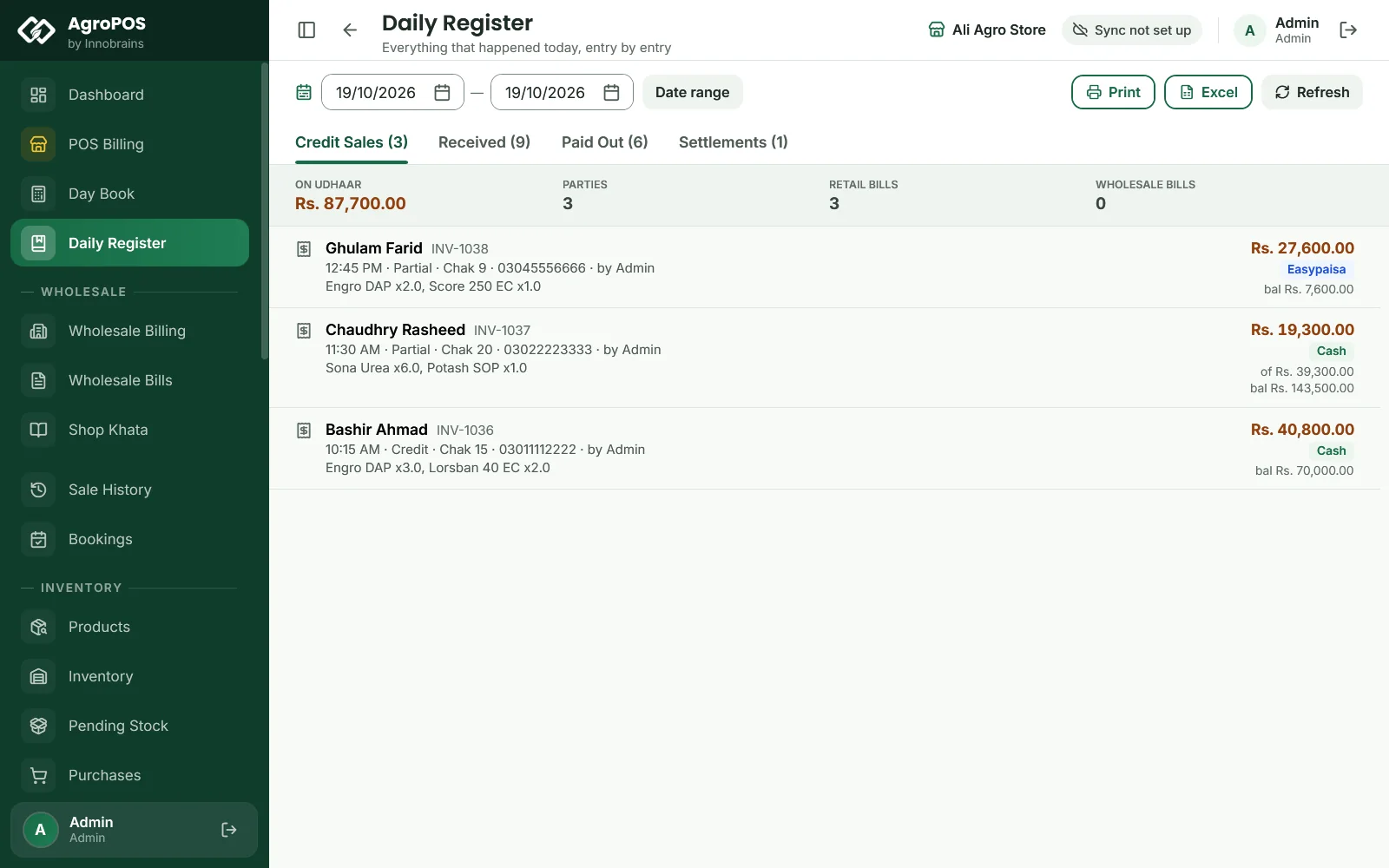
The Daily Register is the shop's rough register (kacha khata) kept for you: everything that went out on udhaar, every rupee that came in against a khata, and every payment that went out, entry by entry with the party, the time and who entered it. Owners use it at night to check the day, and munshis use it to copy entries into the pakka khata. This guide explains its four tabs, what each one leaves out, and how to print it or save it in Excel.

Swipe to see the whole screen · tap to close
Who can open the Daily Register
Daily Register is in the menu for the Store Manager and the Admin. Print and Excel also need the "export data" permission, which both have as standard. The register only reads: nothing you do on it changes the khata or the stock. In a Multi-Counter shop it covers the whole shop, every counter together.
How to read a day
The register opens on today. Each tab shows its count, such as Credit Sales (3), and a summary strip above the entries.
| Tab | What it lists | Summary |
|---|---|---|
| Credit Sales | Retail and wholesale bills with an amount still on the khata | On udhaar, Parties, Retail bills, Wholesale bills |
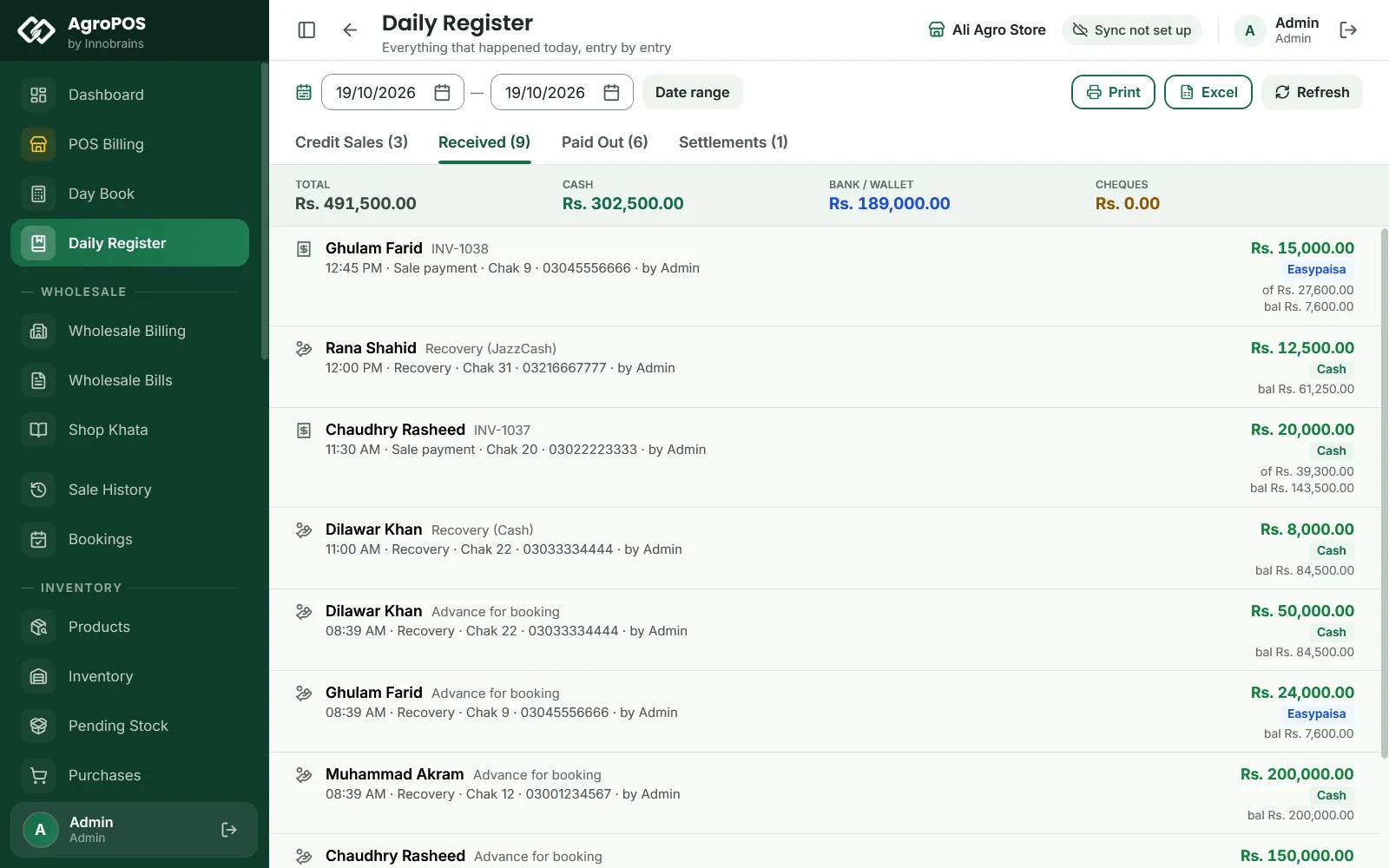
| Received | Money that came in against a khata: the part paid on a credit or partial bill, every Recovery, and booking advances | Total, Cash, Bank / wallet, Cheques |
| Paid Out | Supplier payments, purchase payments, every expense, and cash lent to customers | Total, Cash, Bank / wallet, Cheques |
| Settlements | Party settlements, when a customer paid one of your suppliers directly | Settled, Customers owe less, You owe suppliers less, Parties |
Ctrl+Tab and Ctrl+Shift+Tab move between the tabs. Each entry shows the party and the bill or receipt number, a line with the time, the kind of entry, the village, the phone and by the user who entered it, the items on a bill, any note, the amount and how it was paid, such as "Cheque 004512 · due 25/10/2026" or "Easypaisa". bal is the party's balance as it stands now, not the balance just after that entry.
Swipe to see the whole screen · tap to close
What the register leaves out
The register is about udhaar and money moving against khatas, so some things are deliberately not in it:
- A bill paid in full at the counter is not a credit sale and nothing was recovered, so it is on neither tab. Cash sales are in the Day Book and in Sale History.
- A bill paid from a booking advance is left out of Received: that money was counted on the day of the booking.
- Write-offs are never shown as money received.
- Credit Sales shows what is still owed on each bill today. If the farmer pays part of the bill next week, the amount on its day gets smaller, and a bill paid off in full drops off its day.
Each empty tab says why it is empty, for example "A fully paid bill is a receipt, not a credit sale — look on the Received tab."
How to look at other days
- Pick the first day and the last day in the two date boxes at the top.
- Click Date range.
The title then shows the range, and every tab lists all the days in it. Today brings you back. Refresh (F5) reads the entries again, for example after a till has billed.
How to print or save the register
Print and Excel act on the tab that is showing, for the dates on screen.
- Print makes an A4 page titled Credit Sales, Money Received, Payments Made or Party Settlements, with the totals and a table of Time, Ref, Party, Detail, How paid and Amount. The footer reminds the reader that cheque amounts are promises until cleared.
- Excel asks where to save the file, named like
Credit_Sales_2026-10-19_to_2026-10-19.xlsx, with one row per entry: date, time, party, village, phone, items, how paid, account, cheque number and due date, bill total, amount, party balance and who recorded it. AgroPOS says "File saved successfully".
Rules and tips
- Read Credit Sales and Received together at night: they are the udhaar that went out and the udhaar that came back.
- For the cash in the drawer, use the Day Book. The Daily Register does not count the drawer.
- Each entry is shown with the user who made it, so give every person at the counter their own user.
- The register has no search or party filter. To follow one customer, open their khata under Ledger.
Common questions
Why is a cash bill not in the Daily Register?
A bill paid in full at the counter left nothing on the khata, so it is neither a credit sale nor money recovered. You find it in Sale History, and its cash in the Day Book.
Why did yesterday's credit sale amount change?
Credit Sales shows what is still owed on each bill now. When the customer pays part of it later, the amount shown on the bill's day goes down, and a bill paid in full no longer appears.
Can a cashier see the Daily Register?
Not as standard. It is for the Store Manager and the Admin. The owner can give the view daily register permission to another role under Roles & Permissions.
Does the Daily Register show each counter separately?
No. It lists the whole shop's entries together. Each counter's own cash is in that counter's Day Book when the shop keeps a separate drawer for each counter.
Related guides
Last updated 19 October 2026. Still stuck? Contact us or message us on WhatsApp.