Bigger farmers and zamindars often pay their udhaar by cheque, sometimes post-dated to after the crop is sold. A cheque is a promise until the bank pays it, so AgroPOS keeps it in the Cheque Register and moves the khata only when it clears. A bounced cheque then costs nothing to undo. This guide covers switching cheques on, taking a cheque, clearing it, a bounced cheque, and giving a customer's cheque to a supplier.

Swipe to see the whole screen · tap to close
How to switch cheques on
- As the Admin, open Settings → Modules.
- Under Cheque Module, switch on Cheques.
- Click Save Settings.
Cheque Register then appears under FINANCE for the Store Manager and the Admin ("Clear, bounce or endorse a cheque"), and Cheque appears as a payment method. Anyone who may take the payment can take a cheque, including a Cashier, but only the Store Manager and the Admin can clear, bounce or hand it on.
The module cannot be switched off while any cheque is still in hand or with a supplier: AgroPOS asks you to settle the cheques first, because the register is the only screen that lists them.
Where a cheque is taken
| Where | How |
|---|---|
| POS Billing | Choose the Cheque payment method on a bill for a named customer |
| Recovery | Collect Payment, with Cheque as the payment method |
| Payments | Payment In from a Customer or a Shop, with Cheque |
| Wholesale Billing | Choose the Cheque payment method on a bill to a shop |
| Shop Khata | Receive, with Cheque as the payment method |
| Bookings | New Booking, with Cheque under How it was paid |
A cheque always needs a named customer or shop: at the till AgroPOS asks "whose khata does it settle when it clears?". At the till and at Wholesale Billing, the bill is saved as unpaid, so the full amount stays on the khata until the cheque clears. A cheque from a supplier cannot be taken into the register.
How to take a cheque
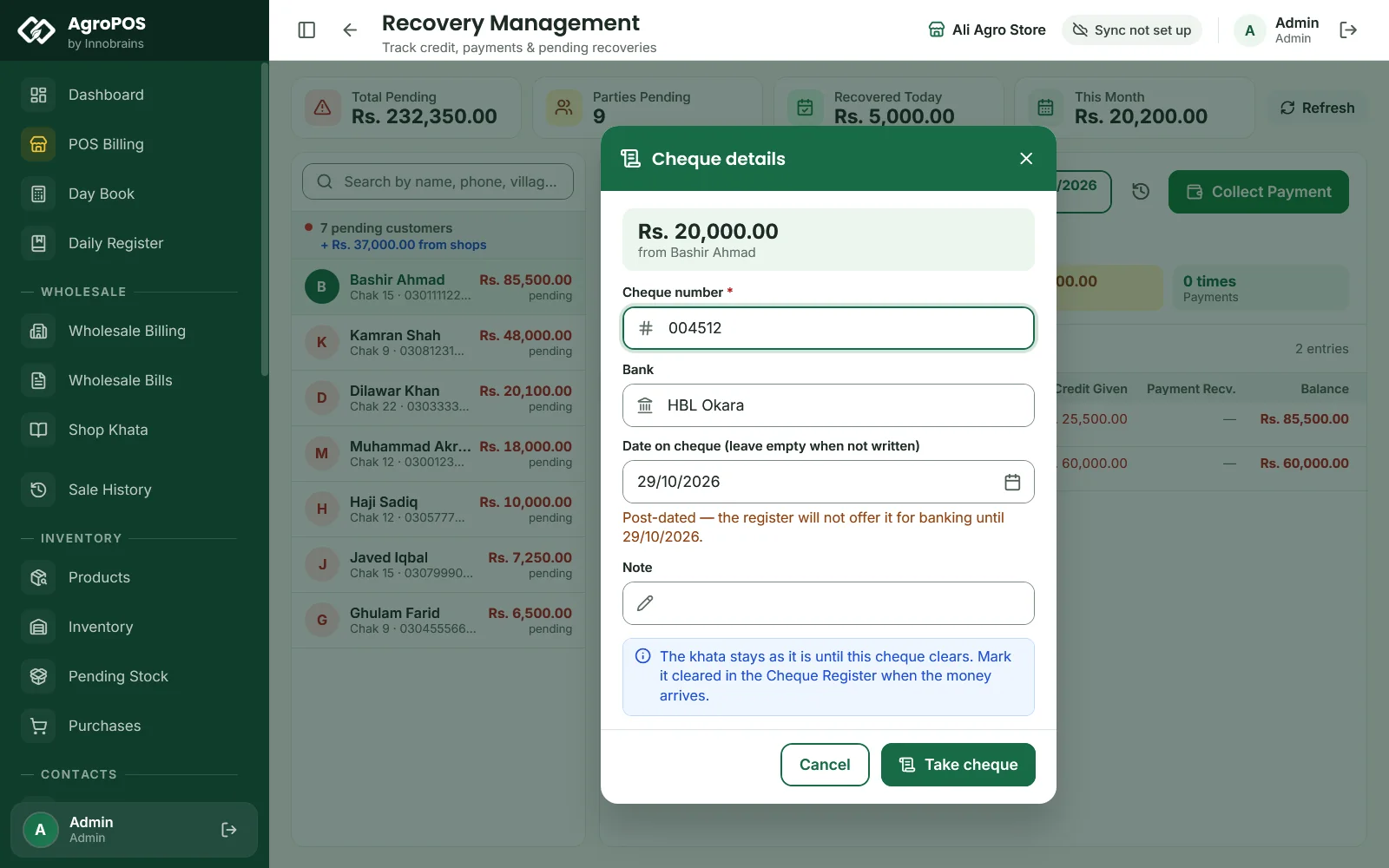
After you choose Cheque and save, Cheque details asks:
- Cheque number (required), as printed on the cheque.
- Bank, such as "HBL Okara".
- Date on cheque, if one is written. A future date marks the cheque Post-dated in the register.
- A Note, such as "Against the cotton crop".
- Click Take cheque. AgroPOS says the cheque is taken and "the khata moves when it clears".
Swipe to see the whole screen · tap to close
Nothing else moves yet: no khata entry, no cash in the Day Book, no bank entry, and no slip. The same cheque number cannot be taken twice while it is outstanding.
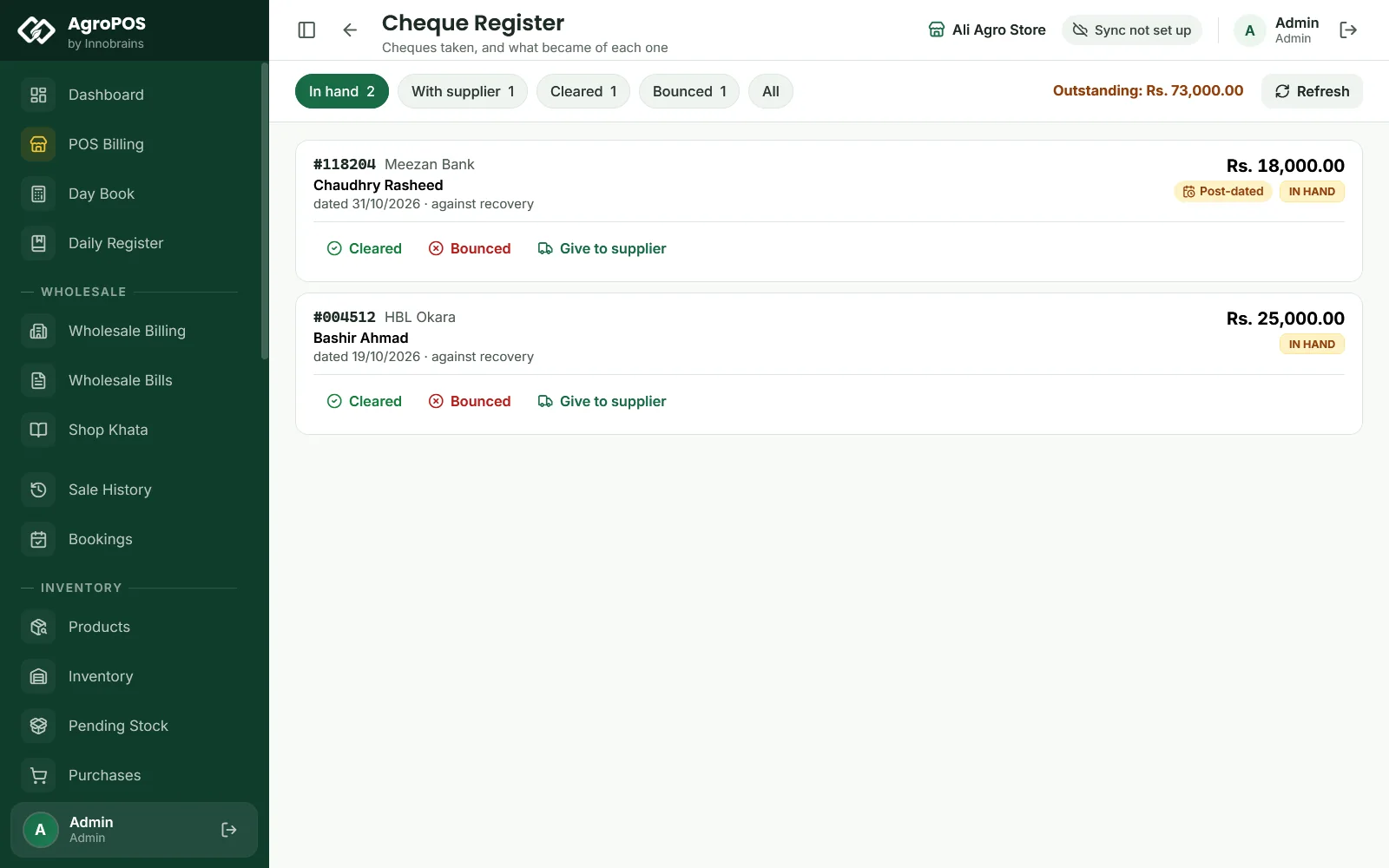
The Cheque Register
The chips show In hand, With supplier, Cleared, Bounced and All, with Outstanding (in hand plus with a supplier). Each card shows the number, the bank, the customer or shop, the amount, its state (IN HAND, GIVEN TO SUPPLIER, CLEARED or BOUNCED), the date on it, and what it came with: a sale, a recovery, a payment, a wholesale bill or a booking.
How to mark a cheque cleared
When the bank pays:
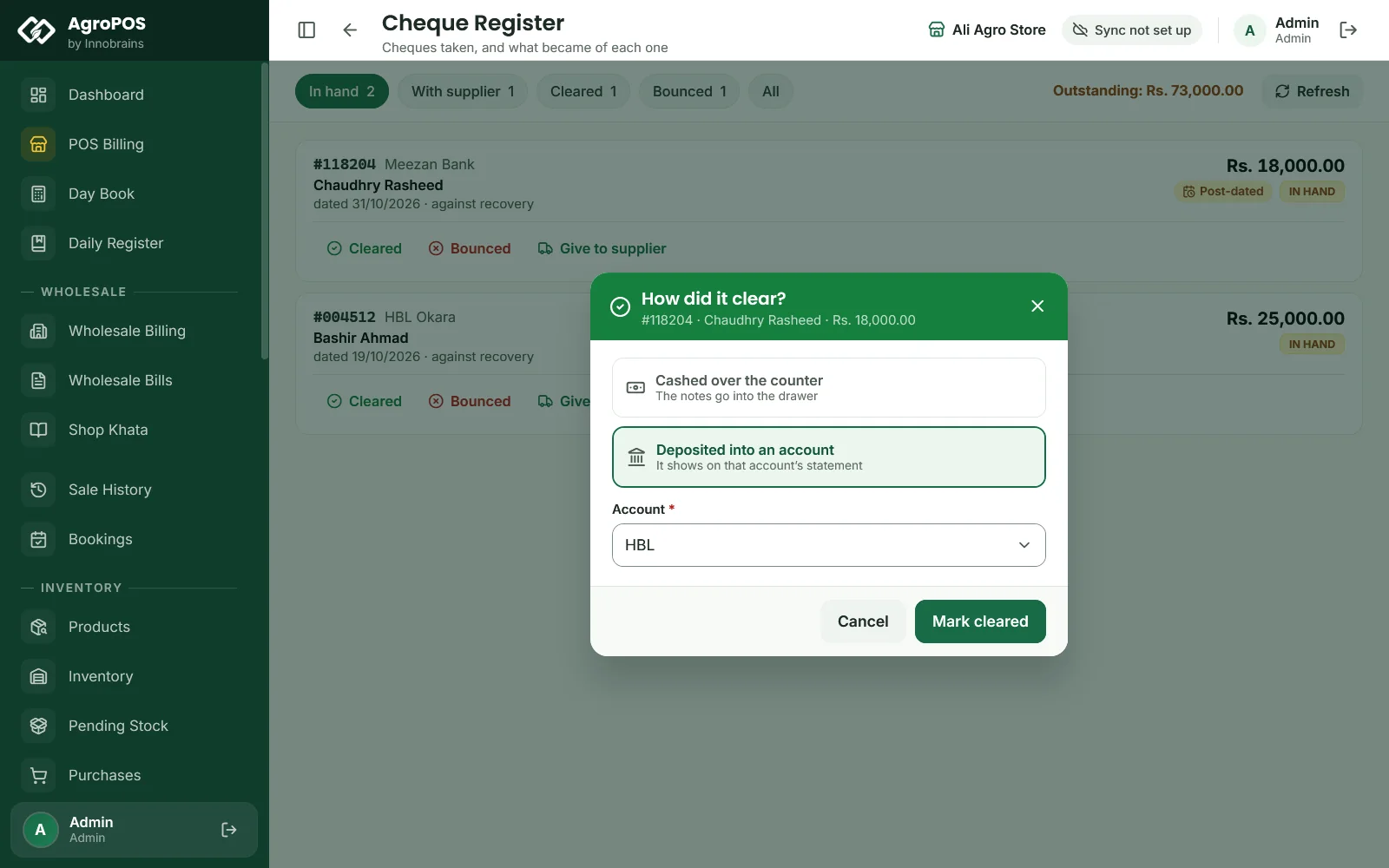
- Click Cleared on the cheque.
- In How did it clear?, choose Cashed over the counter (the notes go into the drawer) or Deposited into an account, and pick the Account.
- Click Mark cleared.
Swipe to see the whole screen · tap to close
Now the customer's khata moves: a payment "Cheque 004512 · HBL Okara" is recorded, settling their oldest bills first, dated the day you mark it cleared. A cashed cheque counts as cash in that day's Day Book. A deposited cheque does not; it is added to the account's statement under Wallets & Banks when Post payments to wallets and accounts is on.
A cheque taken as a booking advance settles no old bill: while the booking is open, it becomes the booking's advance on the day it clears. A cheque on a wholesale bill moves the shop's khata in the same way as a customer's.
A post-dated cheque can be marked cleared before its date; the Post-dated badge is only a reminder.
How to mark a cheque bounced
Click Bounced, type the Reason, such as "Insufficient funds", and click Mark bounced. Nothing has to be undone: the khata never moved, because you were holding paper rather than money. The cheque keeps its reason in the register, and the customer still owes the amount.
How to give a customer's cheque to a supplier
A dealer often hands a farmer's cheque on to the distributor.
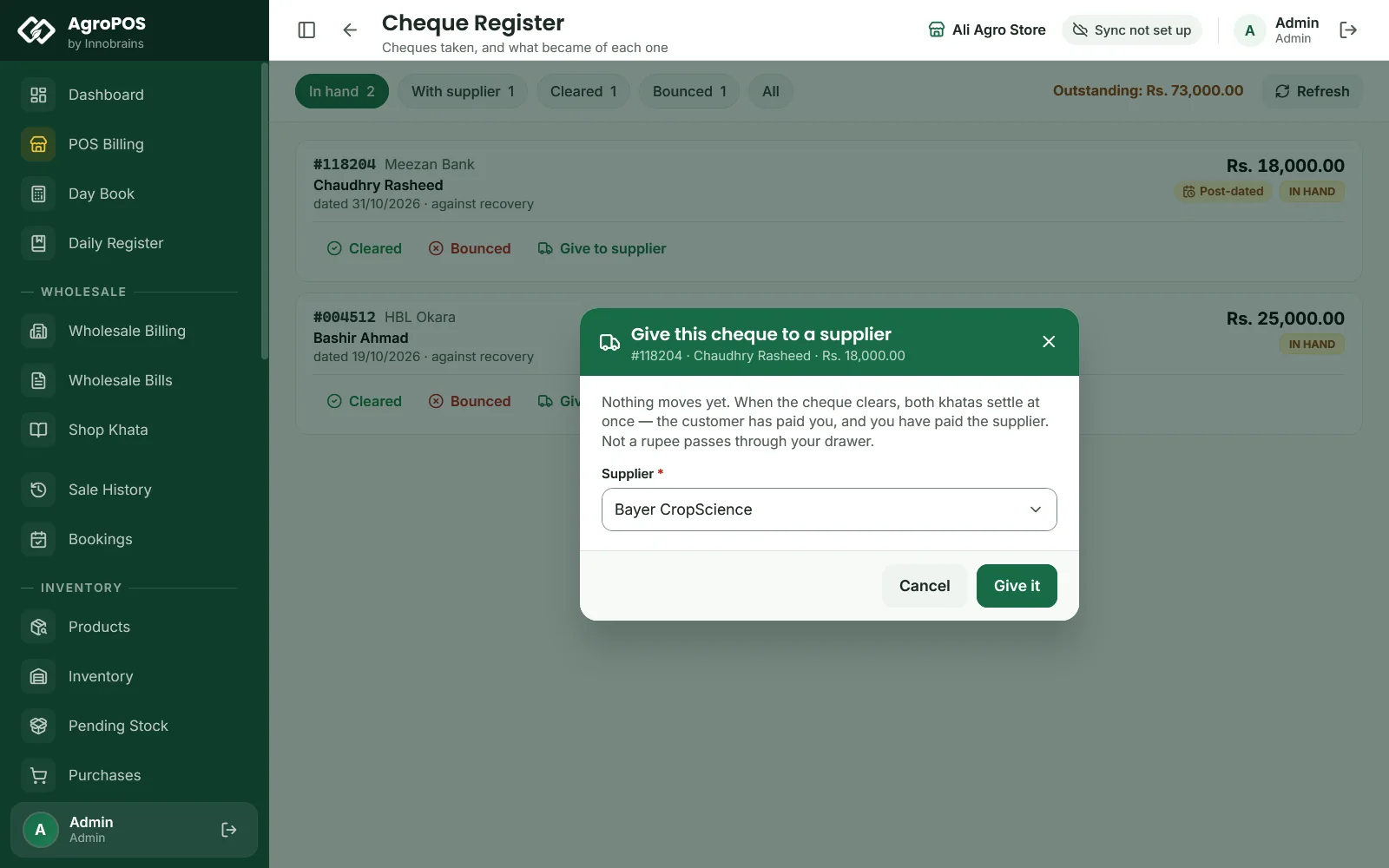
- Click Give to supplier on a cheque in hand.
- Choose the Supplier, shown with what you owe them, and click Give it.
Swipe to see the whole screen · tap to close
Nothing moves yet; the cheque shows under With supplier. When it clears, click Cleared and Yes, it cleared: both khatas settle at once, the customer has paid you and you have paid the supplier. The money never passed through the drawer, so the Day Book does not count it as cash. If it bounces, mark it Bounced as above.
Rules and tips
- Take every cheque through AgroPOS, even post-dated ones, so the register is your cheque diary.
- Check In hand every morning and deposit what is due.
- A cleared or bounced cheque cannot be reopened, edited or deleted, so mark it only once the bank has answered.
- Cheques the shop writes to its own suppliers are recorded as supplier payments by cheque; they are not kept in the register.
Common questions
Why did the customer's balance not go down when I took his cheque?
The khata moves only when the cheque clears. Until then it waits in the Cheque Register under In hand. Mark it Cleared when the bank pays.
What happens to the khata when a cheque bounces?
Nothing, because it never moved. The cheque is marked bounced with the reason, and the customer still owes the amount.
Can my cashier take a cheque?
Yes, at the till, in Recovery or under Payments. Only the Store Manager or the Admin can mark it cleared, bounced or given to a supplier.
Is a cleared cheque counted in the cash drawer?
Only if you choose Cashed over the counter. A cheque deposited into an account is not counted in the drawer.
Related guides
Last updated 21 October 2026. Still stuck? Contact us or message us on WhatsApp.