Most agri dealers sell on udhaar and collect after the harvest. AgroPOS keeps a khata for every customer: each credit bill adds to it, each payment takes from it, and the balance is always up to date. This guide covers adding customers with what they already owe, credit limits, reading a khata, collecting recovery, the payment dates farmers promise, and the reminders AgroPOS gives you.

Swipe to see the whole screen · tap to close
Who can do what
Customers, Ledger, Payments, Recovery and Recovery Dates are open to every standard role, Cashier included ("Add and edit customers", "View the ledger", "Take a recovery payment"). Writing off the rest of a khata and resetting a credit score are for the Admin. Printing or saving a statement from the Ledger needs "Export or print data" (Store Manager and Admin).
How to add a customer with old udhaar
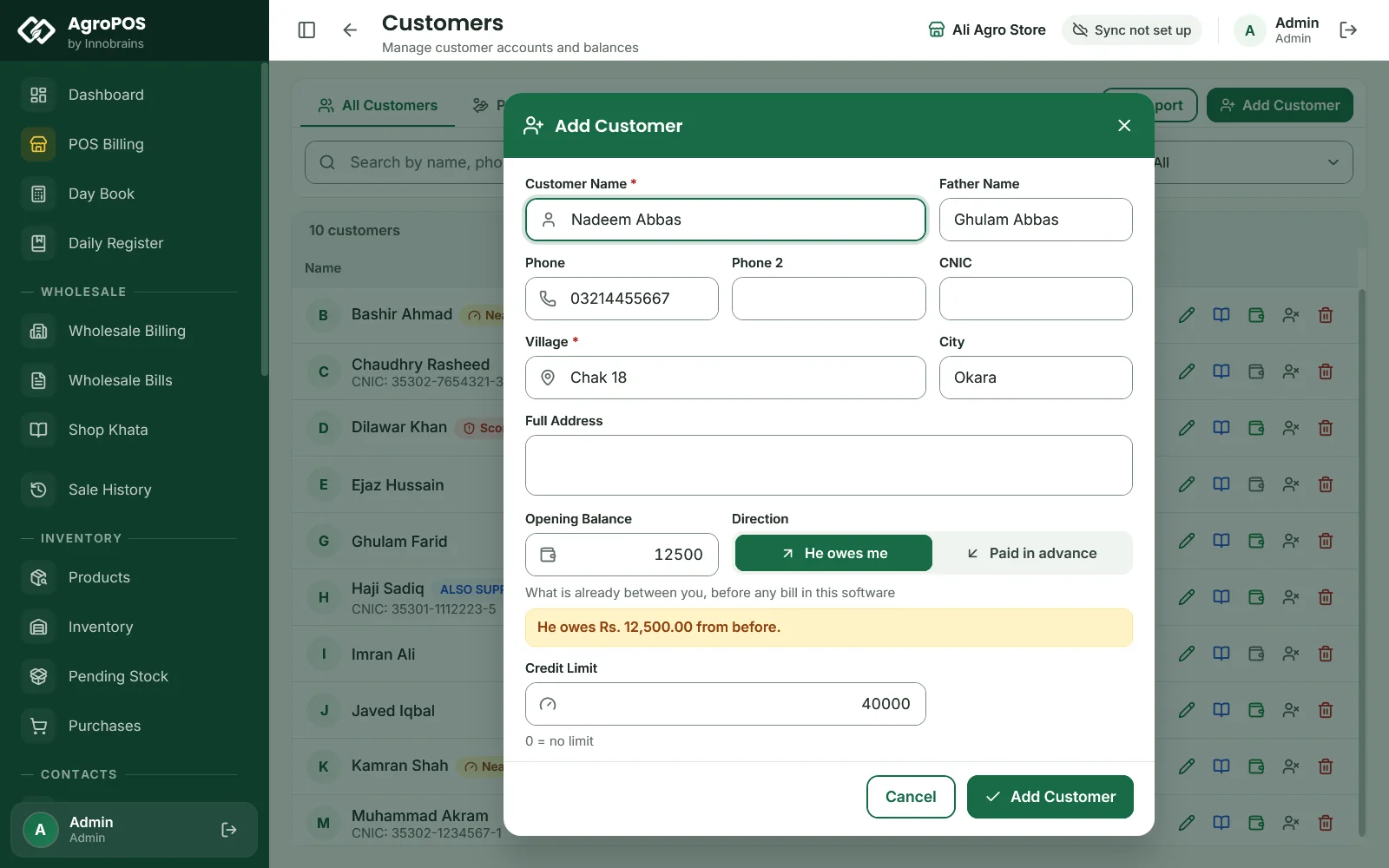
- Open Customers and click Add Customer (Ctrl+N).
- Fill in the Customer Name and Village (both required), and as you like the Father Name, Phone, Phone 2, CNIC, City and Full Address.
- In Opening Balance, type what is already between you from before AgroPOS, and choose He owes me or Paid in advance. AgroPOS reads it back, such as "He owes Rs. 12,500.00 from before."
- Set a Credit Limit if you want one (0 means no limit).
- Click Add Customer.
Swipe to see the whole screen · tap to close
Customers can also be added at the till with Ctrl+N, or imported from Excel (see Importing products and customers). Changing a customer's opening balance later adds an "Opening balance adjusted" entry for the difference.
Credit limits and the credit score
- Credit limit. A credit or partial bill that would take the customer past the limit is refused at the till with the limit and the amount over it. Taking a payment is never limited. In Customers, a Near limit badge shows at 80% of the limit.
- Credit score. Each customer starts at 10 out of 10, and each payment date they miss costs a point. The score shows as Score n/10 in Customers when it is below 8: "Has missed dates" from 5 to 7, "High risk" below 5. Choosing a high-risk customer at the till shows a warning, but does not stop the bill. The Admin can click the score in Recovery and choose Reset to 10; the missed dates stay visible.
How to read a customer's khata
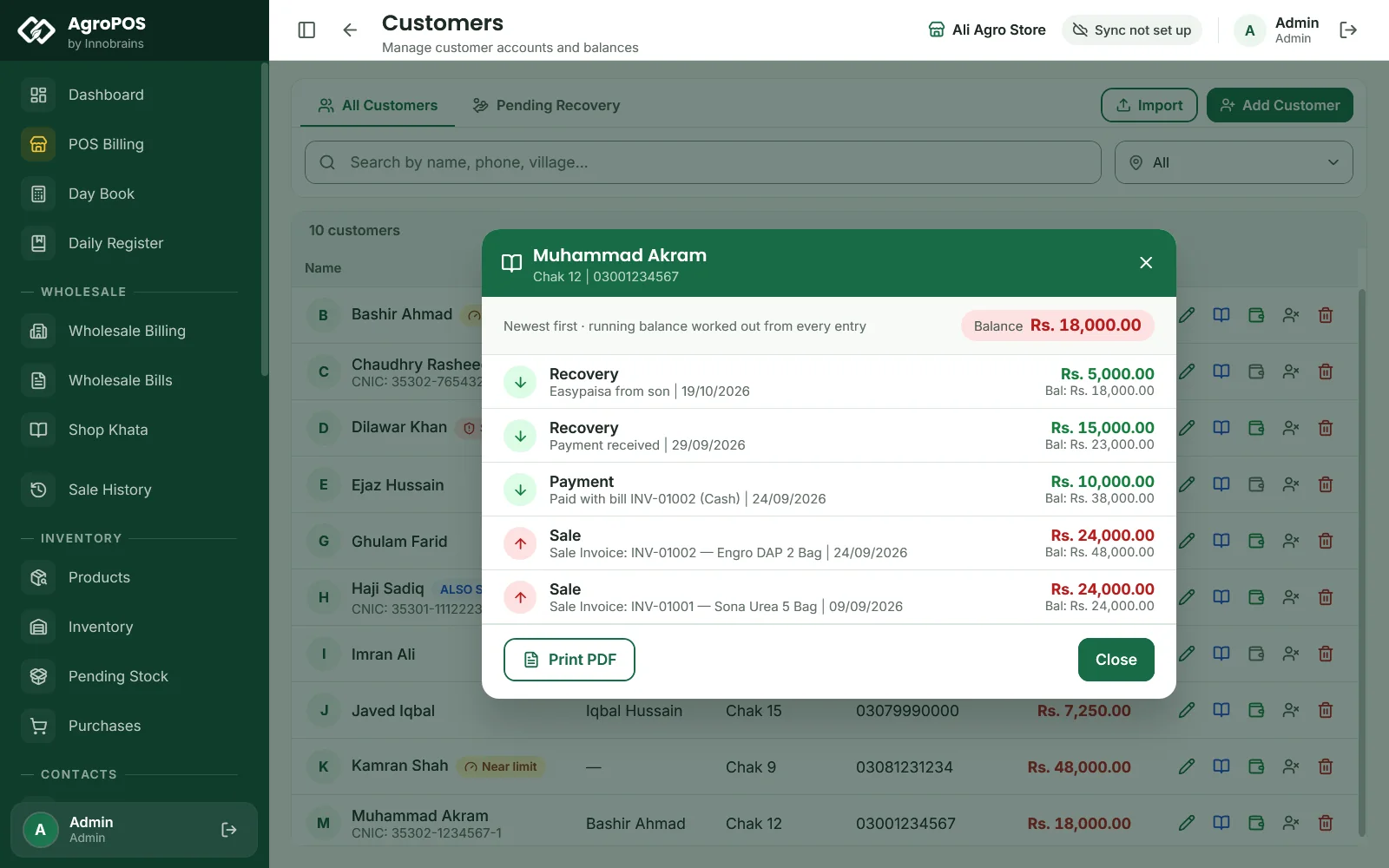
- In Customers, the Pending Recovery tab lists only those who owe, with the Total Pending. The balance shows red when they owe, adv in blue for an advance, and Clear in green. The book icon on a row opens a quick khata with Print PDF.
- In Ledger, the list shows customers with a pending balance, largest first; search to find anyone else. Open one for the full statement: Total Sales, Total Paid, Outstanding, the promised payment date, and every entry with Debit (Sale), Credit (Paid) and Balance. Pick From and To to see some dates only; the balance stays the whole khata's. Print prints the statement on A4 and Excel saves it.
How to collect a recovery
- Open Recovery. The cards show Total Pending, Parties Pending, Recovered Today and This Month.
- Pick the customer on the left. The right side shows Total Credit, Recovered, Pending, the payment date and every sale and payment.
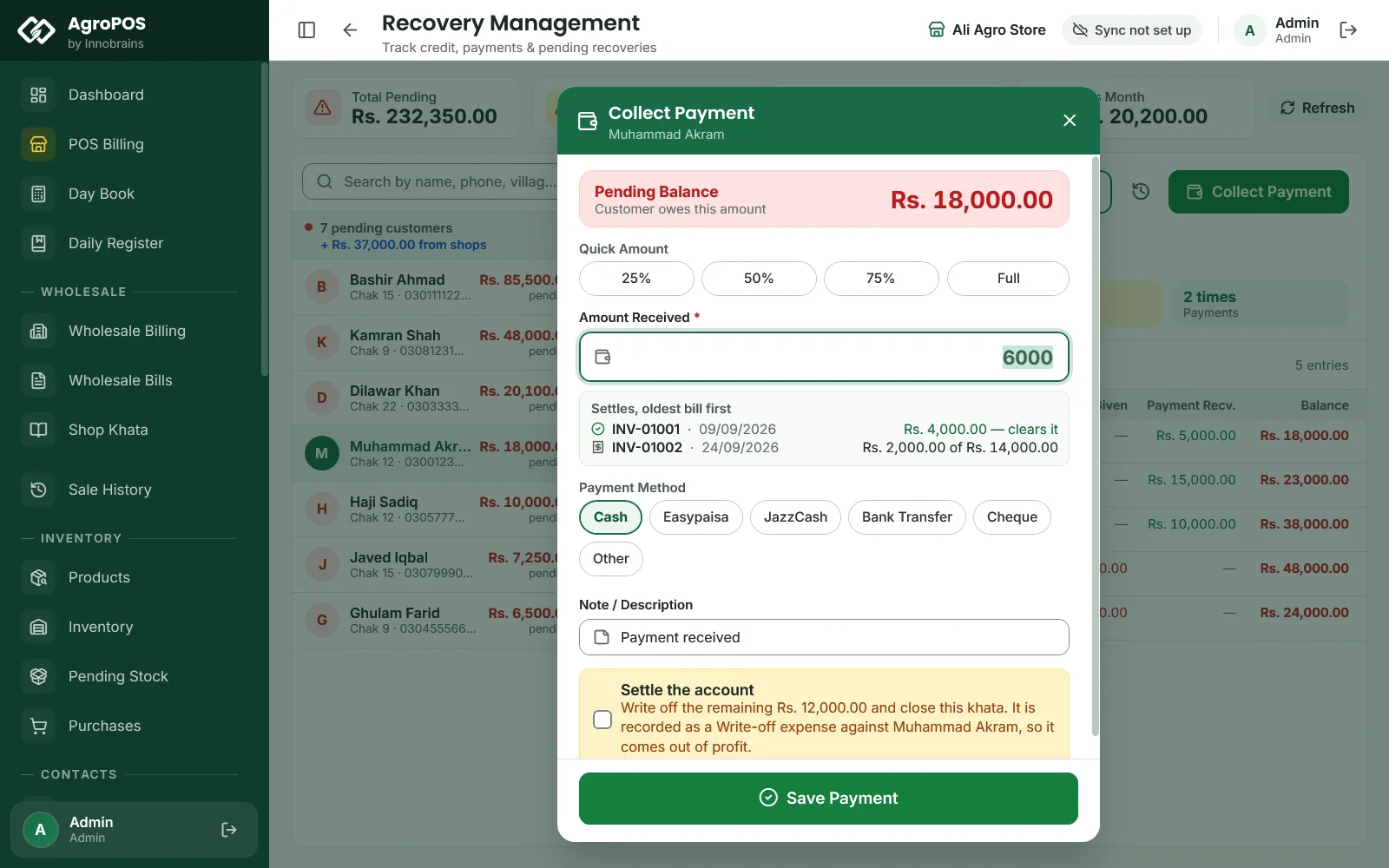
- Click Collect Payment (or press C).
- Type the Amount Received, or click 25%, 50%, 75% or Full. AgroPOS shows which bills it settles, oldest bill first.
- Choose the Payment Method. For Easypaisa, JazzCash or bank with posting to accounts on, the method's default account is shown and the money goes into it; click Change to pick another, or Choose when no default is set.
- Change the Note / Description if you like, and click Save Payment (Enter).
Swipe to see the whole screen · tap to close
The PAYMENT RECEIPT slip prints by itself: previous due, paid now, and what is still due or held as advance. Payment saved shows the slip, with Print slip for another copy. A payment above what is owed asks More than is owed: the extra is held as advance and comes off the next bill.
Quick cash payments can also be taken from the Customers list (the wallet icon, Collect payment) or under Payments. A payment by cheque, with the Cheque Module on, goes into the Cheque Register and moves the khata only when it clears: see Cheques.
Writing off the last few rupees
When a farmer pays Rs 7,000 of Rs 7,250 and the rest is to be forgiven, the Admin ticks Settle the account in Collect Payment. The rest is written off, the khata is closed, and the amount is recorded as a Write-off expense, so it comes out of profit. It is offered only when the amount typed is less than what is owed.
How to record a payment date the farmer promises
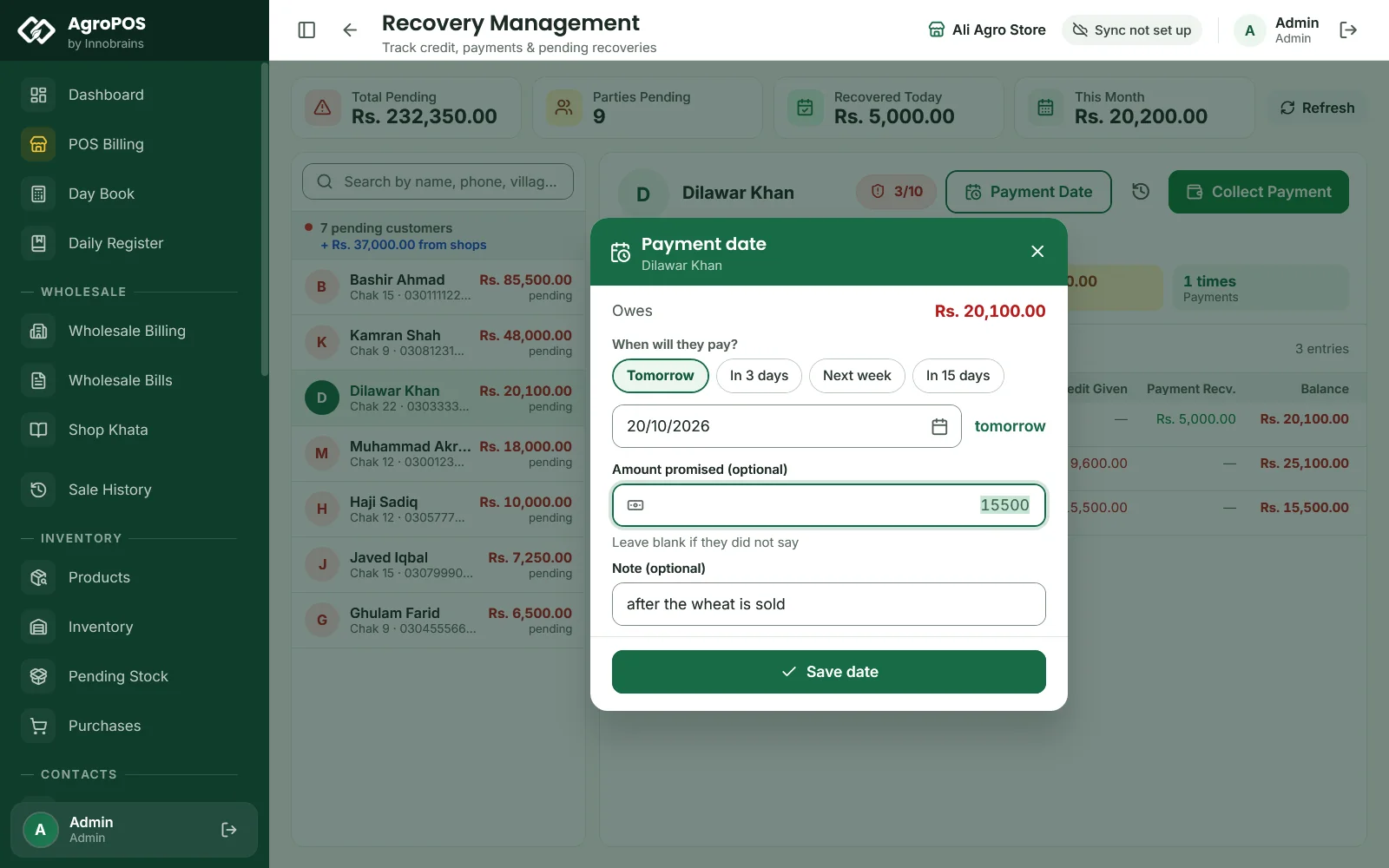
- In Recovery, with the customer chosen, click Payment Date (or press P).
- Under When will they pay? click Tomorrow, In 3 days, Next week or In 15 days, or pick a date up to a year ahead.
- Optional: Amount promised and a Note, such as "after cotton is sold".
- Click Save date.
Swipe to see the whole screen · tap to close
At the till, a credit or partial bill can carry a payment date too (Ctrl+E). A payment received on or before the date marks it Kept; a date that passes with nothing paid is marked Missed and costs a point of the score. A new date replaces the old one, and the dialog says how the old date will be recorded: kept if something was paid against it, missed if it has passed with nothing paid, otherwise simply replaced, which does not count as missed. The history button (H) lists every date with Kept, Missed, Replaced, Late or Open.
Recovery Dates: the day's call list
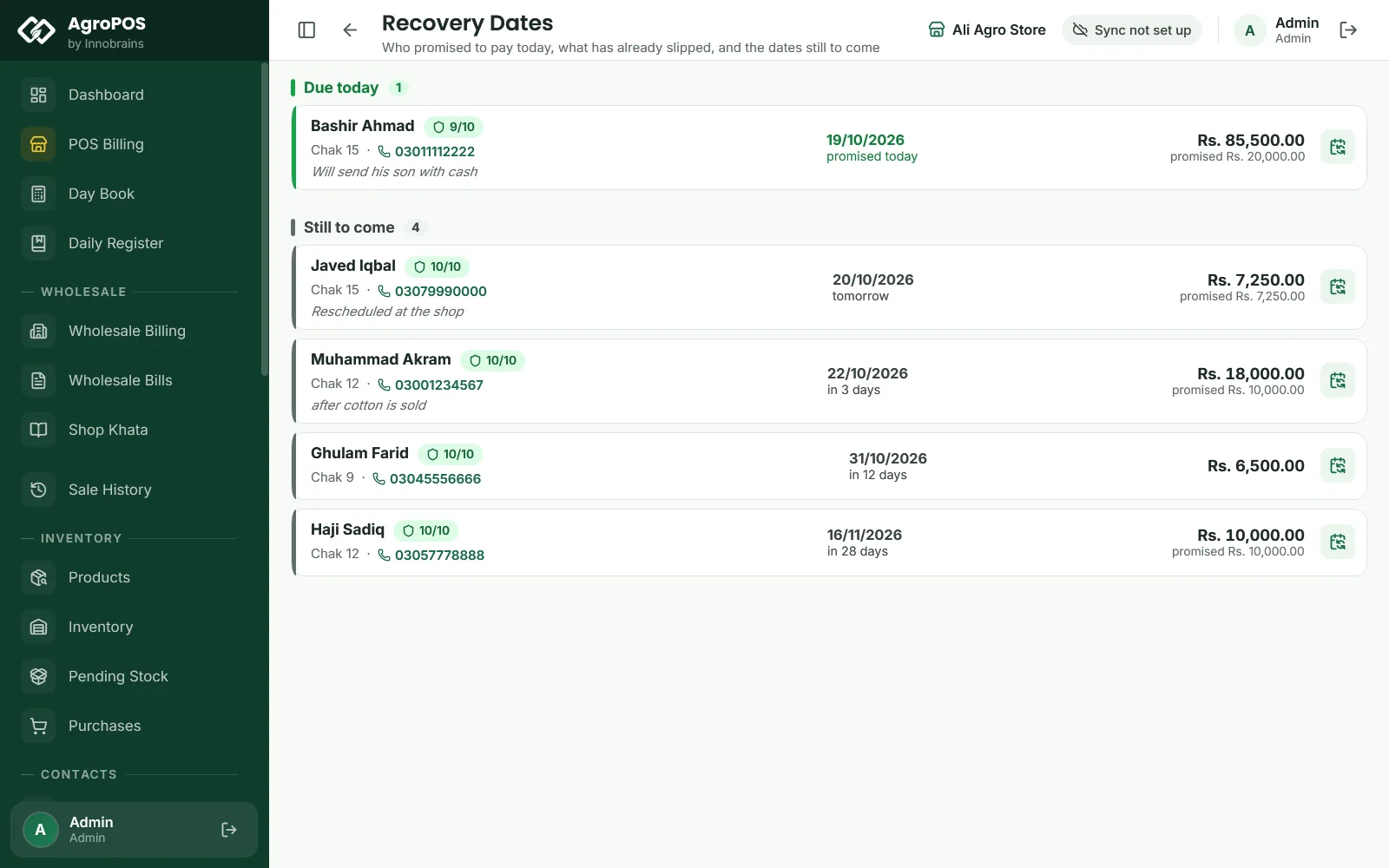
Recovery Dates lists the customers who promised to pay Due today, then the dates Still to come over the next 60 days. Each card shows the village, the phone, the note, the balance and the amount promised. Click the phone to call through a dialler on the PC, if there is one; otherwise AgroPOS shows the number. The calendar icon changes the date.
Swipe to see the whole screen · tap to close
Reminders
AgroPOS reminds you inside the software: the dashboard's Today's Recovery card counts the dates due today, Recovery Dates is the day's list, and the Ledger and Recovery show a promise in red when it is overdue. AgroPOS does not send SMS or WhatsApp messages to customers.
Rules and tips
- Put every payment through AgroPOS on the day it comes, so the khata, the drawer and the payment date all agree.
- Ask for a payment date on every big udhaar bill. It costs nothing and builds the credit score.
- A customer who owes money or holds an advance cannot be deactivated; settle the khata first. Deactivating hides a customer from the lists but keeps their bills and khata.
- With AgroPOS Cloud, the owner sees every khata and promised date on the web panel, even from a phone.
Common questions
How do I enter what a farmer owed before AgroPOS?
Type it in Opening Balance when you add him, with He owes me selected. If he had paid in advance, choose Paid in advance instead.
Can AgroPOS send an SMS or WhatsApp reminder to my customers?
No. Reminders are inside AgroPOS: the dashboard's Today's Recovery, the Recovery Dates list and the overdue marks. Call or message the customer yourself from the number on the card.
Why was the bill refused with a credit limit message?
The bill would take the customer past the credit limit set on him. Take a payment first, make the bill smaller, or raise the limit under Customers, Edit.
What does the credit score mean?
Every customer starts at 10. Each payment date he misses costs one point. Below 5 he is marked High risk, and the till warns you when you choose him. The Admin can reset it to 10.
Can my cashier write off a balance?
No. Settle the account in Collect Payment is only for the Admin, because the written-off amount comes out of profit.
Related guides
Last updated 21 October 2026. Still stuck? Contact us or message us on WhatsApp.