Once the tills are paired, a Multi-Counter shop runs like one big counter: every till bills on the same stock and khata, kept on the main counter. This guide covers the daily routine: starting up, who signs in where, billing on a till, each counter's cash drawer, managing tills from the main counter, and what happens when a till loses the main counter. Setting up and pairing tills is in Multi-Counter setup.

Swipe to see the whole screen · tap to close
Starting the day
- Switch on the main counter first and open AgroPOS on it. The main counter serves the tills from the AgroPOS program itself, so it stays open all day.
- Then open AgroPOS on each till. It shows "Connecting to the main counter…" and then the sign-in screen.
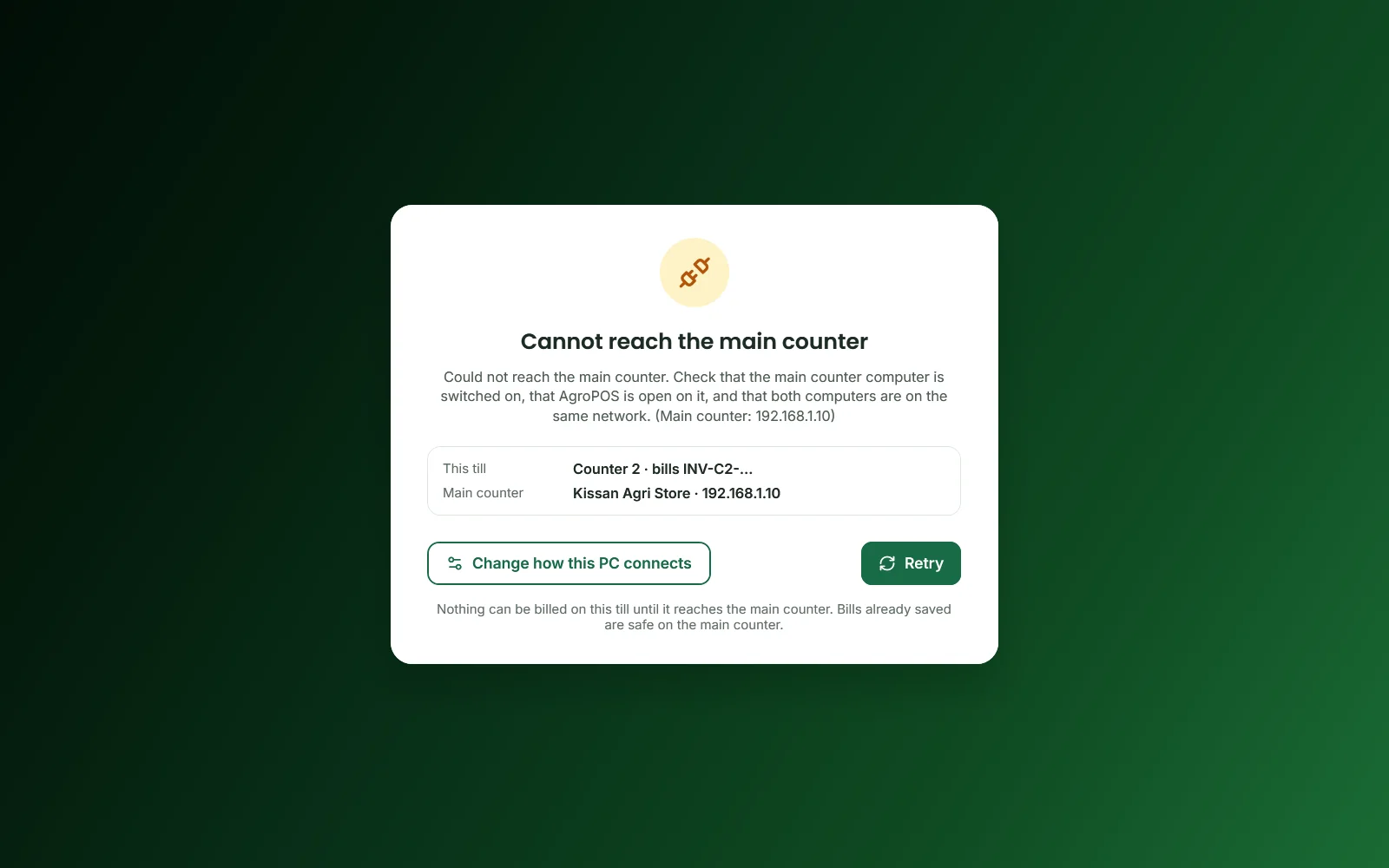
A till that cannot find the main counter shows Cannot reach the main counter: "Nothing can be billed on this till until it reaches the main counter. Bills already saved are safe on the main counter." Check that the main counter is on with AgroPOS open, then click Retry.
Swipe to see the whole screen · tap to close
Who signs in where
| Who | Main counter | Tills |
|---|---|---|
| Admin (the owner) | Yes | Only with Admin can sign in on every counter on |
| Store Manager and Cashier | No, once a till is paired | Yes |
Anyone refused sees "Ye account is counter par login nahi ho sakta." with the rule. The owner switches Admin can sign in on every counter on or off under Settings → Counters → Cash drawers and sign-in on the main counter.
Billing on a till
A till bills exactly like the single counter: see Making your first bill. Things that are different:
- Bill numbers. Each till has its own series, such as
INV-C1-00001on Counter 1, so no two counters print the same number. Wholesale bills stay on the shop's main series. - Shared data. Every sale is checked and saved on the main counter, against the stock and khata at that moment. Lists such as Sale History, Products, Inventory, Customers, the Dashboard and the Day Book reload by themselves when another counter saves; a bill or form you are typing is never touched.
- Held bills are shared: a bill held on one counter can be resumed on another.
- The printer. Each till prints on its own receipt printer when one is set under Settings → Counters → This PC's receipt printer, otherwise on the shop's printer.
Each counter's cash drawer
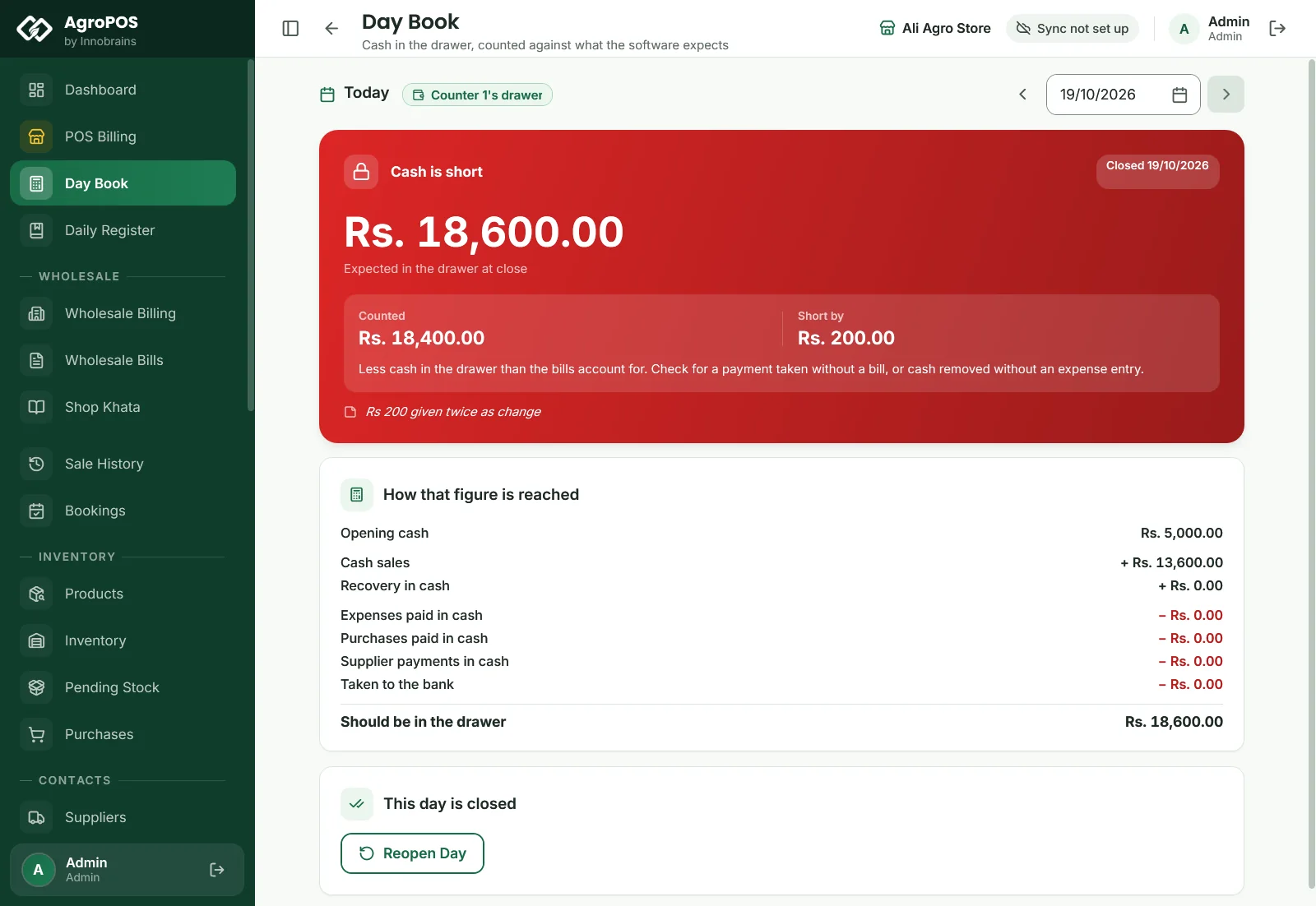
With A separate drawer for each counter, each till opens, counts and closes its own drawer in its own Day Book, which counts only the money that counter took in or paid out. Closing a drawer needs the Store Manager (or the Admin), because the Cashier role has no Day Book.
Swipe to see the whole screen · tap to close
On a shop set up as Multi-Counter in V2, the main counter's Day Book lists Drawers on this day, each counter's opening, what it should hold, its count and its state, and the whole shop's line. With One drawer for the shop, the shop is counted and closed once. See Day Book: opening, counting and closing the day.
Managing tills from the main counter
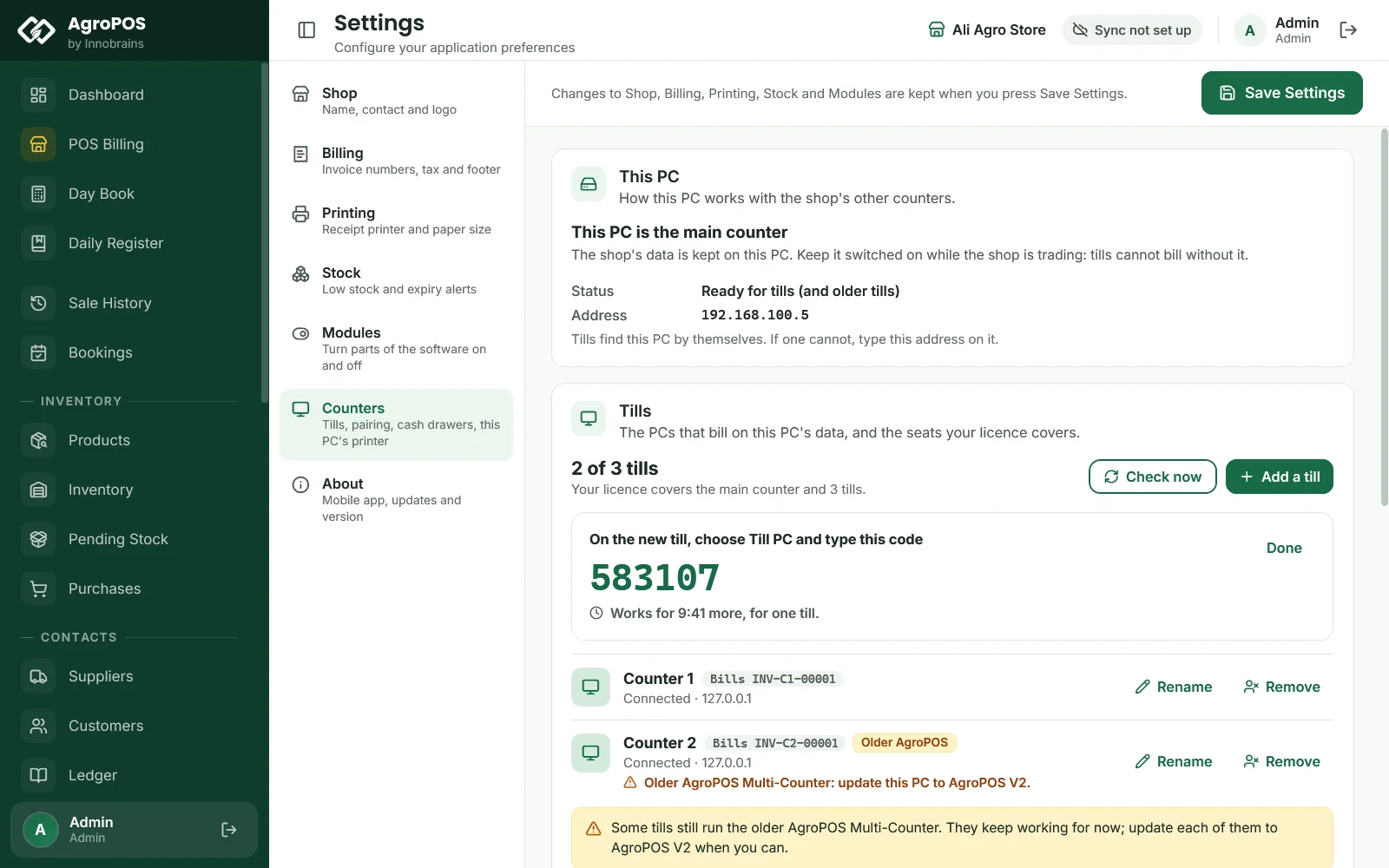
On the main counter, Settings → Counters shows Tills, such as "2 of 2 tills", and each till with its state.
- Add a till makes a six-digit pairing code for the next till, valid for 10 minutes and one till.
- Rename changes a till's Name and Bill tag (1 to 6 letters or digits, such as
C2). A new tag starts its own bill numbers; bills already made keep theirs. - Remove asks Remove this till?: the till "stops working at once and its seat is free for another PC. Its bills stay in the shop's data." To use it again, pair it with a new code.
- Check now asks the licence server how many tills your licence covers, for example after you buy more counters.
When a till loses the main counter
If the link drops while you work, the till says "Lost the main counter. Trying again every few seconds; nothing can be saved until it is back." and then "Back on the main counter."
If it drops while a bill is being saved:
- "The main counter stopped answering while saving. It may have been saved: check Sale History on this till before entering it again."
- "The connection to the main counter dropped before this was saved. Nothing was saved: please enter it again."
Pair this till again means the till was removed or the main counter was replaced; Update this PC or Update the main counter first means the versions differ. See Multi-Counter setup for fixing a till that cannot connect.
Rules and tips
- Keep the main counter, the router and any switch on a UPS: when one of them goes dark, the tills cannot bill.
- Do not close AgroPOS on the main counter while tills are billing.
- Backups, restores, the licence and Cloud Sync are done on the main counter only.
- Before closing, make sure each till has counted its drawer when the shop keeps separate drawers.
Common questions
Can a till bill while the main counter is off?
No. Tills keep no copy of the data, so nothing can be billed until the main counter is back. Bills already saved are safe on it.
Why can my cashier not sign in on the main counter?
Once a till is paired, the main counter is for the Admin, and cashiers and store managers sign in on the tills. Use a till for billing.
How do I add a till after buying more counters?
On the main counter, open Settings, Counters and click Check now while online, then Add a till for a pairing code, and pair the new PC with it.
Can I see which counter made a bill?
Yes. A till's bills carry its tag in the number, such as INV-C2-00015 from Counter 2.
Related guides
Last updated 19 October 2026. Still stuck? Contact us or message us on WhatsApp.