Farmers bring goods back: a bag of urea not needed after the rain, a spray the dealer next door sold cheaper, seed bought for the wrong field. In AgroPOS a return is always taken against the bill it was sold on, so the price, the batch and the khata stay right. This guide covers taking a return, choosing between cash and khata, damaged goods, what a return changes, and cancelling a return made by mistake.
Where returns are taken
There is no separate returns screen: a return starts from the bill.
- Sale History: the return icon on the bill's row, Customer Return / Refund. It works for every bill, to farmers and to shops.
- Wholesale Bills: the icon Shop return / refund on a shop bill's row.
Taking a return needs "Make a sale return", which the Cashier, the Store Manager and the Admin have as standard; without it the return icons are not shown. There is no time limit, and one bill can have several returns until everything on it has come back.
How to take a return
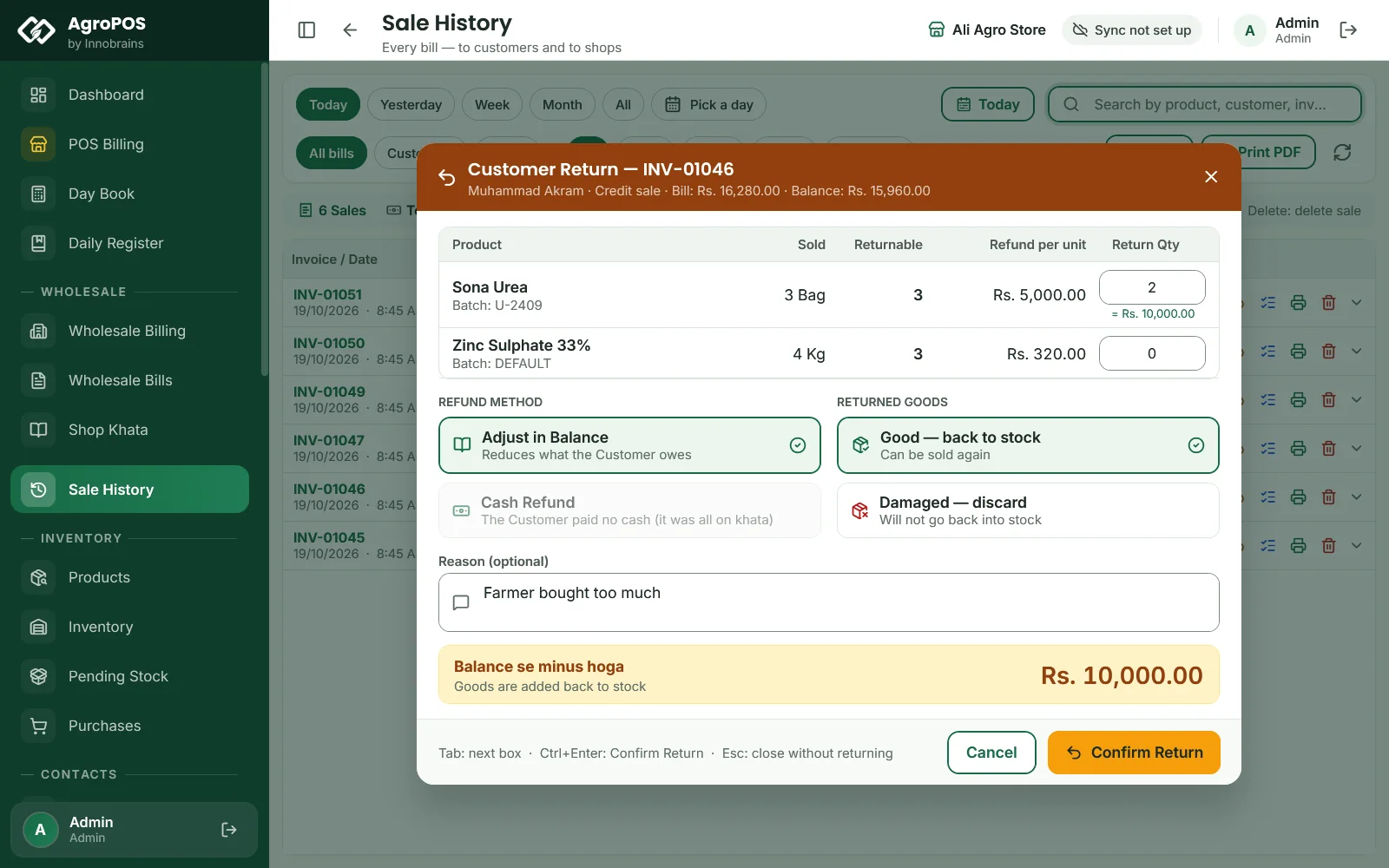
A farmer, Muhammad Akram, brings back two of the three bags of Sona Urea he took on udhaar this morning.
- Open Sale History and find his bill: search his name or the invoice number.
- Click Customer Return / Refund on its row. Customer Return opens with the invoice number, the customer, the bill amount and its balance.
- Each line shows the Product with its batch, how many were Sold, how many are still Returnable, and the Refund per unit. Type the quantity in Return Qty, here
2. A number above what is returnable is cut down to the maximum. - Choose the REFUND METHOD: Adjust in Balance or Cash Refund (below).
- Choose RETURNED GOODS: Good — back to stock or Damaged — discard.
- Optional: type a Reason, such as "Farmer bought too much".
- Check the summary and the total on the right, and click Confirm Return (Ctrl+Enter).

Swipe to see the whole screen · tap to close
AgroPOS says "Return processed — stock and refund adjusted". Each return gets its own number, starting SR- for a bill to a customer and WR- for a bill to a shop.
Cash refund or khata
| Choice | What it does | When it is offered |
|---|---|---|
| Adjust in Balance | Reduces what the customer (or the shop) owes. If they owe less than the return, the rest stays as advance on their khata. On a wholesale bill made out to a supplier, the supplier's account moves instead. | For a named customer or shop; not for a walk-in |
| Cash Refund | You hand cash back ("Cash wapis"). | When something was paid on the bill; up to what was paid |
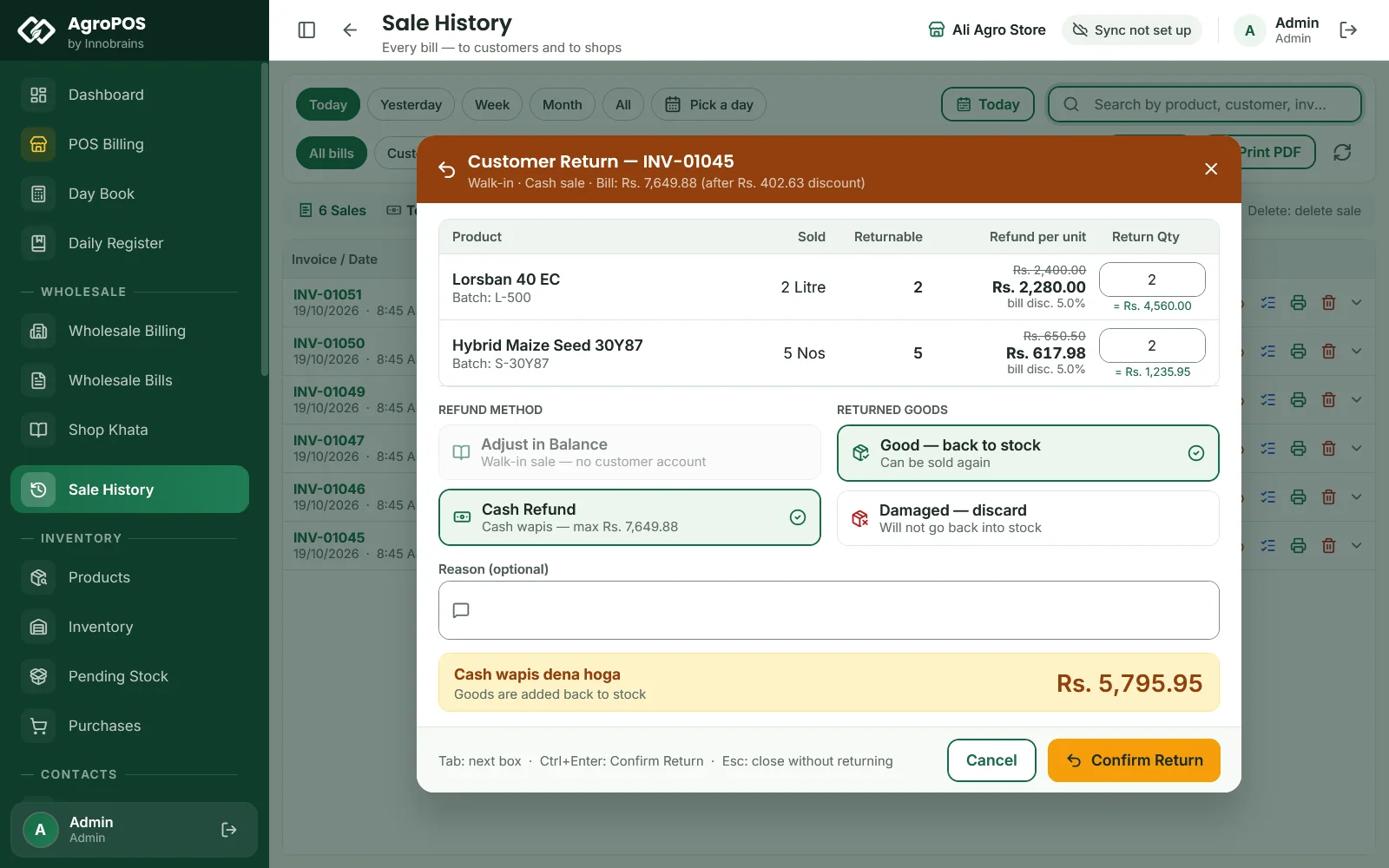
A walk-in customer can only be refunded in cash. A bill that was all on khata can only be adjusted in balance. If the cash asked for is more than what was paid, AgroPOS says so and asks you to put the rest through Adjust in Balance. A refund is always recorded as cash, even if the bill was paid by Easypaisa or bank: send that money back yourself the same way.
Swipe to see the whole screen · tap to close
The price of a returned item
The refund per unit is what the customer really paid for it: the price after the line discount, with the bill's discount and tax shared out. When a discount or tax changed the price, the dialog shows the bill price struck through, with a note such as "bill disc. 5.0%".
What a return changes
- Stock: good goods go back into the same batch they were sold from, recorded as a Sale Return in the stock history. Damaged goods do not go back into stock.
- The bill: its total stays as it was billed. Its balance (on khata) or its paid amount (on a cash refund) goes down, so Sale History shows the new balance.
- The khata: an entry such as "Return SR-… against invoice INV-…" on the day of the return.
- Cash: a cash refund is recorded as an expense in the category Sale Return Refund, paid in cash, so the Day Book counts it as cash out.
- Profit: Reports → Profit & Loss shows returns as Less: returns under the sales, and leaves the refund expense out so it is not counted twice.
A return is not a new bill and prints no slip of its own. For an exchange, take the return, then make a new bill for the new goods.
How to see or cancel a return
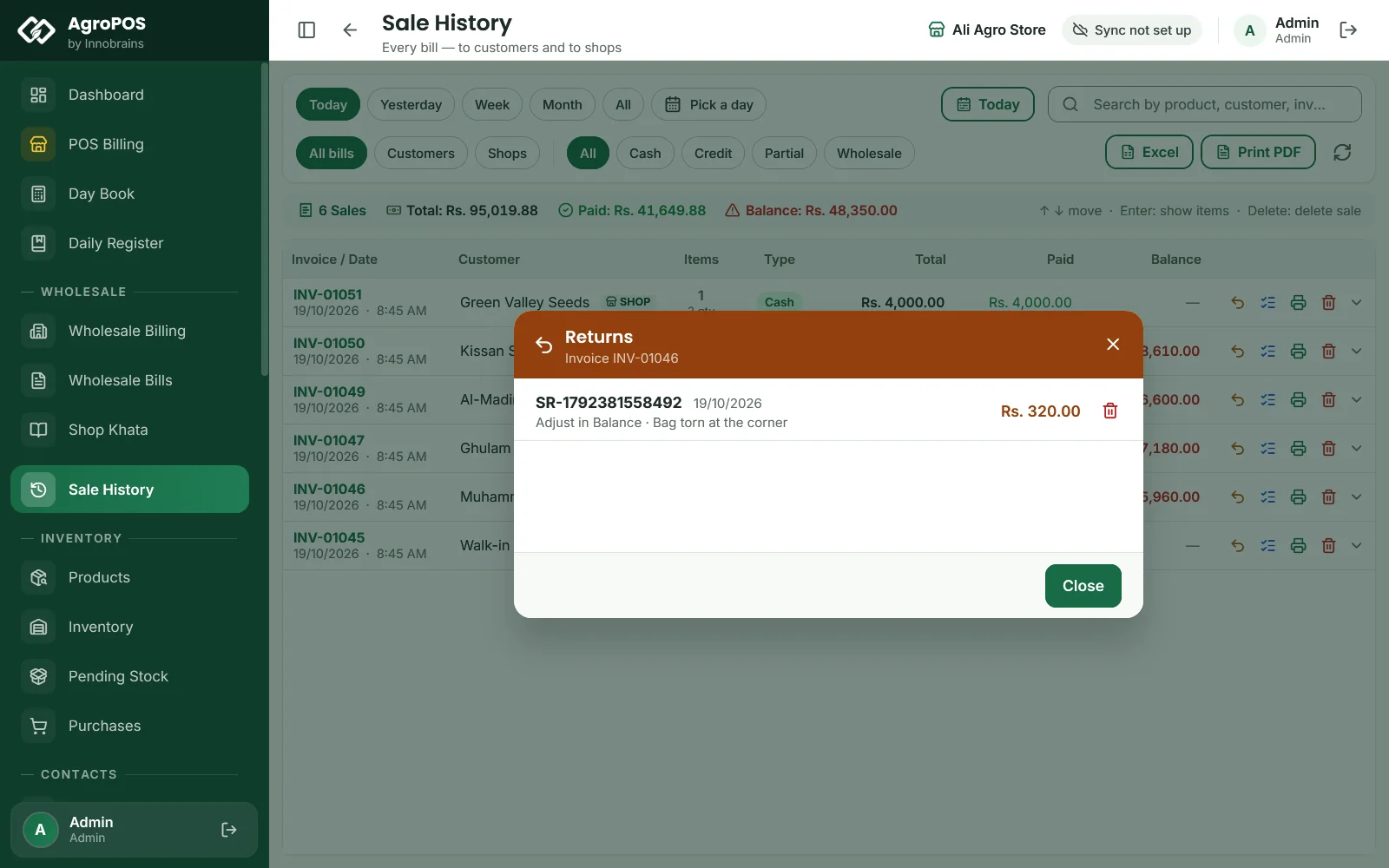
The Store Manager and the Admin see a second icon on each row of Sale History and Wholesale Bills: View / cancel returns. It lists every return on that bill with its number, date, value, method, and whether the goods were damaged.
To cancel a return made by mistake, click Cancel this return on it and confirm with Cancel Return. The stock comes back out of the batch, and the refund or the khata credit is reversed. A return cannot be cancelled if the goods it put back have already been sold again.
Swipe to see the whole screen · tap to close
Rules and tips
- Always take a return on the original bill, not as a negative bill or a stock adjustment, so the khata and the batch stay right.
- Check the goods before choosing Good — back to stock: a torn bag or an opened bottle should go as Damaged — discard.
- A bill with a return on it cannot be cancelled. Cancel the return first if you really need to cancel the whole bill.
- On AgroPOS Cloud, the web panel's Returns page lists every return of both books, read-only.
Common questions
Can I return goods from a bill of last month?
Yes. There is no time limit. Find the bill in Sale History with the date chips or the search, and take the return on it.
The farmer paid by Easypaisa. Can AgroPOS refund him on Easypaisa?
The refund is recorded as cash in AgroPOS. Send the money back on Easypaisa yourself, or choose Adjust in Balance to leave it on his khata as advance.
Why can I not choose Adjust in Balance?
The bill is a walk-in sale, so there is no khata to adjust. A walk-in return can only be refunded in cash.
Why does Sale History still show the full bill total after a return?
The total stays as billed. The return reduces the bill's balance or its paid amount, and the return itself is listed under View / cancel returns.
Can a cashier cancel a return?
No, not with the standard Cashier role. Seeing and cancelling returns is for the Store Manager and the Admin.
Related guides
Last updated 21 October 2026. Still stuck? Contact us or message us on WhatsApp.