Before the season, many farmers pay for their urea, DAP or seed in advance at today's rate and lift it over the following weeks, a trolley at a time. Bookings records the goods, the locked rate and the advance, and each lifting goes through POS Billing in booking mode and prints a gate pass. This guide covers switching bookings on, taking a booking, lifting at the till, and cancelling a booking.

Swipe to see the whole screen · tap to close
How to switch bookings on
- As the Admin, open Settings → Modules.
- Under Selling Modules, switch on Bookings — pay now, lift later.
- Click Save Settings.
Bookings then appears in the menu, after Sale History, for the Store Manager and the Admin ("Take an advance booking"). Lifting at the till needs only the right to make a bill, so a Cashier can lift.
If you switch bookings off while some are still open, AgroPOS asks Hide bookings?: nothing is deleted, but nobody can lift against them until you switch it on again.
How to take a booking
Bashir Ahmad pays Rs 1,50,000 today for 30 bags of Sona Urea and 10 bags of DAP, to lift after sowing.
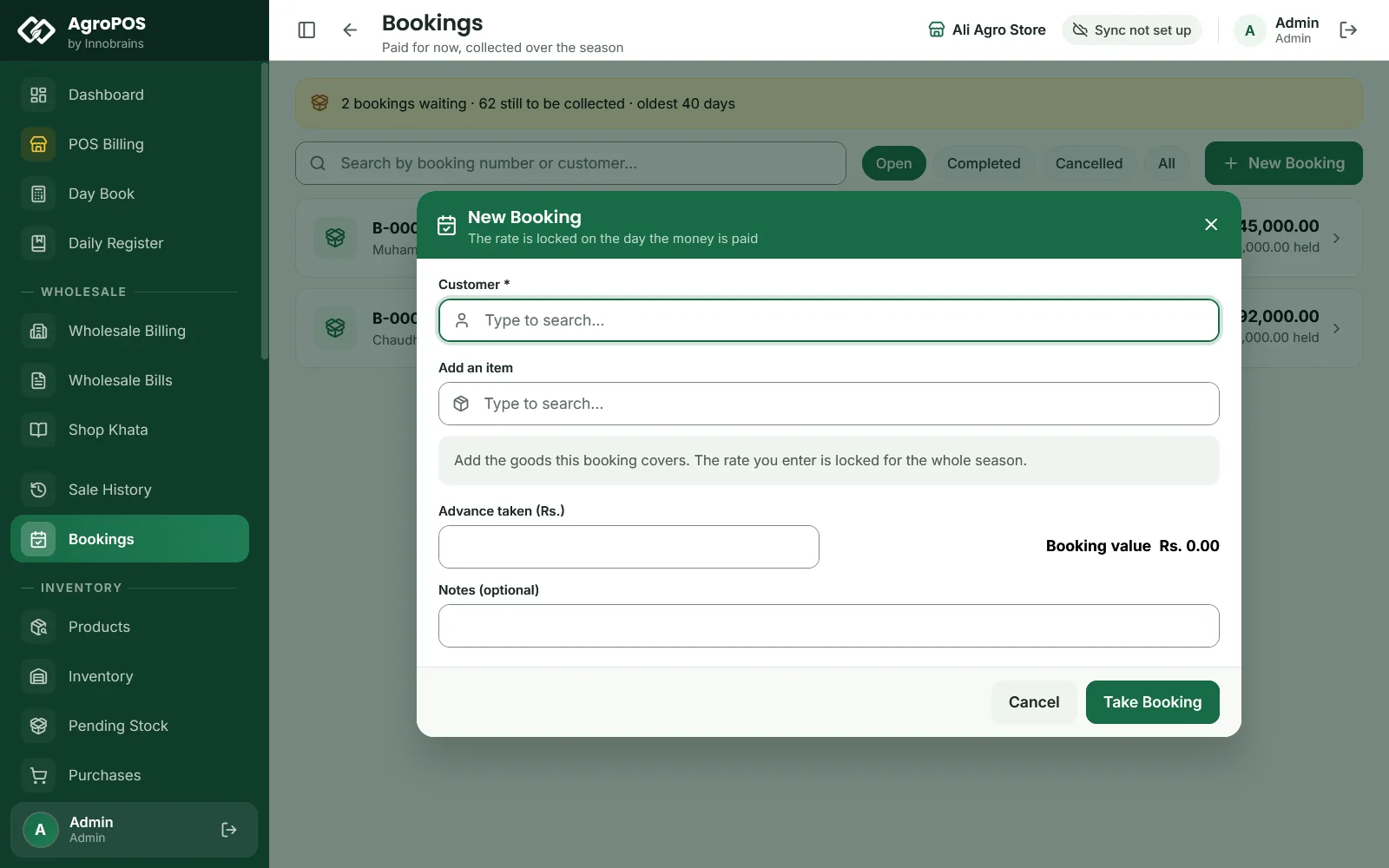
- Open Bookings and click New Booking.
- In Customer, type and choose the farmer. Bookings are for customers, not shops.
- Under Add an item, choose each product. For each line, type the Quantity. The Rate (locked) starts at the product's sale price; type the agreed rate if it is different.
- Type the money taken in Advance taken (Rs.). AgroPOS shows the Booking value, and either "Fully covered by the advance" or how much will go on the khata as the goods are collected.
- Choose How it was paid: Cash, Easypaisa, JazzCash, Bank Transfer or Other, and Cheque when the Cheque Module is on. For a cheque, type the Cheque number, Bank and Date on cheque: the cheque goes into the Cheque Register, and the booking holds the advance, and his khata moves, only when it clears.
- Optional: Notes, such as "Rabi season, lifts in two loads".
- Click Take Booking. AgroPOS says "The booking is taken."
Swipe to see the whole screen · tap to close
AgroPOS warns, but lets you go on, when the advance does not cover the booking, or when more is booked than is in the godown: the goods only have to be there when the farmer lifts them. Bookings are numbered B-00001, B-00002 and so on. No receipt prints when a booking is taken.
How a farmer lifts goods at the till
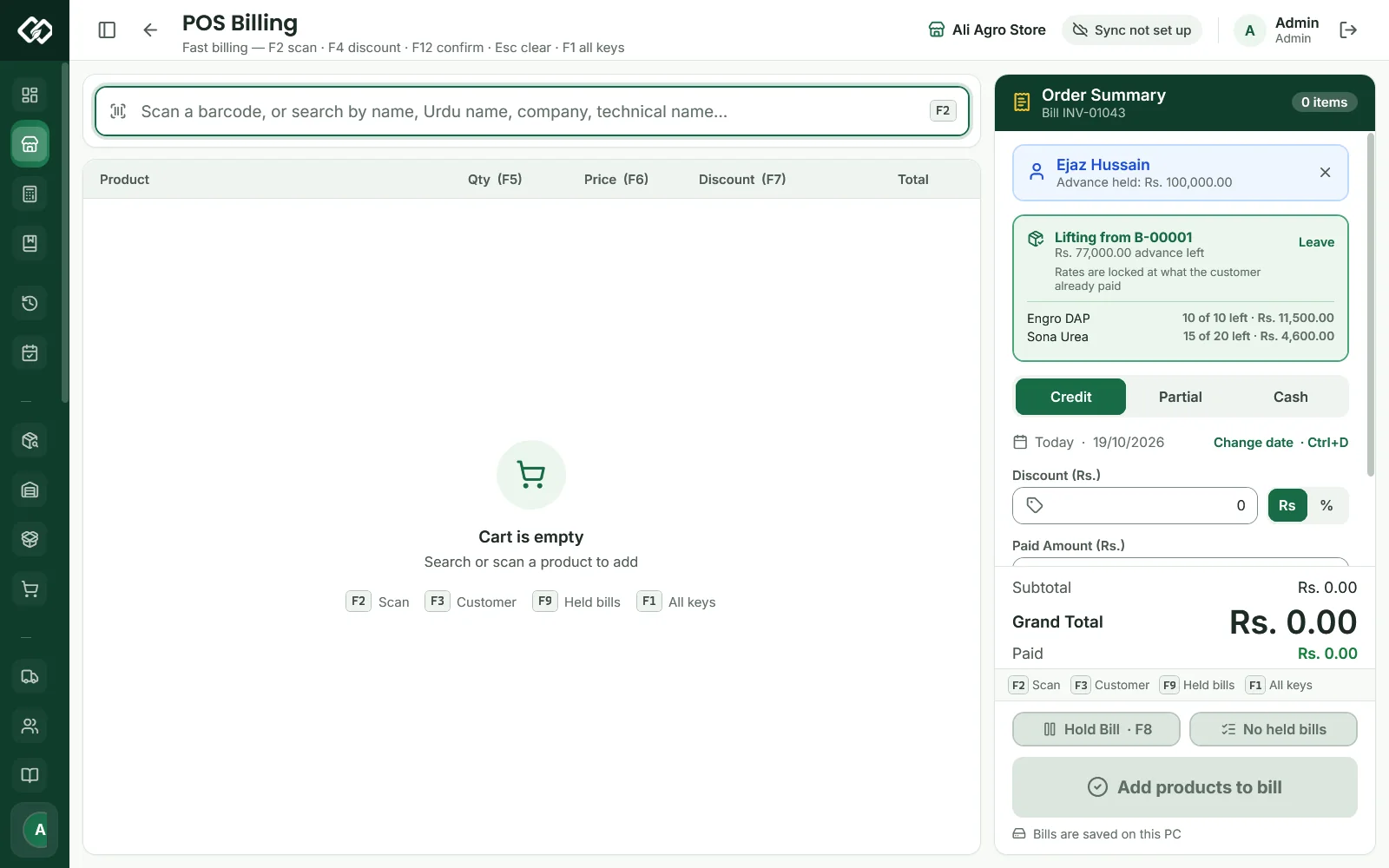
- Open POS Billing and choose the customer (F3). The till shows This customer has a booking and how much is still to collect.
- Click Lift from booking, or press Ctrl+B. If he has more than one open booking, pick it in Which booking?.
- The green bar shows Lifting from B-…, the advance left, and each item with how much is left of what was booked and its rate.
- Add the goods he is taking now, as on a normal bill.
- Check the prices. Each line of a booked product comes in at the booked rate, marked Booked Rate, for a Cashier too; loose (by the kg) lines keep their parchoon rate. A Cashier may type a booked product's booked rate with F6, but no other price: any other price needs a Store Manager or Admin.
- Choose how much comes from the advance: Cash (Ctrl+3) takes the whole bill from the advance, up to what is held; Partial takes the amount you type in Paid; Credit takes nothing from the advance. Whatever is not taken from the advance goes on his khata.
- Fill Received by (Ctrl+R) with who took the goods, such as "Son Kamran", and press F12.
Swipe to see the whole screen · tap to close
The gate pass
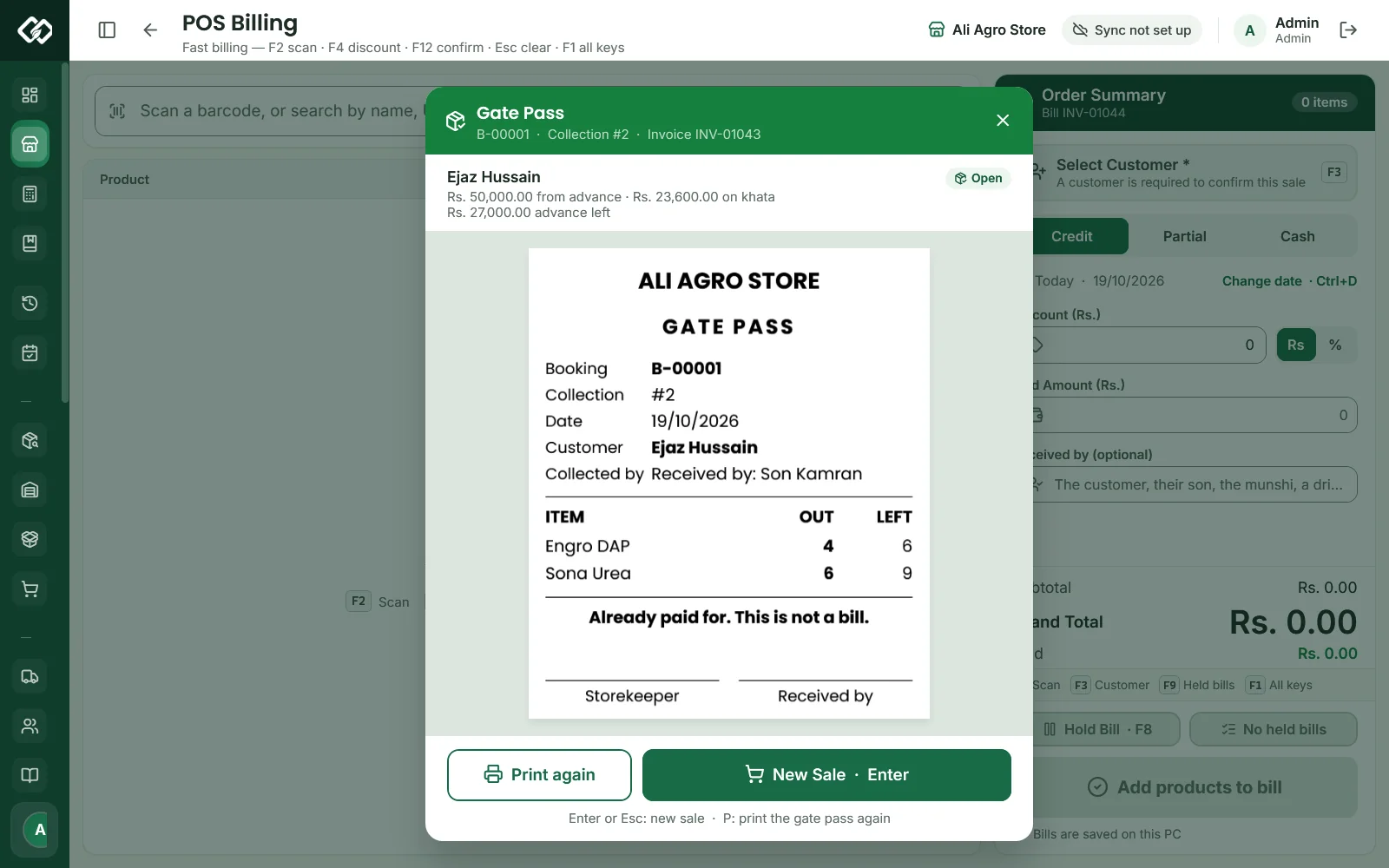
Instead of the receipt, the till shows the Gate Pass with the booking number, the collection number (#1, #2…), the invoice, how much came from the advance, and the advance left. The paper prints by itself once: the shop's name, GATE PASS, the booking, the collection, the date, the customer, who collected, a table of each item OUT and LEFT, the line "Already paid for. This is not a bill." and places for the storekeeper's and the receiver's signatures. It shows quantities only, no rupees. Print again (P) prints another copy; Enter starts a new sale.
Swipe to see the whole screen · tap to close
A farmer can lift in as many parts as he likes. When everything booked has been lifted, the booking becomes Completed.
How to follow and cancel bookings
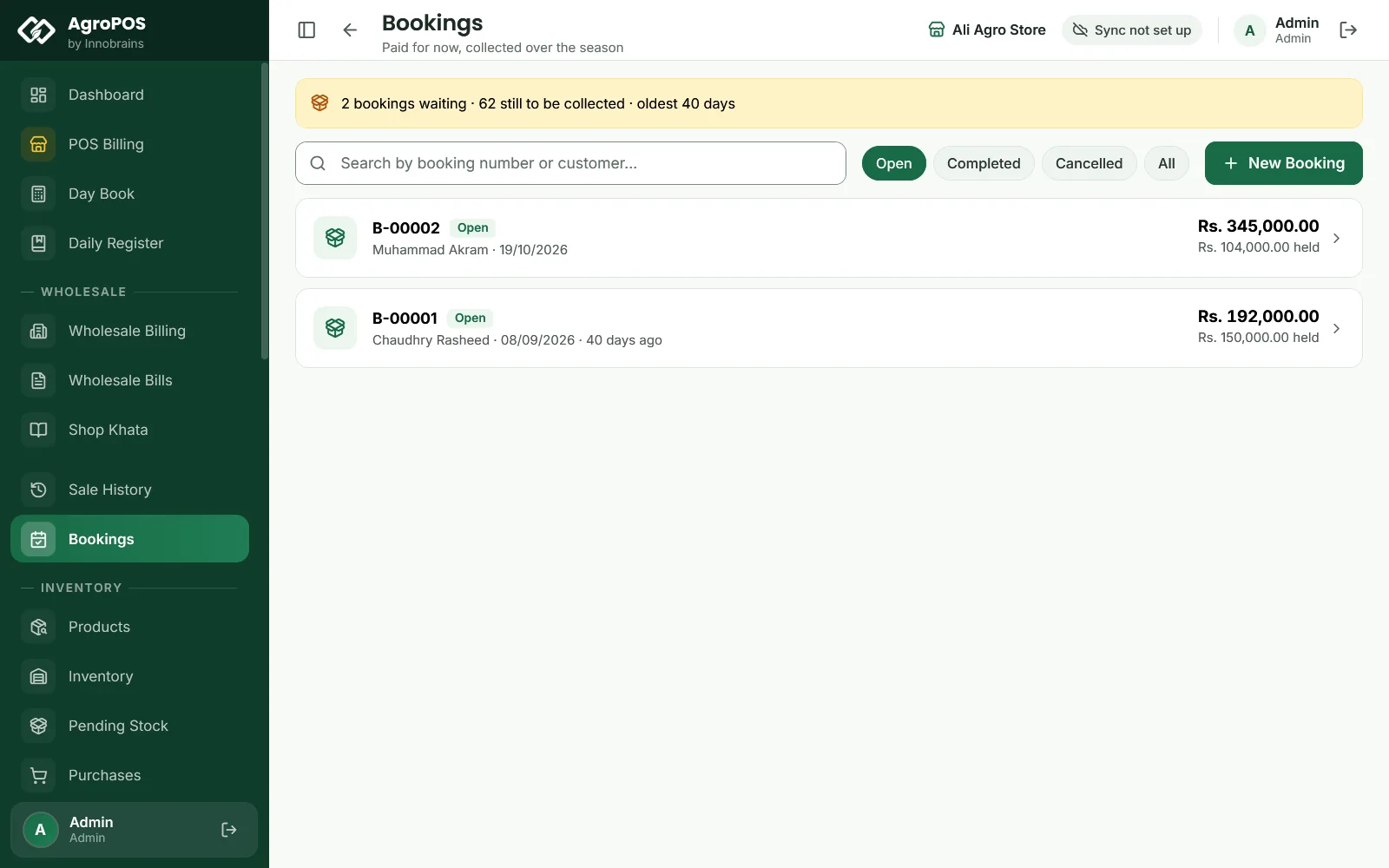
Bookings opens on Open bookings, with a banner of how many are waiting, how much is still to collect, and how old the oldest is. An open booking whose advance does not cover what is still to collect shows Short Rs. …. Completed, Cancelled and All show the others; search by booking number or customer. Click a booking to see the Booking value, the Advance held and what is Still to collect, each item booked, collected and left, and every collection with its date, how it was paid and who received the goods.
To cancel an open booking, click Cancel booking in its detail and confirm. The goods still booked are released. The advance still held stays on the customer's khata as advance credit, where it has been since the booking, to come off his next bill: nothing new is written to his khata, and AgroPOS does not pay out cash. Goods already lifted are not affected. A completed booking cannot be cancelled.
The dashboard shows Un-lifted Bookings: how many bookings are waiting and how old the oldest is, amber after 45 days.
Stock and money
- Stock is not set aside when a booking is taken. It leaves the shop at each lifting, from the batch with the earliest expiry, like any sale. Keep enough in the godown for what is booked.
- The advance is recorded on the day it is paid as a payment from the customer, "Advance for booking". A cash advance counts in that day's Day Book as cash recovery. It goes on his khata as credit once and is held for the booking: it settles none of his old udhaar bills. An advance by cheque is recorded on the day the cheque clears.
- A lifting is a normal bill with its own invoice number. The part taken from the advance is not counted again as cash in the Day Book or the Daily Register: that money was counted on the booking day. On his khata it shows as "Booking B-…: advance used for INV-…", so the advance is used up, not counted twice.
- A lifting's bill cancelled in Sale History gives its goods and the advance it used back to the booking.
Rules and tips
- Agree the rate and write it in the booking: the till puts it on the booked goods at each lifting.
- A booking cannot be changed after it is taken, and more advance cannot be added to it. For a change, cancel it and take a new one.
- A Cashier can lift at the booked rate; a different price or a discount still needs a Store Manager or the owner.
- On AgroPOS Cloud, the web panel's Bookings page shows every booking, read-only.
Common questions
Is the stock reserved for the farmer when he books?
No. AgroPOS warns if you book more than is in stock, but the goods leave only when he lifts them. Make sure the stock is there by then.
Can my cashier lift a booking?
Yes, at POS Billing with Ctrl+B. The booked goods come in at the booked rate, marked Booked Rate, and loose lines at their parchoon rate, so the cashier can complete the lifting. Any other price or a discount still needs a Store Manager or Admin.
The farmer wants his money back. How do I cancel?
Open the booking and click Cancel booking. The advance still held stays on his khata as advance credit; AgroPOS pays nothing out by itself. If you hand him the cash, record it under Payments, Payment Out, Customer, so his khata and the drawer both show it.
What does the gate pass show?
The booking and collection number, the date, the customer, who collected, and each item's quantity out and left; a loose line's quantity out is in kilos. It shows no prices: it is not a bill.
Related guides
Last updated 21 October 2026. Still stuck? Contact us or message us on WhatsApp.