A forgotten password should never close the shop. In AgroPOS the Admin resets any staff member's password in a minute, and if the owner forgets the Admin password, Innobrains support unlocks it over the phone with a code that changes every day. This guide covers both, the first sign-in password, and what to do when AgroPOS says too many wrong attempts.

Swipe to see the whole screen · tap to close
Signing in
The sign-in screen asks for the Username and Password. The username is filled in with the last person who signed in, or admin. Alt+V shows or hides the password, and "Caps Lock is on" warns you when it is. A wrong username or password says "Invalid username or password".
After five wrong tries for one username, AgroPOS says "Too many wrong attempts. Wait 30 seconds, then try again."
When a staff member forgets their password
Staff cannot reset their own passwords. The Admin does it:
- Sign in as the Admin and open Users.
- Click the key icon (Change Password) on the person's row.
- Type a New Password of at least 4 characters and click Change Password.
- Tell the person the new password.
The change is recorded in Change History as "Password — changed". See Users, roles and permissions.
The first sign-in password
A new AgroPOS signs in as admin with the password admin123. The first time, it asks you to Choose a new password: type it in New password and Type it again, at least 4 characters and not admin123, then Save and continue. This cannot be skipped.
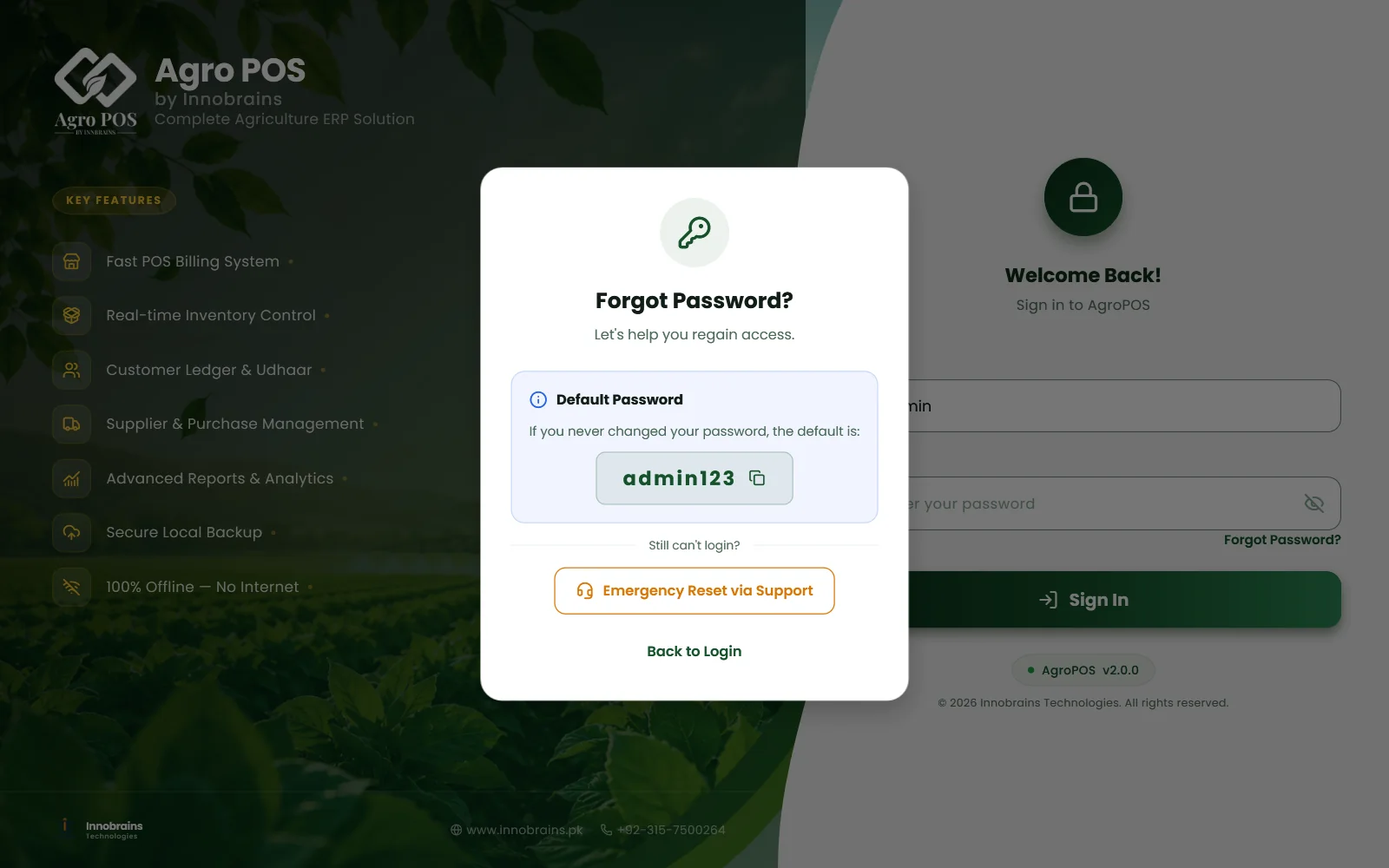
While the main Admin still uses admin123, Forgot Password? shows it: "If you never changed your password, the default is: admin123". Once you choose your own password, it is no longer shown.
When the owner forgets the Admin password
- On the sign-in screen, click Forgot Password? (Alt+F).
- Click Emergency Reset via Support.
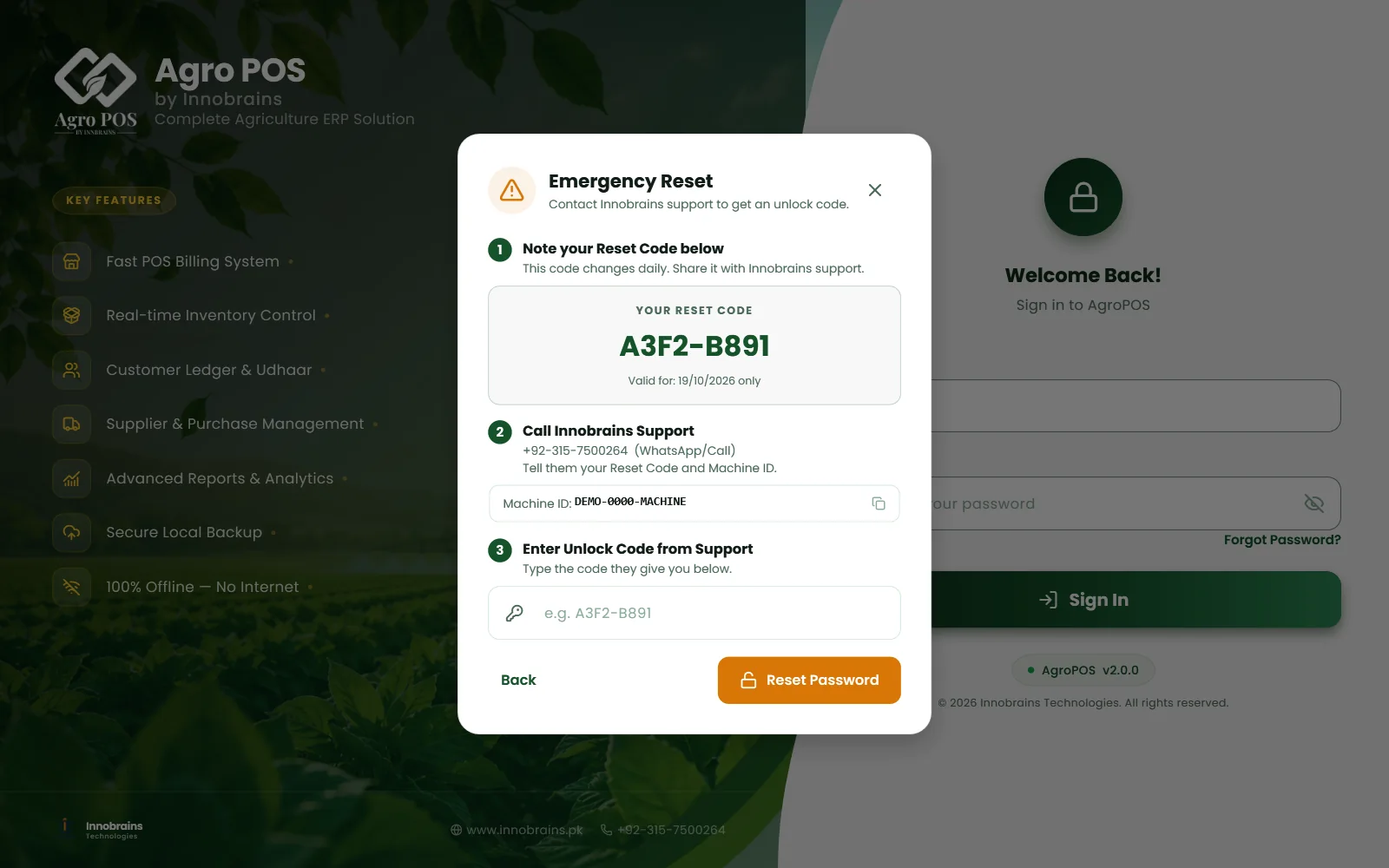
- Note YOUR RESET CODE. It is valid for today's date only.
- Call or WhatsApp Innobrains support on +92-315-7500264. Tell them your reset code and the Machine ID shown below it; click the machine ID to copy it.
- Type the Unlock Code they give you, such as
A3F2-B891, and click Reset Password. - Password Reset! says you can now sign in as
adminwithadmin123. Click Go to Login, sign in, and choose a new password straight away.
Swipe to see the whole screen · tap to close
The emergency reset changes only the main Admin's password, back to admin123, and switches that account on again if it had been switched off. No other user and none of the shop's data is touched. If no Admin exists at all, it creates one: admin / admin123.
A wrong code says "Invalid code. Contact Innobrains support." The reset code changes every day, so call support on the same day you note it.
If nobody can sign in
If every user has been switched off, AgroPOS says "Nobody can sign in: this shop's data has no active user account." Use Forgot Password? → Emergency Reset via Support as above: it switches the Admin on again.
The counter lock is not a sign-out
If Lock the counter when nobody is using it is on, an idle counter shows Counter locked. Type your own password and click Unlock: the bill on screen is still there. Someone else can click Sign out and use another account. See Users, roles and permissions.
Rules and tips
- Choose an Admin password the owner will remember, and do not share it with the counter staff.
- Give each person their own user and password, so a forgotten password is fixed by the Admin without involving support.
- Keep the support number near the counter: +92-315-7500264 on WhatsApp or by call.
- In a Multi-Counter shop, the Admin signs in on the main counter; reset staff passwords from there.
Common questions
What is the default AgroPOS password?
The user name is admin and the password is admin123. AgroPOS makes you choose your own password the first time you sign in with it.
Does the emergency reset delete my data?
No. It only sets the main Admin's password back to admin123. Bills, khata, stock and other users are not touched.
Why does the reset code not work tomorrow?
The reset code is valid for one day only, by the Pakistan date. Note a new code and call support again.
Can a cashier change her own password?
No. The Admin changes it under Users with the key icon on her row.
Related guides
Last updated 19 October 2026. Still stuck? Contact us or message us on WhatsApp.