
Billing till
Search by name or scan with any USB barcode scanner. Pick a specific batch and pack size, apply per-item discount, take cash or credit, and print immediately.
AgroPOS by Innobrains Technologies, Jhang, is billing and inventory software for pesticide, khaad (fertilizer) and seed dealers across Punjab and Pakistan — batch-wise stock with expiry dates, udhaar and recovery, and the Agriculture Department inspection registers. It works without internet, because the shop does too.
Built for single-counter shops and for large dealerships alike — from a village pesticide shop to a high-volume khaad dealer moving stock by the tonne, and businesses selling wholesale to other shops at a trade rate alongside retail. Measured on a dataset of 100,000 invoices and 500,000 sale lines, a product search answers in 3 ms and a bill saves in 24 ms.
Version 1.1.0 · Windows 10 / 11 (64-bit) · One licence per counter
AgroPOS is Windows point-of-sale and inventory software for agriculture-input dealers in Pakistan — the shops that sell pesticides (dawai), fertiliser (khaad) and seed (beej) to farmers. It runs on the shop's own PC and works with no internet connection. It is built by Innobrains Technologies in Jhang, Punjab, and sold as a one-time licence of Rs. 30,000 for one computer — not a monthly subscription.
It handles batch-wise stock with expiry dates, the farmer udhaar khata, supplier accounts, profit and loss, wallets and bank accounts and the Agriculture Department inspection registers. Not to be confused with AgroPós, the Brazilian postgraduate-education brand, or AgriPOS, a Bangladeshi Android app — AgroPOS by Innobrains is Pakistani Windows software for agri-input retail.
A pesticide or fertilizer shop does not fail on sales. It fails on the things around the sale: which batch expires first, who still owes money from last season, and whether the register is ready when an inspector walks in. AgroPOS is built around those three.
Every batch carries its own expiry date, pack size and purchase rate. Sales pull from the earliest-expiring batch first, so old stock leaves before it turns into a loss. More on batch and expiry tracking.
Set a credit limit per customer. The till warns before the limit is crossed, and Recovery Management keeps the pending list in front of you instead of in a diary.
Stock register, batch-wise register, expiry report, sales and purchase registers — formatted for Agriculture Department inspection, with your dealer licence number on the header.
| Runs on | Windows 10 / 11, 64-bit |
|---|---|
| Internet | Only for activation, cloud backup and updates. Billing works fully offline. |
| Data stays | On your own PC (SQLite), with optional encrypted-at-rest cloud copies |
| Built for | Pesticide, herbicide, fungicide, fertilizer, seed and PGR dealers |
| Users | Admin, Cashier, Store Manager |
| Currency | PKR, with configurable tax percentage |
The software runs on your machine and keeps working if the internet is down. Cloud is used only to keep a copy of your data safe and to deliver updates.
Start with POS software for pesticide and fertilizer dealers, or go straight to the page for pesticide dealers, khaad and fertilizer shops, or the Agriculture Department registers an inspector asks for.
Search by name or scan with any USB barcode scanner. Pick a specific batch and pack size, apply per-item discount, take cash or credit, and print immediately.
Batch number, expiry, pack size, purchase rate and supplier on every lot. Stock moves out earliest-expiry-first, and one sale can draw from several batches cleanly.
Opening stock typed in when a product was created is recorded, but the till sells from batches and an opening figure creates none — so it reads as in stock and refuses to bill. Pending Stock lists exactly those products and walks you through the purchase that makes them sellable, with your supplier and your rate.
Dashboard counters for batches expiring within your chosen window and products below your reorder threshold. Both limits are yours to set.
Every sale, payment and return as a running balance — date, description, debit, credit, balance. Print or share any customer's ledger as a PDF.
A customer owes 51,000 and settles at 50,000? Take the payment and tick Settle the account. The khata closes at zero and the forgiven 1,000 is booked as a Write-off expense against that customer — so it comes out of profit instead of quietly inflating it. Admin only.
A shop you buy from as well as sell to now has a Pay button beside Receive, so money going out lands on the same khata as money coming in. Payments settle the oldest bills first.
Record the date a customer says they will pay. The list shows who promised today and which dates have already passed — green when paid, red when missed. Every missed date costs a point off their credit score out of 10, and the till warns before selling on credit to anyone below 5. Part payment on the day keeps the promise.
Every evening, how much cash should be in the drawer? AgroPOS adds your opening float, the cash from sales and recovery, and takes off cash expenses, purchases, supplier payments and anything banked. Count the notes, enter the total, and it tells you whether it matches and by how much it is short or over. Udhaar stays on the khata, not in the count.
Sales and recovery record how the money actually arrived. Only cash goes into the drawer, so a payment by wallet or bank is counted as income but never as notes in the till — which is what makes the evening count worth trusting. Asked only when money is really changing hands.
All customers with pending balances in one list, with their full credit history. Collect a payment and it settles against the oldest invoices automatically.
Raise a purchase, then confirm delivery — stock lands only when goods actually arrive. Supplier payables and advances tracked on the same ledger model.
Return goods to the exact batch they left from. Refund as cash or against the customer's balance — and every return can be reversed if entered wrongly.
Seven official registers on one screen with a date range: stock, batch-wise stock, expiry, sales, purchase, company-wise stock and daily sales.
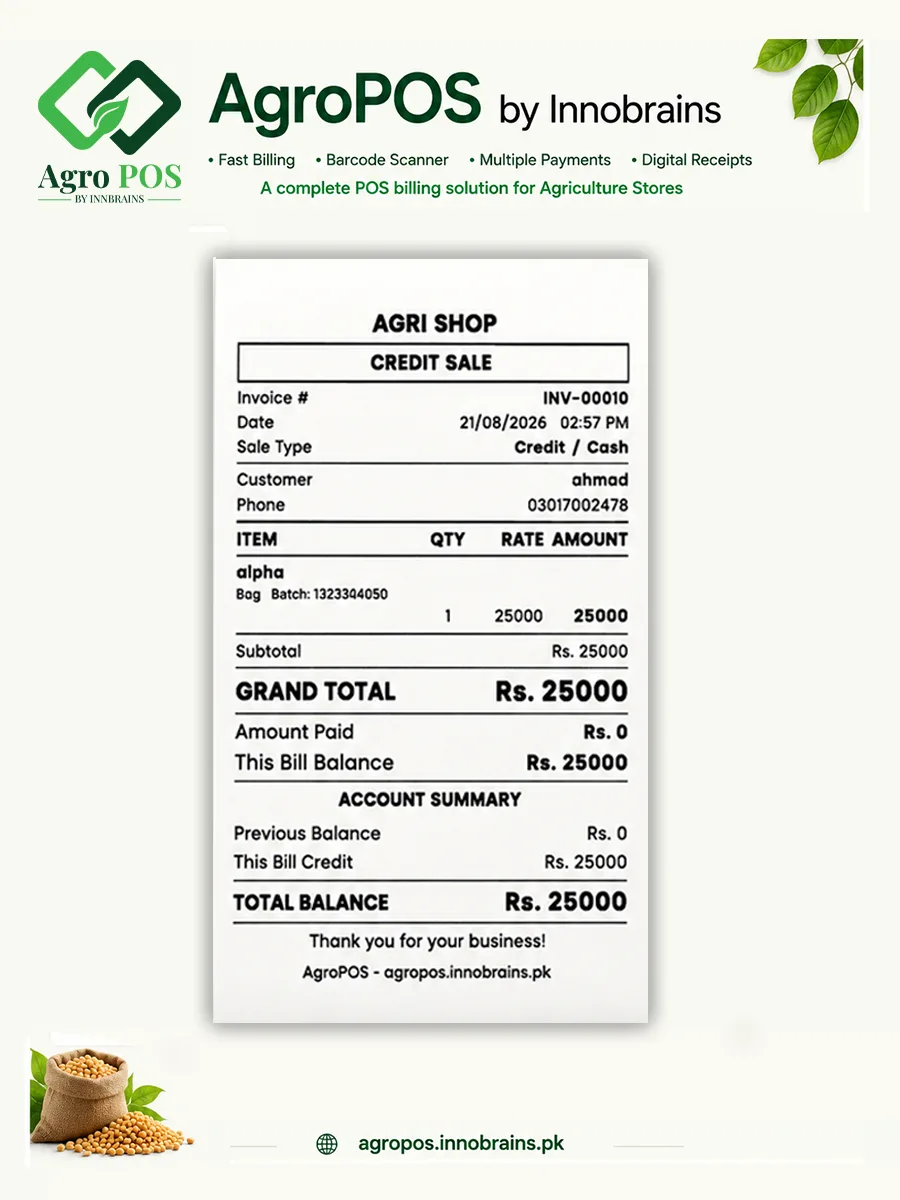
80 mm thermal receipt or full A4 invoice, printed through Windows. Save the invoice as a PDF or share it to WhatsApp from the app.
Sales, less returns, less what the goods actually cost, less your expenses by category — and the net profit for any period, with its margin. Costs come from the rate each batch was bought at, so a figure from last season does not change when a new delivery arrives dearer.
Which lines actually earn, ranked by profit rather than turnover. The product that sells most is often not the one that earns most.
Add every account the shop uses, and Easypaisa or JazzCash wallets alongside them. Record money in and out, and print a PDF statement with a running balance. Entries can be back-dated. Payments can post themselves into the right account, or stay entirely in your hands.
A customer goes back to the godown mid-bill? Hold it, bill the next man, and bring it back with one click. No invoice number is used and no stock is reserved, and a resumed bill is re-priced against live stock.
Every 10 minutes AgroPOS checks for changes and backs up — a file on your own PC first, then an encrypted copy to the cloud. Both, every time, and again when you close the software. Cloud backup is included with the licence, free for the first year; the local half never stops and costs nothing.
A farmer wants ten kilos out of a fifty-kilo bori? Pick the bag, press Kg, type 10. The bill and the receipt say 10 Kg, your own per-kilo rate is charged, and the bag opens itself when the loose stock runs short. Stock reads "19 bags + 30 Kg", never a fraction.
See your customers, their khata, recovery, suppliers and stock on your phone when you are away from the shop — and send any customer their account statement as a PDF over WhatsApp. Read-only, so the phone can never change your books. Included free with the licence.
Sales, top products, expenses and recovery reports with a monthly chart. Stock and sales export to Excel as well as PDF.
Pick any product and see each batch plus the complete movement history — what came in, what went out, and the running balance after each entry.
A rate that looks wrong three months later, a credit limit nobody remembers raising — an edit used to leave no trace. Change History records edits to rates, credit limits, tax percent, invoice numbering and user roles: the old value, the new one, who changed it and when. Passwords are never recorded, only that one changed. Admin only.
Shop name, dealer licence number and NTN on printed documents. Set your own invoice prefix and next number, tax rate and currency symbol.
Big numbers, plain labels, and the day's figures where you can see them without hunting. Here is what the four screens you'll live in look like.
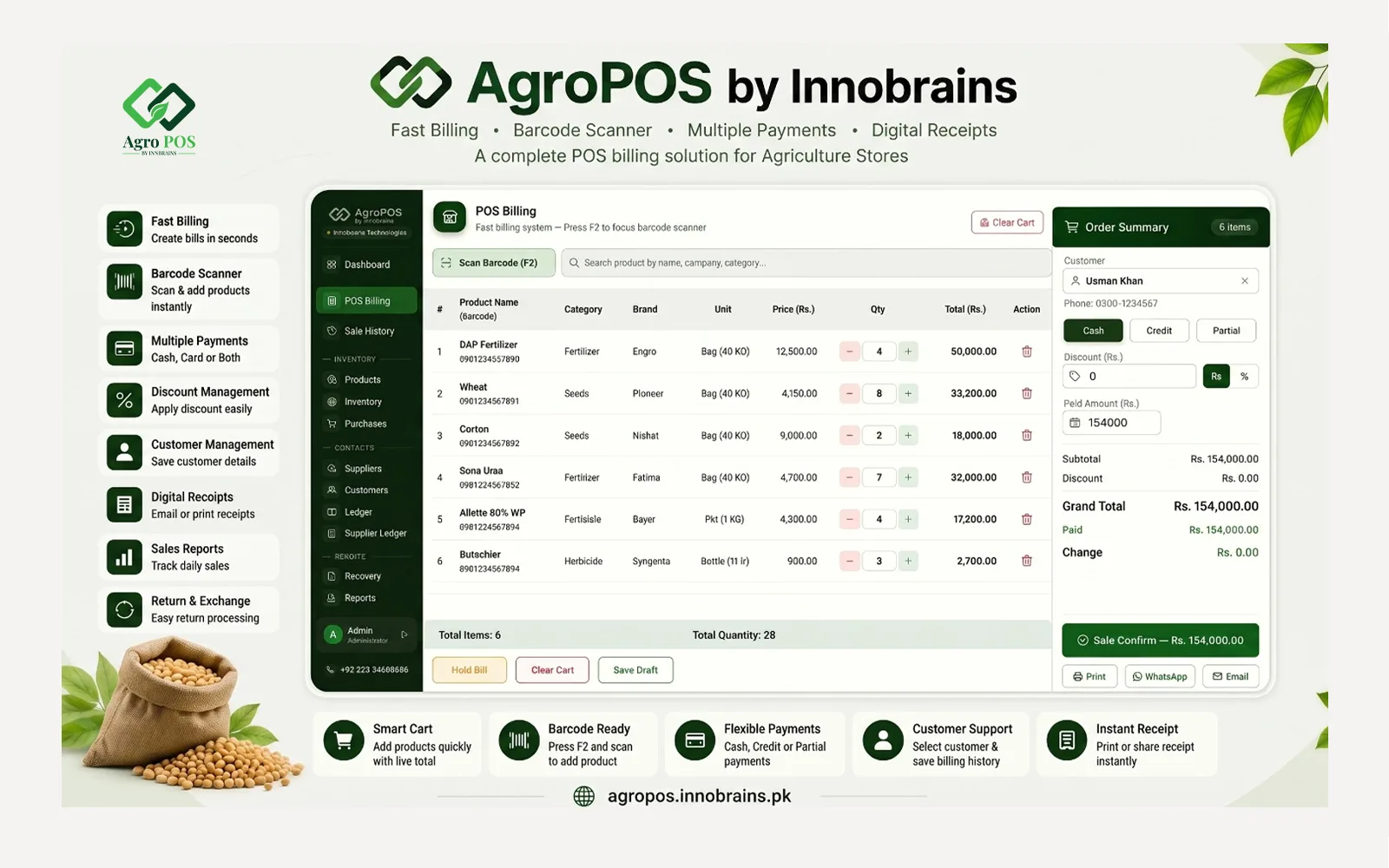
POS BillingSearch or scan, pick the batch, take cash or credit, print.
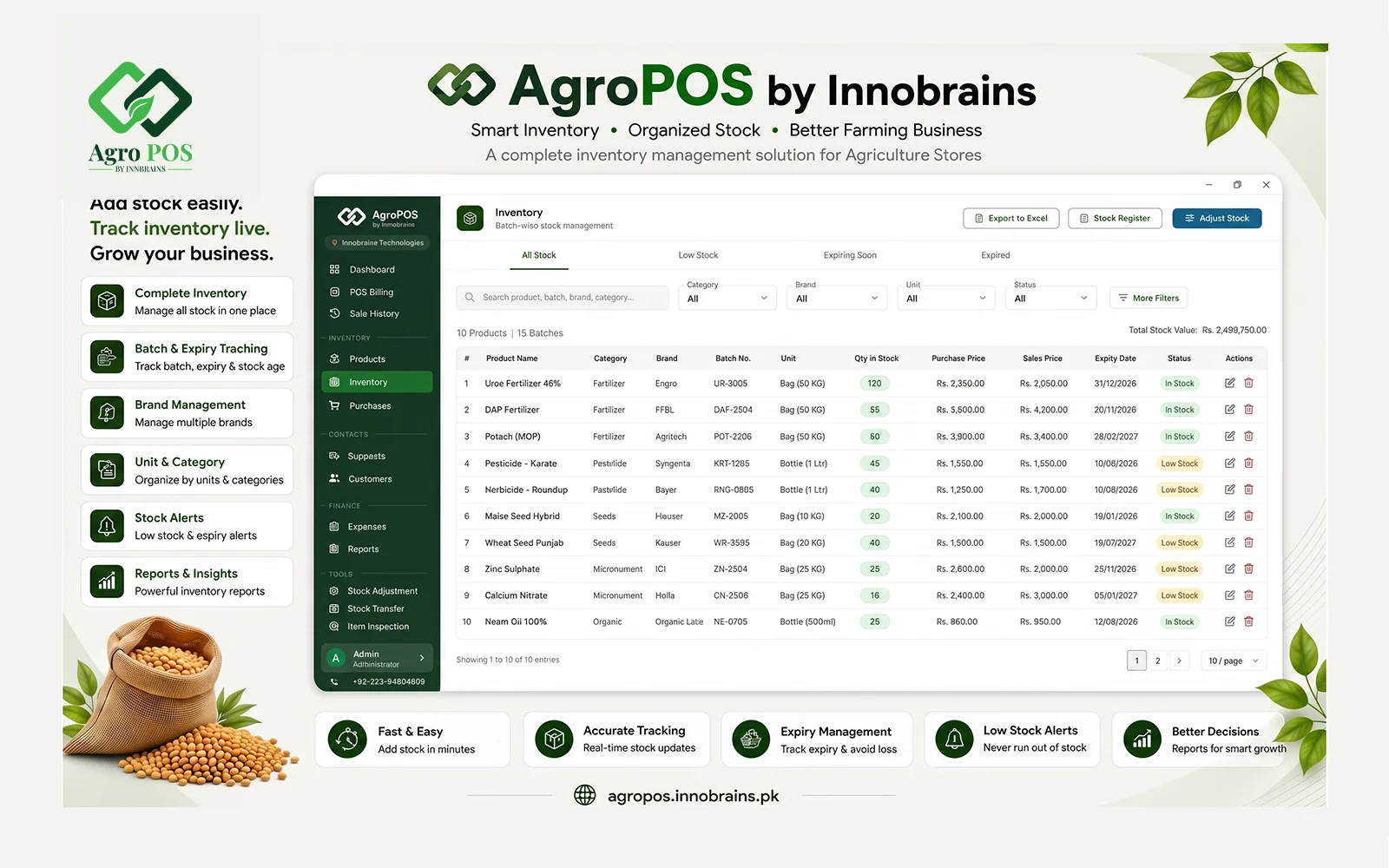
Batch inventoryEvery lot with its own batch number, expiry and purchase rate.
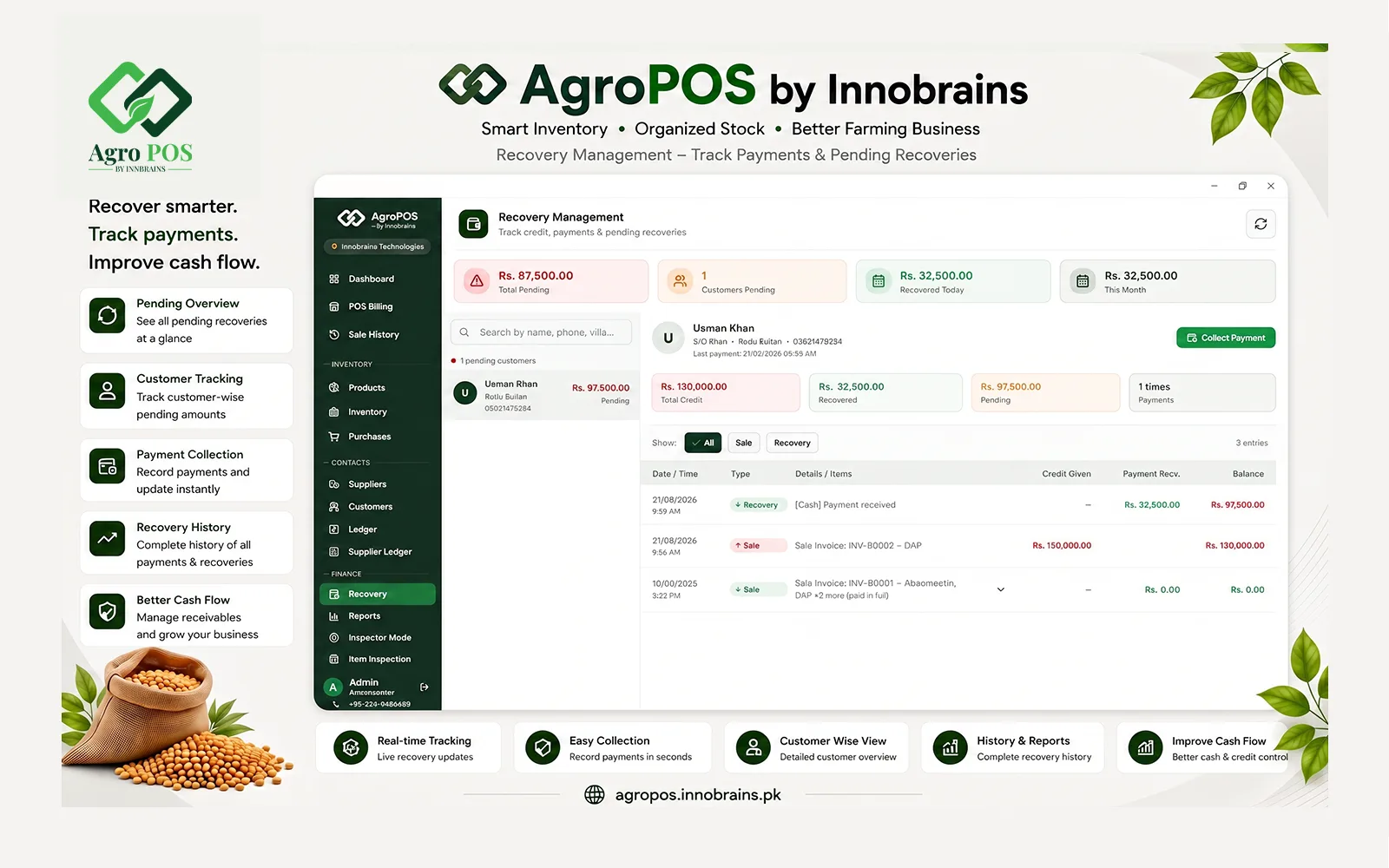
Ledger & recoveryWho owes what, since when, and what they last paid.
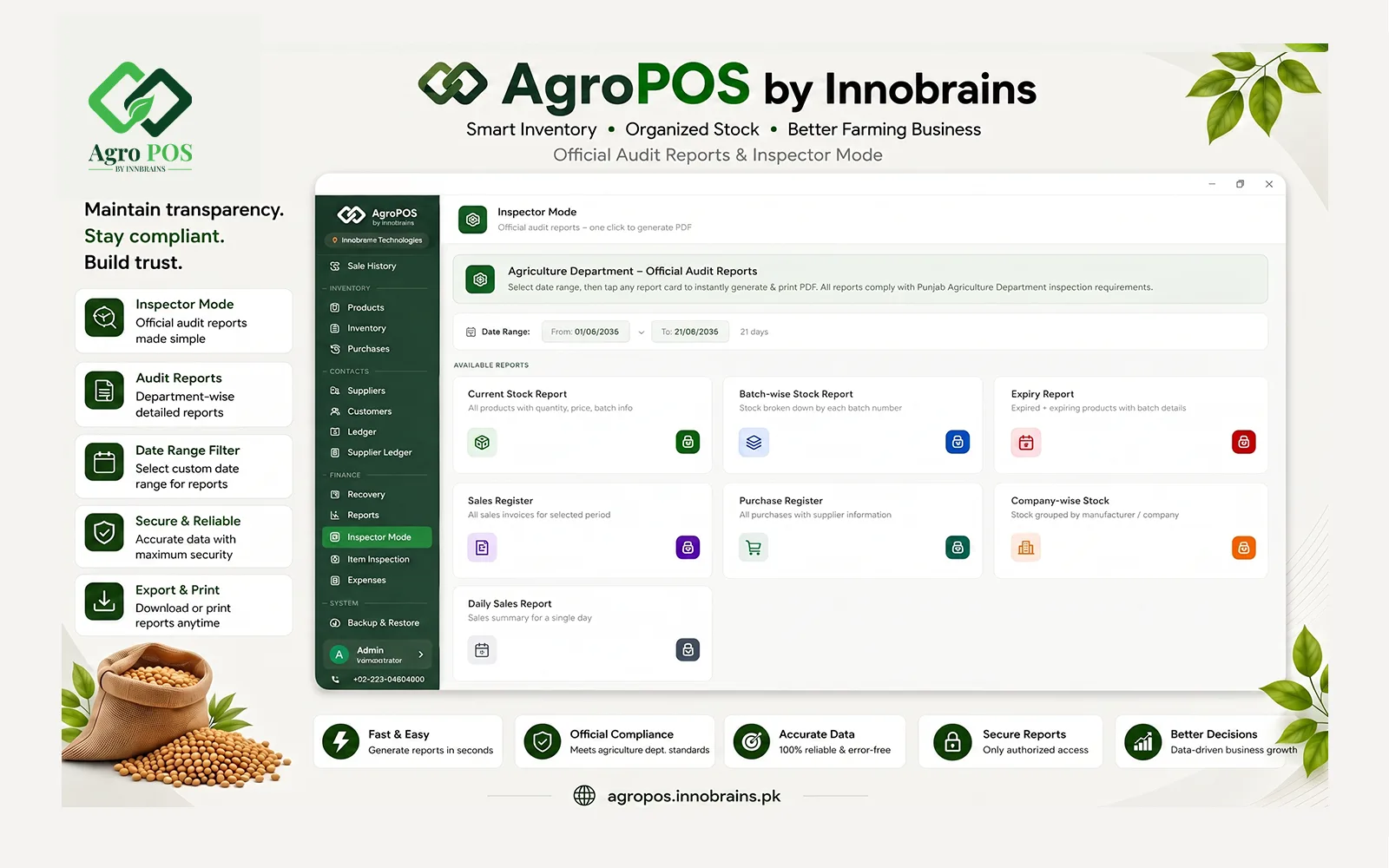
Inspector ModeOfficial registers for inspection, printed in one click.
No tiers, no add-ons, nothing held back for a higher plan. Run the full software free for 14 days, and when it has earned its place at your counter, buy the licence once — it is yours for life.
Price in PKR. Setup, training and WhatsApp support are included — not billed separately.
Four steps. Most shops are billing on the same day they install.
Pick a plan and create your account. Send the payment to the JazzCash or bank account we show you, then upload the screenshot.
We verify the payment and issue your licence key. It appears in your account along with the installer download.
Run the setup as Administrator, enter the licence key once, and that PC is activated. SmartScreen? Choose More info → Run anyway.
Add your shop details, enter a purchase and confirm delivery so batches land in stock. Then cut your first invoice.
| Screen | What you do there |
|---|---|
| POS Billing | Cut invoices, take cash or credit |
| Inventory | See every batch, its expiry and its quantity |
| Recovery | Chase pending credit, record payments |
| Purchases | Enter supplier bills, confirm delivery |
| Inspector Mode | Print official registers for inspection |
| Backup & Restore | Take a copy, or bring data back |
The installer prints the default username and password on its finish page, and the setup guide repeats them. Change the password from Settings → Users on day one, and add a separate account for each person who uses the till.
Any standard USB keyboard-wedge scanner works — no driver, no configuration. Scan into the barcode field on the billing screen and the item drops into the cart.
We walk you through the first setup on WhatsApp or a remote session, including loading your opening stock and outstanding customer balances.
| Licence key format | XXXXX-XXXXX-XXXXX-XXXXX |
|---|---|
| Machine ID | IB-XXXX-XXXX-XXXX-XXXX, derived from the PC itself |
| Activation | Online, once. After that the app runs offline. |
| Machines per licence | Set per product — typically one shop PC |
| Changing PC | Request a transfer; we approve it and you activate on the new machine |
| Forgot password | Recovery code issued by Innobrains support after verification |
The licence binds to a hardware-derived Machine ID, so nobody can copy your install onto another PC and use it.
New versions are verified with a SHA-256 checksum, downloaded quietly in the background, and installed when you accept the restart. Your data is untouched.
Tell us before you format. We reset the activation, and your cloud backups come back on the new install because they belong to the licence.
A shop's whole history sits in one database file. AgroPOS keeps copies in two places and, crucially, ties the cloud copies to your licence — so a dead disk and a fresh Windows install does not mean starting from zero.
Uploads on its own while you work and again when you close the app — and only when something actually changed, so it never eats your data bundle.
Backups belong to the licence, not the machine. Activate on a new computer and your earlier backups are listed there, ready to restore.
A backup is a consistent snapshot — never a half-written file, even if it runs mid-sale. Before a restore overwrites anything, the current data is copied aside and rolled back automatically if the restore fails.
| Local copies | ZIP files in your Documents folder, most recent kept |
|---|---|
| Cloud copies | On Innobrains servers, scoped to your licence key |
| Runs | Automatically while open, and on app close |
| Integrity | SHA-256 checksum stored with every upload |
| Restore from | A local file, or any cloud backup on your licence |
| Kept for | Recent copies in full, then daily copies going back |
A restore overwrites the current data with the backup's. The app tells you plainly when a backup came from a different machine, so you always know what you are about to load.
If you sell dawai, khaad or beej to kisan on cash and udhaar, this was written for your counter. These are the shops running AgroPOS today.
Batch-wise stock with expiry, Registration numbers and technical names on every product. Expired batches are blocked at the till.
Bag, kilo and maund units, company-wise stock for Engro, Fauji, FFC and the rest, and supplier accounts that show what is still payable.
Lot and variety tracking with the same batch discipline, so a germination complaint can be traced back to the supplier it came from.
Credit management built the way a village counter works — running balance, credit limit, father's name and village on every customer, and recovery that settles oldest bills first.
One screen replaces the register, the calculator and the diary. Barcode scanning, thermal printer and A4 invoice, daily khata, expenses and Excel export.
Dealers in Jhang, Faisalabad, Sahiwal, Okara, Multan, Bahawalpur and Lahore run AgroPOS. It works offline, which matters more in a small town than in a city.
Yes. Billing, inventory, ledgers and reports all run on your own PC and need no connection. Internet is used only three times: to activate the licence once, to upload cloud backups, and to download updates. If the connection drops, the shop keeps running.
Stock is stored per batch, not just per product. Each batch keeps its own batch number, expiry date, pack size, purchase rate and supplier. When you sell, the software takes stock from the earliest-expiring batch first, so older goods move before they expire. You can also pick a specific batch or pack size at the counter when a customer asks for one.
Each customer has a running balance and an optional credit limit. The till warns you before a sale would push a customer past their limit. Recovery Management lists everyone with a pending balance along with their full history, and when you record a payment it is settled against the oldest unpaid invoices first.
Yes. Inspector Mode prints seven registers for any date range: stock register, batch-wise stock register, expiry report, sales register, purchase register, company-wise stock report and daily sales report. Your shop letterhead and dealer licence number appear on each one.
AgroPOS backs itself up automatically, and to two places. Every 10 minutes it checks whether anything has changed; when it has, it writes a backup file on your own PC first and then uploads an encrypted copy to the cloud — both, never one without the other. Closing the software backs up again whatever the timer says, so the day's work is off the machine before you lock the shop. If the internet is down when a backup is due, the local copy is still written and the cloud copy goes up when the line returns. A lost or formatted computer therefore costs you the machine, not your records: install AgroPOS on a new PC, restore, and the stock, ledgers and invoices are where you left them. Cloud backup is included with every licence and is free for the first year, then Rs 5,000 a year to keep uploading; local backup is unconditional and costs nothing.
Yes. Contact Innobrains for a machine transfer. Once we approve it, you activate with the same licence key on the new PC, and you can restore your data there from a cloud backup.
All questions dealers ask — licensing, backups, printers, wholesale and more
What things actually cost, what the inspector asks for, and how the udhaar register fails — written for shops, not for software buyers.
Rabi is shorter than kharif, heavier on fertiliser, and harder on cash flow — you extend credit in October and collect after the A...
Cotton, rice and sugarcane do not arrive at your counter on the same day. Stocking for kharif is a sequence, and the shops that ge...
A khaad-dawai shop does not buy from a market — it buys from eight or ten companies, each with its own account, its own scheme and...
Message us on WhatsApp with your shop name and city. We'll send the installer, issue your licence key, and help you load opening stock and outstanding balances.